Medical clinics still have front desk staff manually typing patient intake forms into their system. Patient fills out a paper form, staff reads it, enters name, DOB, insurance, medications, allergies one field at a time. For a busy clinic seeing 40+ patients a day, that’s hours of data entry — and the occasional missed penicillin allergy.
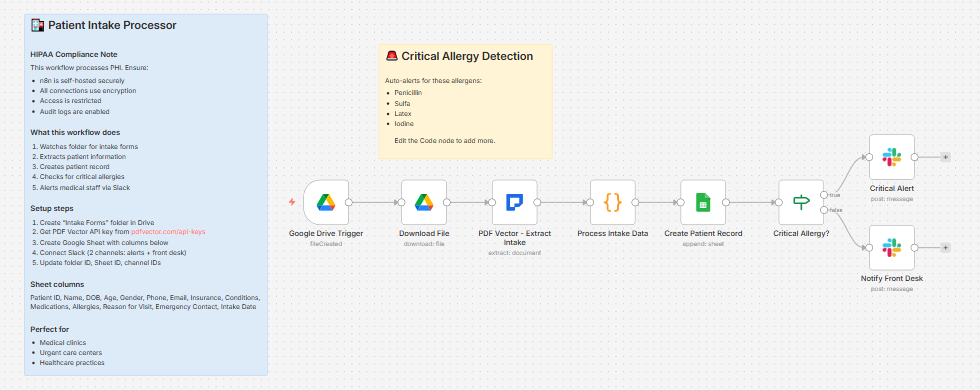
Built a workflow that processes intake forms automatically the moment they land in Google Drive.
What it does
Intake form uploaded to Drive folder → extracts all patient data → generates patient ID → creates record in Google Sheets → checks for critical allergies → routes to two different Slack alerts depending on result
Takes about 15 seconds per form.
What gets extracted
Patient information:
-
First name, last name, date of birth, gender
-
Phone, email, full address
-
SSN last 4 digits (if present on form)
Insurance:
-
Provider name, policy number, group number
-
Subscriber name and relationship
Medical history:
-
Current and past conditions
-
Past surgeries with dates
-
Family medical history
Current medications:
-
Medication name, dosage, frequency
-
Formatted as:
Metformin 500mg (twice daily); Lisinopril 10mg (once daily)
Allergies:
-
Allergen name + reaction description
-
If no allergies: logs
NKDA(No Known Drug Allergies)
Emergency contact:
- Name, relationship, phone number
Reason for visit
Critical allergy detection
This is the most important part. The workflow checks every allergy against a list of high-risk allergens:
-
Penicillin
-
Sulfa
-
Latex
-
Iodine
-
Aspirin
-
NSAIDs
If any match, it fires an immediate alert to your medical staff Slack channel:
🚨 CRITICAL ALLERGY ALERT

Patient: Sarah Johnson

Patient ID: PT-M8X2K

DOB: 1985-03-14

⚠️ ALLERGIES: Penicillin (anaphylaxis); Sulfa (rash)

Reason for Visit: Chest infection follow-up
If no critical allergies, it routes to a standard front desk notification instead:
✅ New Patient Intake

Patient: John Smith

Patient ID: PT-N9Y3L

Age: 42

Insurance: Blue Cross Blue Shield - POL-123456

Reason: Annual physical
Two separate Slack channels — one for clinical alerts, one for front desk. Staff know immediately whether they need to act before the patient walks in.
What lands in Google Sheets
Each row: Patient ID, Name, DOB, Age, Gender, Phone, Email, Insurance, Conditions, Medications, Allergies, Reason for Visit, Emergency Contact, Intake Date
Setup
You’ll need:
-
Google Drive and Sheets (free)
-
n8n instance (self-hosted — uses PDF Vector community node)
-
PDF Vector account (free tier: 100 credits/month, roughly 25-30 forms)
-
Slack with two channels: one for clinical alerts, one for front desk
About 20 minutes to configure.
Important: This workflow processes protected health information (PHI). Make sure your n8n instance is self-hosted with encryption enabled and access restricted. Google Drive and Sheets should have appropriate access controls. This is not a substitute for proper HIPAA compliance review.
Download
Workflow JSON:
github.com/khanhduyvt0101/workflows
Full workflow collection:
Setup Guide
Step 1: Get your PDF Vector API key
Sign up at https://www.pdfvector.com — free plan works for testing. Go to API Keys and generate a key.
Step 2: Create your Google Drive folder
Create a folder called “Intake Forms” in Google Drive. Copy the folder ID from the URL (string after /folders/).
Step 3: Set up your Google Sheet
Create a new spreadsheet with these exact headers in Row 1:
Patient ID | Name | DOB | Age | Gender | Phone | Email | Insurance | Conditions | Medications | Allergies | Reason for Visit | Emergency Contact | Intake Date
Copy the Sheet ID from the URL.
Step 4: Set up Slack channels
Create two channels (or use existing ones):
-
#clinical-alerts— for critical allergy notifications to medical staff -
#patient-intake— for standard front desk notifications
Copy the channel IDs for both.
Step 5: Import the workflow
Download the JSON from GitHub and import into n8n via Import from File.
Step 6: Configure the nodes
Google Drive Trigger:
-
Connect your Google account
-
Paste your Intake Forms folder ID
Download File:
- Same Google credential
PDF Vector - Extract Intake:
-
Add new credential (Bearer Token type)
-
Paste your API key
Process Intake Data:
- Edit the
criticalAllergensarray to add any additional allergens relevant to your practice
Create Patient Record:
-
Connect Google Sheets
-
Paste your Sheet ID
Critical Alert (Slack):
-
Connect Slack
-
Paste your clinical alerts channel ID
Notify Front Desk (Slack):
-
Same Slack credential
-
Paste your front desk channel ID
Step 7: Test it
Activate and drop a test intake form PDF into your Drive folder. Check both Sheets and Slack after about 30 seconds.
Accuracy
Tested across standard patient intake form formats — single page, multi-page, checkbox-style, and handwritten printed forms.
-
Typed/digital forms: ~96% on structured fields (name, DOB, insurance)
-
Medications and allergies: ~93% — occasionally merges dosage into the name field
-
Handwritten forms: ~80% — legible handwriting works fine, messy handwriting drops accuracy significantly
-
Multi-page forms: adds about 3-5 seconds per additional page
The critical allergy detection is string-matching based, not AI judgment. If “penicillin” appears anywhere in the allergies field, it triggers. That means very few false negatives — but verify your allergen list covers your patient population.
Cost
Free tier is 100 credits/month. Each intake form uses about 3-4 credits. So roughly 25-30 forms per month for free.
Basic plan is $25/month for 3,000 credits if you’re running a busy practice.
Customizing it
Add more critical allergens:
In the Process Intake Data node, edit the criticalAllergens array. Add anything specific to your practice — common antibiotics, contrast dye, specific drug classes.
Add severity routing:
Parse the reaction field for words like “anaphylaxis” or “severe” and create a separate escalation path beyond the standard critical alert.
Connect to an existing EHR:
If your EHR has an API (Epic, Athenahealth, etc.), replace the Google Sheets node with an HTTP Request node that posts the patient record directly. The extracted data structure maps cleanly to standard patient demographic fields.
Trigger from email instead of Drive:
If patients submit forms by email attachment, swap the Drive trigger for a Gmail trigger. Everything downstream stays the same.
Add appointment confirmation:
After creating the patient record, add a Gmail node to send the patient a confirmation with their patient ID and appointment details.
Limitations
-
Requires self-hosted n8n for PHI processing
-
Accuracy drops significantly on low-quality scans or heavy handwriting
-
Critical allergy detection is keyword-based — unusual allergen names or abbreviations may not match
-
Does not connect to EHR systems out of the box — that requires additional API integration
-
Google Sheets is not a HIPAA-compliant storage solution by default — evaluate your compliance requirements carefully before production use
Links
-
PDF Vector n8n integration: n8n Integration - PDF Vector
-
Full workflow collection: GitHub - khanhduyvt0101/workflows: Awesome PDF Automation Workflows - A curated collection of ready-to-use automation workflows for PDF processing and document extraction · GitHub
-
n8n docs: https://docs.n8n.io
Questions? Drop a comment if something’s not working or you want to extend it for your practice type.