Hiring without an ATS means someone is manually opening every resume email, copy-pasting details into a spreadsheet, and trying to remember which candidates were actually good. Built a workflow that handles the intake process automatically so HR only deals with decisions, not data entry.
What it does
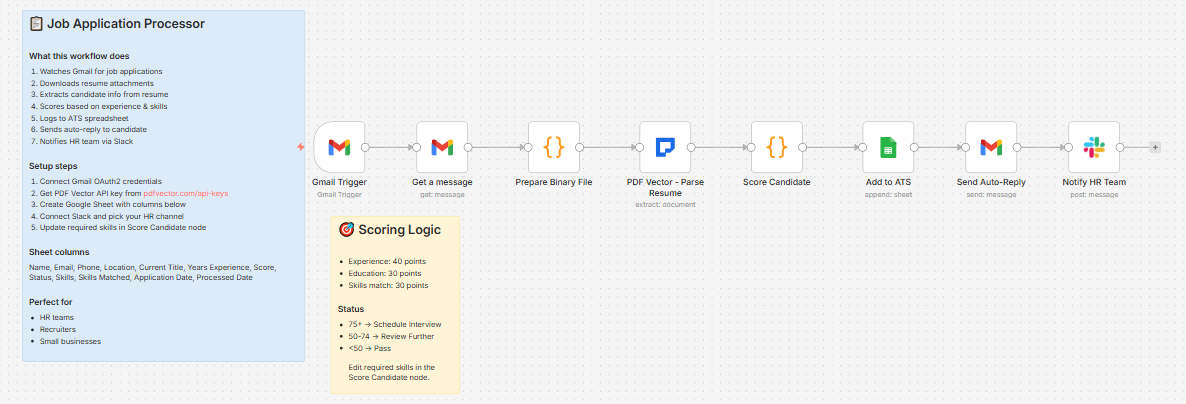
New email with resume attachment → downloads the PDF → extracts candidate info → scores against your required skills → logs to ATS spreadsheet → sends auto-reply to candidate → notifies HR on Slack
Takes about 10-15 seconds per application.
Scoring logic
Three components, 100 points total:
Experience (40 points max)
-
7+ years → 40 pts
-
5-6 years → 35 pts
-
3-4 years → 25 pts
-
1-2 years → 15 pts
-
Under 1 year → 5 pts
Education (30 points max)
-
PhD / Doctorate → 30 pts
-
Master’s / MBA → 25 pts
-
Bachelor’s → 20 pts
-
No degree found → 10 pts (base)
Skills match (30 points max)
Compares extracted technical skills against your required skills list. 3 points per match, max 10 skills = 30 points. You customize the required skills list in the Score Candidate node.
Status thresholds:
-
75+ → Schedule Interview
-
50-74 → Review Further
-
Below 50 → Pass
What gets extracted from the resume
-
Full name, email, phone, location, LinkedIn URL
-
Total years of experience, current job title
-
Work history — company, title, dates, key achievements
-
Education — institution, degree, field, year
-
Technical skills (languages, tools, frameworks)
-
Soft skills, certifications, languages spoken
The Slack notification
📥 New Application Received

Candidate: Jane Smith

Current Role: Senior Frontend Developer

Experience: 6 years

Score: 82/100

Status: Schedule Interview

Top Skills: JavaScript, React, TypeScript, Node.js, AWS
Fires the moment the resume is processed. HR sees the score before opening the spreadsheet.
The auto-reply
Sends a plain acknowledgment email to the candidate automatically:
Dear [Name],

Thank you for your interest in joining our team.

We have received your application and our team is

currently reviewing it.

We will be in touch within the next few business

days regarding next steps.

Best regards,

The Hiring Team
Customizable in the Send Auto-Reply node.
What lands in Google Sheets
Each row: Name, Email, Phone, Location, Current Title, Years Experience, Score, Status, Skills, Skills Matched, Application Date, Processed Date
Filter by Status column to get your shortlist instantly.
Setup
You’ll need:
-
Gmail account (where applications arrive)
-
Google Sheets (free)
-
n8n instance (self-hosted — uses PDF Vector community node)
-
PDF Vector account (free tier: 100 credits/month, roughly 30 resumes)
-
Slack (optional — delete last node if not needed)
About 15 minutes to configure.
Download
Workflow JSON:
github.com/khanhduyvt0101/workflows
Full workflow collection:
Setup Guide
Step 1: Get your PDF Vector API key
Sign up at https://www.pdfvector.com — free plan works fine. Go to API Keys and generate a key.
Step 2: Set up your Google Sheet
Create a new spreadsheet with these exact headers in Row 1:
Name | Email | Phone | Location | Current Title | Years Experience | Score | Status | Skills | Skills Matched | Application Date | Processed Date
Copy the Sheet ID from the URL (long string between /d/ and /edit).
Step 3: Import the workflow
Download the JSON from GitHub and import into n8n via Import from File.
Step 4: Configure the nodes
Gmail Trigger:
-
Connect your Google account (OAuth2)
-
Watches all incoming Gmail by default — add a filter label if you want to limit to specific emails (e.g., only emails labeled “Application”)
Get a message:
-
Same Gmail credential
-
downloadAttachments: trueis already set — this downloads the resume PDF
Prepare Binary File:
- No config needed — renames
attachment_0todatafor PDF Vector compatibility
PDF Vector - Parse Resume:
-
Add new credential (Bearer Token type)
-
Paste your API key
Score Candidate:
-
Edit the
requiredSkillsarray at the top of the code to match your job requirements -
Default is set for a software engineering role — change to whatever you’re hiring for
-
Adjust score thresholds at the bottom if needed
Add to ATS:
-
Connect Google Sheets
-
Paste your Sheet ID
Send Auto-Reply:
-
Same Gmail credential
-
Edit the email body to match your company tone
Notify HR Team:
-
Connect Slack
-
Set your HR channel ID
Step 5: Test it
Send yourself a test email with a PDF resume attached. Wait about 30 seconds and check your Sheet, your Slack channel, and the sender’s inbox for the auto-reply.
Accuracy
Tested across resumes in various formats — single column, multi-column, creative layouts, and plain text.
-
Name, email, phone extraction: ~98% on digital PDFs
-
Work experience parsing: ~93% — dates occasionally malformed
-
Skills extraction: ~95%
-
Education: ~97%
-
Years of experience calculation: ~90% — sometimes off when candidates have gaps or overlapping roles
Scanned resumes (photo/image PDFs): drops to ~85% overall. Still usable but worth spot-checking.
Cost
Free tier is 100 credits/month. Each resume uses about 3 credits. So roughly 33 resumes per month for free.
Basic plan is $25/month for 3,000 credits (~1,000 resumes) if you’re doing volume hiring.
Customizing it
Change required skills for different roles:
Open the Score Candidate node and edit the requiredSkills array. For a marketing role you might use ['seo', 'google analytics', 'copywriting', 'hubspot', 'paid ads'].
Adjust experience weighting:
The three scoring components (experience 40, education 30, skills 30) can be rebalanced. For entry-level roles you might weight skills higher and experience lower.
Add a minimum score filter:
Insert an IF node after Score Candidate to only log and notify on candidates above a threshold. Useful if you’re getting a high volume of unqualified applications.
Trigger from Google Drive instead of Gmail:
If candidates submit through a form that saves resumes to Drive, swap the Gmail Trigger and Get a message nodes for a Google Drive Trigger + Download File.
Send rejection email for Pass status:
Add a second email branch after the IF node that sends a polite rejection to candidates who scored below 50.
Limitations
-
Requires self-hosted n8n (PDF Vector is a community node)
-
Watches all Gmail — you’ll want to add a filter label or sender filter for production use
-
Scoring is rules-based, not AI judgment — a candidate with 8 years but no matching skills will still score lower than intended
-
Doesn’t parse LinkedIn profiles, only PDF/Word resumes attached to email
-
Auto-reply sends immediately — no way to review before it fires unless you add an approval step
Links
-
PDF Vector n8n integration: n8n Integration - PDF Vector
-
Full workflow collection: GitHub - khanhduyvt0101/workflows: Awesome PDF Automation Workflows - A curated collection of ready-to-use automation workflows for PDF processing and document extraction · GitHub
-
n8n docs: https://docs.n8n.io
Questions? Drop a comment if something’s not working or you want to adjust the scoring for a different role type.
 all great catches, especially the scanned resume flagging. You’re right, auto-routing OCR’d resumes to “Pass” based on lower scores is brutal. Should flag those for manual review instead.