First week of semester. Five or six syllabi drop. Each one is 8-12 pages. You skim through looking for exam dates, assignment deadlines, office hours, textbooks — mentally trying to piece together what the next 16 weeks look like across all your courses.
Then week three arrives and someone realizes an assignment was due the 14th, not the 17th.
Built a workflow that reads every syllabus the moment it lands in Drive and posts a structured summary to Slack — all deadlines sorted chronologically, grading breakdown, required materials, instructor contact. Done before you’ve attended your first class.
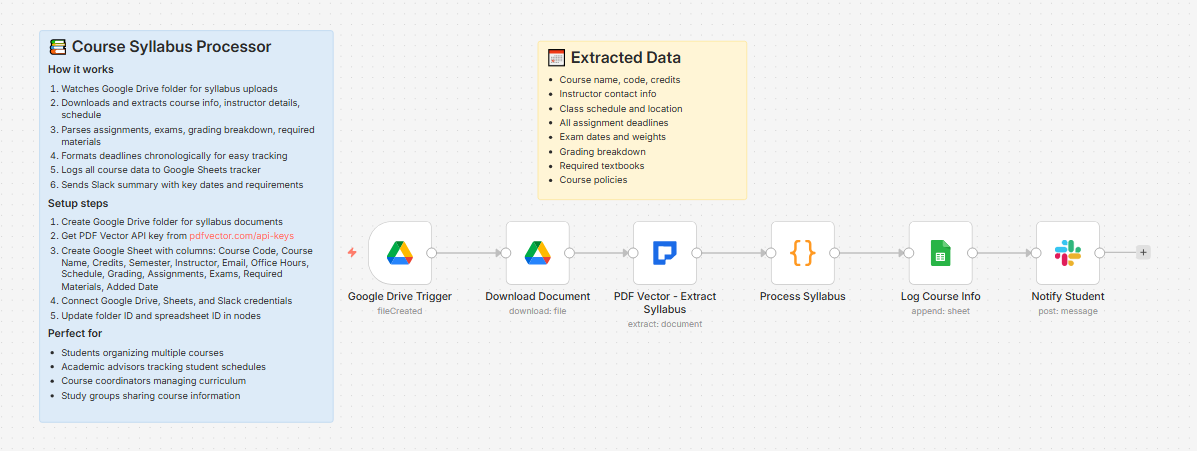
What it does
Syllabus dropped in Drive → extracts all course data → sorts deadlines chronologically → logs to course tracker → posts full summary to Slack
About 12-15 seconds per syllabus. Drop 5 syllabi, get 5 structured summaries within 2 minutes.
What gets extracted
Course: Name, code, credits, semester, department
Instructor: Name, email, phone, office location, office hours
Schedule: Meeting days, time, location, semester start and end dates
Materials: Required textbooks — title, author, ISBN; optional materials flagged separately
Grading breakdown: Every category with percentage weight
e.g., Assignments: 30% | Midterm: 25% | Final: 35% | Participation: 10%
Assignments: Name, type, due date, weight, description
Exams: Name, date, time, location, weight
Upcoming deadlines: All assignments and exams merged, sorted chronologically, top 10 listed
Policies: Attendance, late work, academic integrity
What lands in Slack
📚 New Syllabus Processed
CS401 - Advanced Algorithms
👨🏫 Dr. Maria Santos | [email protected]
🕐 Office Hours: Mon/Wed 2-4pm, Room 312
📅 Schedule: Mon, Wed, Fri at 10:00am — Building A, Room 204
📊 Grading: Assignments: 30% | Midterm: 25% | Final: 35% | Participation: 10%
📝 Assignments: 8 | Exams: 2 | Required Materials: 2
Upcoming Deadlines:
📌 Assignment 1 - Sorting Algorithms: Feb 14
📌 Assignment 2 - Graph Problems: Feb 28
📌 Midterm Exam: Mar 12
📌 Assignment 3 - Dynamic Programming: Mar 21
...
📄 View Syllabus
What lands in Google Sheets
Each row: Course Code, Course Name, Credits, Semester, Instructor, Email, Office Hours, Schedule, Grading, Assignments (count), Exams (count), Required Materials (count), Added Date
One row per course. All your courses for the semester in a single view. Never hunt for an instructor’s email again.
Setup
You’ll need:
-
Google Drive (“Syllabi” folder)
-
Google Sheets (free)
-
n8n instance (self-hosted — uses PDF Vector community node)
-
PDF Vector account (free tier: 100 credits/month — a full semester costs about 20-25 credits)
-
Slack
About 10 minutes to configure.
Download
Workflow JSON:
Course-syllabus-processor.json
Full workflow collection:
Setup Guide
Step 1: Get your PDF Vector API key
Sign up at pdfvector.com — free plan works.
Step 2: Create Drive folder and Sheet
Folder: “Syllabi” — copy folder ID.
Sheet headers:
Course Code | Course Name | Credits | Semester | Instructor | Email | Office Hours | Schedule | Grading | Assignments | Exams | Required Materials | Added Date
Step 3: Import and configure
Download JSON → n8n → Import from File.
Google Drive Trigger: Connect Drive, paste folder ID
PDF Vector - Extract Syllabus: Add credential, paste API key
Log Course Info: Connect Sheets, paste Sheet ID
Notify Student: Connect Slack, select your personal or study group channel
Accuracy
Tested on syllabi from US universities across engineering, business, and humanities.
-
Course name, code, instructor: ~97%
-
Schedule (days, time, location): ~94%
-
Assignment names and due dates: ~92% — works best when dates are explicit (Feb 14) vs relative (Week 3)
-
Grading breakdown with weights: ~93%
-
Required textbooks: ~95%
-
Exam dates: ~96%
Cost
A full semester of 5-6 courses uses about 20-25 credits — well within the free tier.
Customizing it
Google Calendar integration: After Slack, loop through the assignments array and create a Calendar event for each deadline automatically
Study group sharing: Point Slack to a shared group channel — everyone gets the same notes when any member uploads a syllabus
Master deadline view: Create a second Sheets tab “Deadlines” and append each assignment and exam as individual rows — one row per deadline across all courses, sorted by date
Questions? Drop a comment.