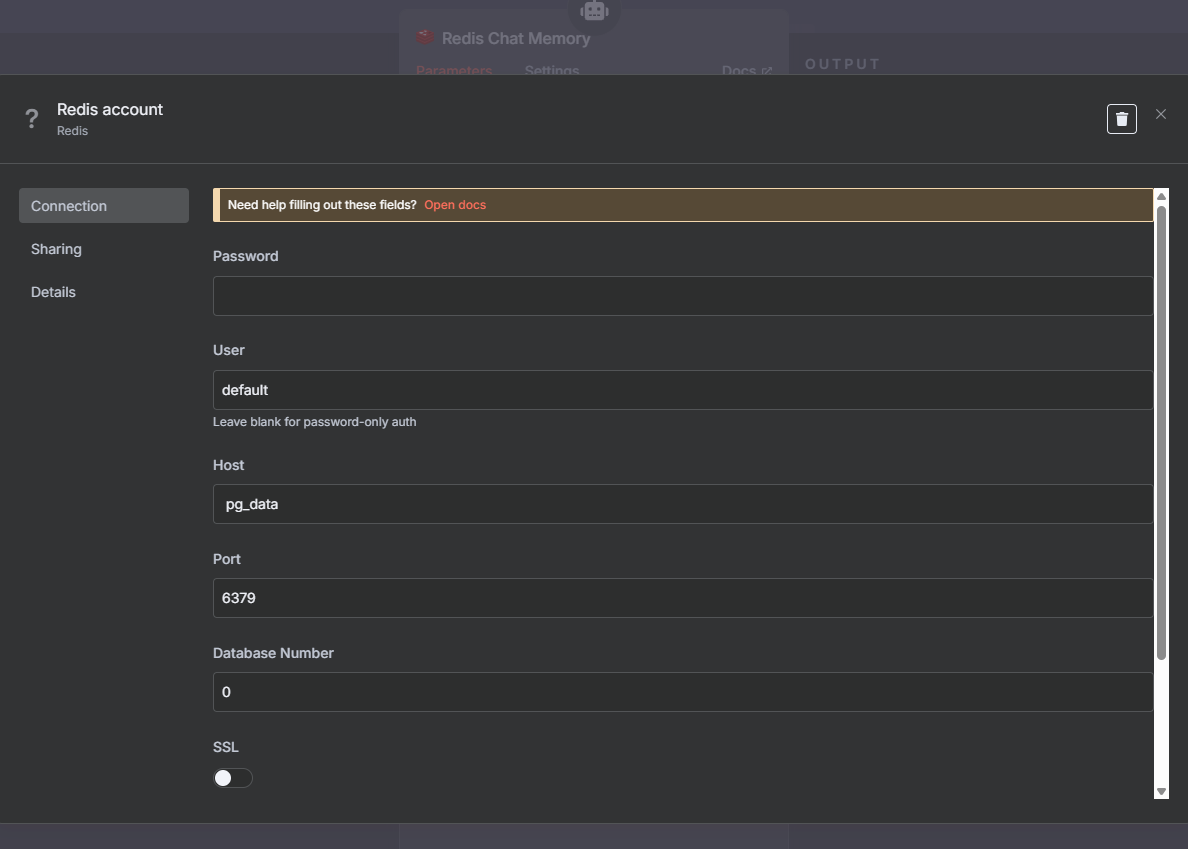
I'm unable to connect to redis on the vps n8n, running in different projects, but in the same docker

Hi guys, I’m running n8n and traefik in one project and evolution and redis in other projects and different folders. It’s not like what’s shown in the video. I abandoned the project with Easypanel because it consumes a lot of machine performance and crashes. I think that’s why I’m having trouble with this new project without Easypanel. If anyone has managed to configure the Redis Chat Memory node in different projects, please help me. Thanks.

PS: The video I’m talking about in the text is this one, more specifically between 3 minutes and 6 minutes: https://www.youtube.com/watch?v=IvqAzWEETJc

I thank everyone who collaborated with the old project using EasyPanel, I would like to know what I should do with the topics I opened for him, since I preferred to abandon and create two different projects.

@Afonso_Campos, hi! Welcome back.

When you say “different project”, what do you mean exactly? If this was mentioned in the video, I apologize, I don’t speak Portuguese.

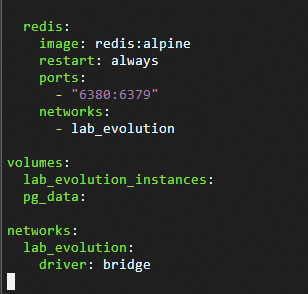
hi, regards different projects because they are made in different folders, while with the video everything is done in a single project within easypanel (redis, n8n and the evolution api), here is a printscreen of the configuration of the .yml file of my redis.

not sure what easypanel is, but if we are talking about just a docker compose environment, you just need to make sure that the containers are in the same network for them to be able to talk to each other internally. Otherwise, if they are not running within the same docker environment, you would need to access redis from n8n by it’s external address (if this is possible in your setup).

[quote=“jabbson, post:4, topic:150102, full:true”]
not sure what easypanel is, but if we are talking about just a docker compose environment, you just need to make sure that the containers are in the same network for them to be able to talk to each other internally. Otherwise, if they are not running within the same docker environment, you would need to access redis from n8n by it’s external address (if this is possible in your setup).
[/quote]They are running in the same docker compose, but in two different folders, but I don’t know how to configure one project to see the other.

for your *redis container you will need to specify the same network as what your n8n container runs in, for example:

networks:
  n8n-infra:
    external: true

Then you should be able to address your redis from n8n by name.

Would the configuration below be the one that would connect the two projects with yours above?

environment:
- NODE_REDIS_HOST=redis

This is the final part of the configuration of the other project with traefik and n8n, the printscreen only has the final part of the n8n configuration.

Which docker network does your n8n compose file uses?

I am not sure what this env var is…

Sorry, but I’m a beginner and I don’t know how to answer you, how do I find the network?

I used this docker command [ docker inspect <container_id> ] to see the network, but it returns a lot of texts

The text that the command put about network: “NetworkSettings”: {
“Bridge”: “”,
“SandboxID”: “3c03f28d0664af385f0b17ce16a3c9efdfaee0f95e2346c007c092f28b227207”,
“SandboxKey”: “/var/run/docker/netns/3c03f28d0664”,
“Ports”: {
“6379/tcp”: [
{
“HostIp”: “0.0.0.0”,
“HostPort”: “6380”
},
{
“HostIp”: “::”,
“HostPort”: “6380”

the above configuration is for the redis service, and the configuration below is for the n8n service: “NetworkSettings”: {
“Bridge”: “”,
“SandboxID”: “aa4cc36bee62796a8a4e4386f3bfff77d6c4a3c3e5427183d24d0b303f24bec0”,
“SandboxKey”: “/var/run/docker/netns/aa4cc36bee62”,
“Ports”: {
“5678/tcp”: [
{
“HostIp”: “127.0.0.1”,
“HostPort”: “5678”
}
]
},
“HairpinMode”: false,
“LinkLocalIPv6Address”: “”,
“LinkLocalIPv6PrefixLen”: 0,
“SecondaryIPAddresses”: null,
“SecondaryIPv6Addresses”: null,
“EndpointID”: “”,
“Gateway”: “”,
“GlobalIPv6Address”: “”,
“GlobalIPv6PrefixLen”: 0,
“IPAddress”: “”,
“IPPrefixLen”: 0,
“IPv6Gateway”: “”,
“MacAddress”: “”,
“Networks”: {

continuation of n8n:
“Networks”: {
“docker_default”: {
“IPAMConfig”: null,
“Links”: null,
“Aliases”: [
“docker-n8n-1”,
“n8n”
],
“MacAddress”: “92:2c:88:1f:48:ad”,
“DriverOpts”: null,
“GwPriority”: 0,
“NetworkID”: “8b039a4a72a18541f5ea9569f5080f1fc296b7f7f0cef44fa717a88b6c707551”,
“EndpointID”: “ab6981202160381cf8ea4bb004722575118dda060f62c43b4693fe573df3eec5”,
“Gateway”: “172.18.0.1”,
“IPAddress”: “172.18.0.3”,
“IPPrefixLen”: 16,
“IPv6Gateway”: “”,
“GlobalIPv6Address”: “”,
“GlobalIPv6PrefixLen”: 0,
“DNSNames”: [
“docker-n8n-1”,
“n8n”,
“548d0a2041eb”

Apologies, i was driving and couldn’t answer.

I recommend you explicitly create your networks instead of relying on the default bridge. I know for sure that named network is reusable across projects, while the default one - probably not. In any case, having named networks is a good practice and could solve your issue.

I’ve noticed that containers change names every time they are restarted, unfortunately I know almost nothing about networks, I spent my whole life with hardware, I took courses in basic, assembly and visual basic, but I’ve never worked with software, I have no idea what you mean, I’m sorry.

Oh, the network I was talking about is a virtual network for docker containers to talk to each other. Take a look at this page: Networks | Docker Docs

It explains what networks are and how to configure them. Here is a simplified example of what your config could look like with networks:

Your n8n docker-compose file (simplified):

volumes:
  n8n_storage:

networks:
  n8n-infra:

services:
  n8n:
    image: n8nio/n8n:latest
    hostname: n8n
    container_name: n8n
    restart: unless-stopped
    networks: ['n8n-infra']
    environment:
      - DB_TYPE=postgresdb
      - DB_POSTGRESDB_HOST=postgres
      - DB_POSTGRESDB_USER=${POSTGRES_USER}
      <other env varialbes, omitted for brevity>
    env_file:
      - .env
    volumes:
      - n8n_storage:/home/node/.n8n
      - ./mitmproxy:/opt/custom-certificates
      - ./shared:/data/shared

Notice it has a network specified (by default of the internal bridge type).

Then in your redis compose file you could have:

networks:
  n8n-infra:
    external: true

services:
  redis:
    image: redis:latest
    hostname: redis
    container_name: redis
    networks: ['n8n-infra']
    restart: unless-stopped
    <...the rest of the parameters...>

Here we again have a network specified, only this time of the type external, which tells docker that this network is managed by another project and should not be created, but instead is expected to exist.

See if you can use that to connect your n8n container to the redis across in a different project.

I looked at the page you recommended and made some changes, but it didn’t work. What if I ran both projects inside the same container? Would it be easier for the applications to communicate? Like in the case of video.

I’d recommend against running multiple apps in the same container (for which you would need to create a new custom image). Can you provide your resulting docker compose files (make sure to mask any sensitive information) for both n8n and redis?
This topic was automatically closed 90 days after the last reply. New replies are no longer allowed.