Hi everyone. I have a question regarding the workflow tool in the Langchain Chat Agent. I’m building a workflow tool that is capable of loading HTML pages for further analysis. I stumbled across certain blocks and found several tricks on how to optimize the page before sending it to LLM. Right now I don’t understand how to pass the parameters in the workflow tool. Please take a look at 2 examples.
First, I’m asking a question like “What are the last blog posts on blog.n8n.io?”
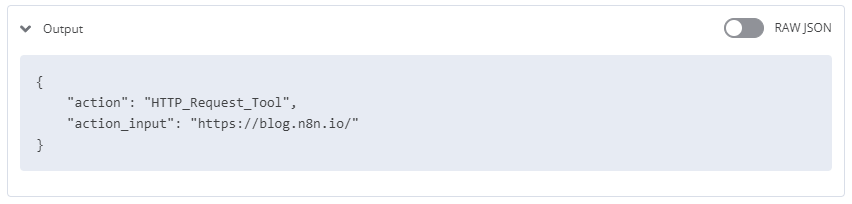
In the incoming node of the workflow tool I see smth like:
In this case Chat Agent correctly passes the query with the url. Not as a proper url parameter, but fine. How can I make it pass a JSON with specified keys?
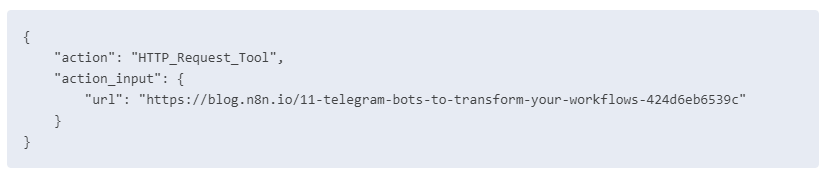
Second, when I ask to summarize a article, Agent sends some incorrect url, but that’s okay. It now sends it as a JSON with “url” key, but I didn’t specifically define this.
for some reason such parameter call never reaches the workflow tool (maybe because it starts with ```json words? The firs node receives just empty value.
[{}]
I’m pretty much sure I’m missing something here, but I can’t figure out where to look for and which examples to check.
Once again, there Tool parameters are generated by GPT, it’s not a pre-defined tool parameter.
n8n version: 1.18
Database (default: SQLite): Postgres
n8n EXECUTIONS_PROCESS setting (default: own, main): main
Running n8n via (Docker, npm, n8n cloud, desktop app): Docker
Hi there,
I have a similar problem so I’ll send my own workflow as an example.
In the logs I see the model puts the user’s email as action_input when I send a test chat such as “please arrange a meeting, my email is [email protected]”, but then in the tool, the input is empty
Here is the example workflow :
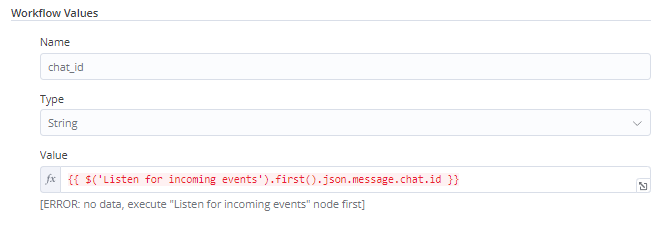
As I see, you pass an empty value {{ }} via an email parameter.
Here’s an example of a Telegram bot with LanChain that utilises the same approach:
In the workflow values you need to pass a valid value (hard-coded string or an expression)
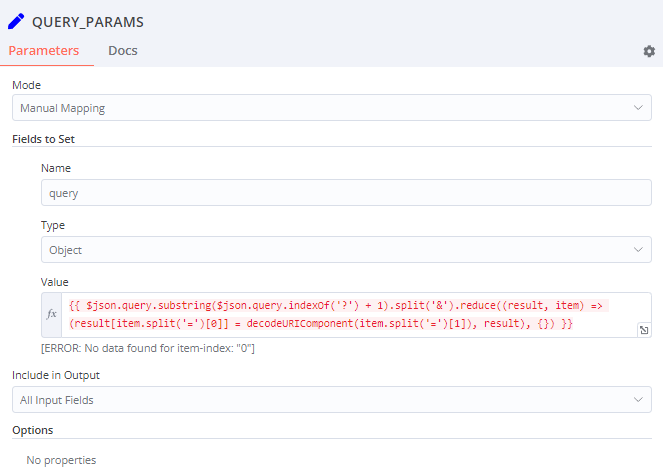
How I overcame the problem in my example: I ask GPT to pass a query string instead of JSON, in this case I can parse query parameters and extract several parameters that I need. Please take a look at the final example: AI agent that can scrape webpages | n8n workflow template
Hi, thanks a lot for your answer and the example, it works perfectly fine to pass multiple parameters.
My only challenge now is that if it doesn’t have the information to be sent to the tool in the query, its makes it up instead of asking the uhman as I asked it to do. If you have any suggestion about how to deal with that, I’d be very grateful.
Add a system prompt to ask the user if the information is missing, AND / OR
Ask to put a default parameter if some information is missing.
Once the tool receives default values, it can fall back with an error i.e. “missing this and that, please ask the user to provide XYZ information”. The AI agent will receive the error message from the tool and hopefully ask the user about it