I am running a small educational institute and I’m currently optimizing our tech stack to be more cost-effective.
My Goal: I want to build a support ticket automation system where GoHighLevel (GHL) acts as the frontend (WhatsApp) and HubSpot acts as the backend database.
The Stack I want to use:
Frontend: GoHighLevel (WhatsApp Channel with AI enabled).
Backend: HubSpot CRM (Where all student data lives).
Automation Bridge:n8n (Self-hosted/Cloud) instead of Zapier.
The Logic I’m trying to build:
Trigger: A student messages on WhatsApp (GHL). The AI detects a support issue (e.g., “Teacher Complaint”) and triggers a workflow.
Webhook: GHL sends data via Webhook to n8n.
Action (n8n):
Step 1: Search HubSpot for the contact by Phone Number to get the Record ID.
Step 2: Create a Ticket in HubSpot and associate it with that existing contact ID (to avoid duplicates).
Step 3 (Optional): Send a confirmation reply back to GHL.
My Challenge: I am new to n8n and looking for guidance on how to structure this flow correctly, specifically the “Lookup & Associate” part to ensure tickets don’t get created as “orphans”.
Ask: Does anyone have a similar n8n workflow template or screenshots they could share? Or is there an expert here who could help me set this up for a friendly budget?
Any advice or pointers would be greatly appreciated!
Hi @Lougha007, I would be happy to help advise on your workflow. Can you share your existing workflow here in a code block so i can get an idea of how far you got, or do you want to handle this over a private call?
I haven’t finalized the workflow code yet, but I have designed the exact Logic Flow I want to implement.
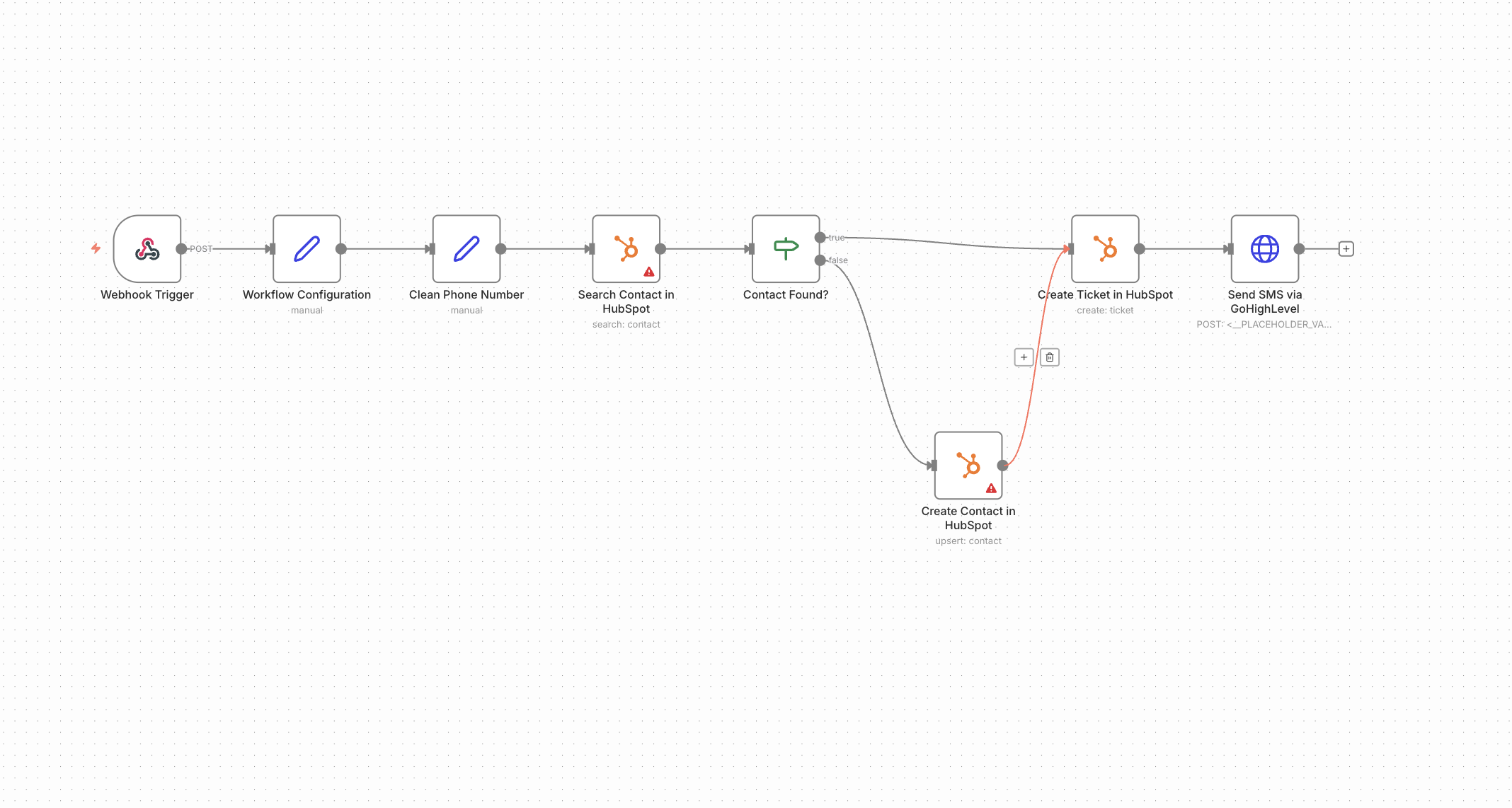
Here is the blueprint of what I am trying to build. I need help specifically with the HubSpot Search & Association step (Branching Logic) to ensure tickets are linked to the correct contact.
The Workflow Logic:
1. Trigger: Start with a Webhook node (POST) that receives a JSON payload (from my frontend app) containing: contact_email, contact_phone, and message_body.
2. Preparation: Clean the contact_phone (remove spaces/dashes) to ensure accurate searching.
3. Logic Flow:
Step A: Search HubSpot for a Contact using the phone or email.
Step B (If Node): Check “Does the HubSpot Contact ID exist?”
True (Found): Pass the existing contactId.
False (Not Found): Create a new contact in HubSpot using the incoming data, then output the new contactId.
4. Execution: Merge both branches into a HubSpot: Create Ticket node.
Map the contactId to associate the ticket with the student.
Subject: “Support Request from [contact_email]”
Description: The incoming message_body.
Pipeline: “New”.
5. Notification: Send a reply back to the user via WhatsApp confirming the Ticket ID.
Could you please advise on how to structure the “Search → If/Else → Merge” part in n8n to avoid duplicates?
This is fairly easy, since the Hubspot API is returning almost(!!) the same response after creating, or searching for an contact. The small but very relevant difference is that when searching for a contact, the id is called “id” and when creating a contact it’s called “vid”. Therefore I have added a simple “Rename Keys” Node:
Thank you both for the incredible support and the screenshots.
I tried to implement the “Rename Keys” solution and connect my HubSpot credentials, but I am still hitting some roadblocks. To be honest, as a non-technical person, I am finding the configuration a bit overwhelming, even though it might look simple to you experts.
@Wouter_Nigrini, you mentioned in your first reply that we could handle this over a private call.
I would love to take you up on that offer. I really need someone to walk me through the final setup (Credentials & Testing) via a screen share to get this running.
Please let me know how we can schedule this (I am happy to discuss your rates/fee for the time).
The general concept here is to reference the previous item in the “Create a Ticket” Node. This is done by {{ $json.id }}. This expression references the incoming item for that node, no matter over which connection its sent. As long as the incoming item has a id, it will be referenced correctly. This is why we don’t need a Merge node or anything else.
Btw..I did not post just a screenshot, but a workflow you could copy to your canvas and play around with