Describe the problem/error/question
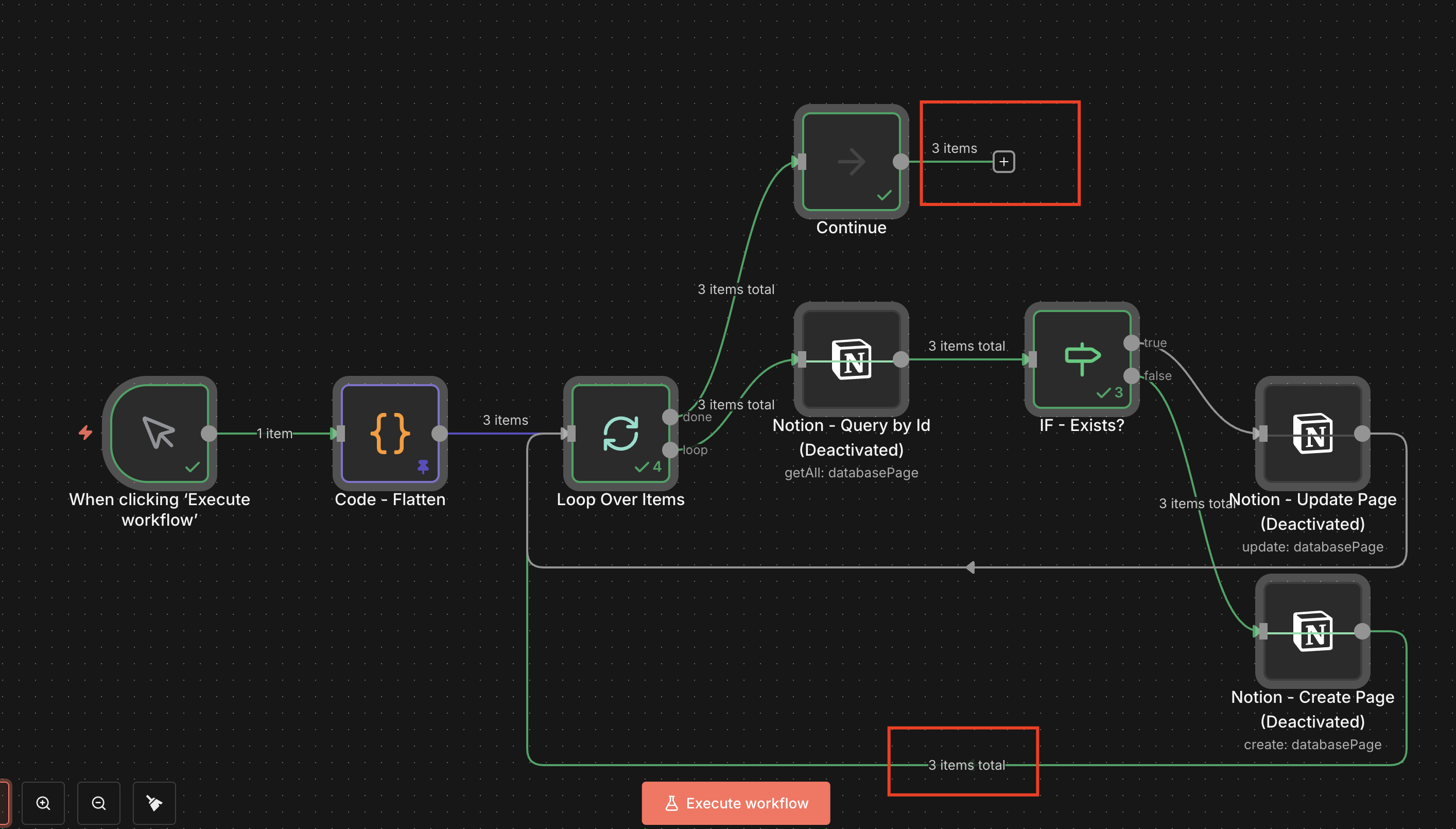
I am building a very simple workflow that should sync data from Firebase to a Notion database.
-
A Firebase node retrieves a list of agents.
-
A “flatten” Code node converts the result into a list of items like this:
json
[ { "agentName": "Agent A (Group)", "agentRef": "id_001", "lastSync": "2025-12-05T15:26:48.626146Z", "nbCompanies": 2 }, { "agentName": "Agent B (Group)", "agentRef": "id_002", "lastSync": "2025-09-22T10:08:44.238688Z", "nbCompanies": 4 }, { "agentName": "Agent C (Group)", "agentRef": "id_003", "lastSync": "2024-12-14T14:37:27.784322Z", "nbCompanies": 18 } // etc. (9 items in total)]
-
The Loop Over Items (Split in Batches) node receives all 9 items as input.
-
For each item, I do:
-
Notion - Queryon a “Id” field where**{{$json.agentRef}}matches** -
IF - Exists?-
true →
Notion - Update Page -
false →
Notion - Create Page
-
-
Goal: for each item in the list, create or update a Notion page with the agentName, agentRef, lastSync, and nbCompanies properties.
Problem
The Loop Over Items node does not process all items passed to it.
In the logs:
-
The node right before the Loop shows
9 items. -
The Loop starts, but only the first page is updated in Notion, then the execution finishes as if everything were done (no error).
What I have already checked
-
The “flatten” Code node really returns 9 separate items (not a single item containing an array).
-
In the Loop, the batch size is set to 1 and the “loop” connection goes back into the Loop Over Items node.
-
The Notion nodes work correctly when tested with a single item.
Questions
-
Am I using the Loop Over Items (Split in Batches) node correctly in this scenario?
-
What could cause the loop to stop before processing all 9 items when there is no error in the execution?
What is the error message (if any)?
None
Please share your workflow
Share the output returned by the last node
Information on your n8n setup
- n8n version: 2.0.3
- Database (default: SQLite):d default
- n8n EXECUTIONS_PROCESS setting (default: own, main): Default
- Running n8n via (Docker, npm, n8n cloud, desktop app): Hostinger
- Operating system: VPS