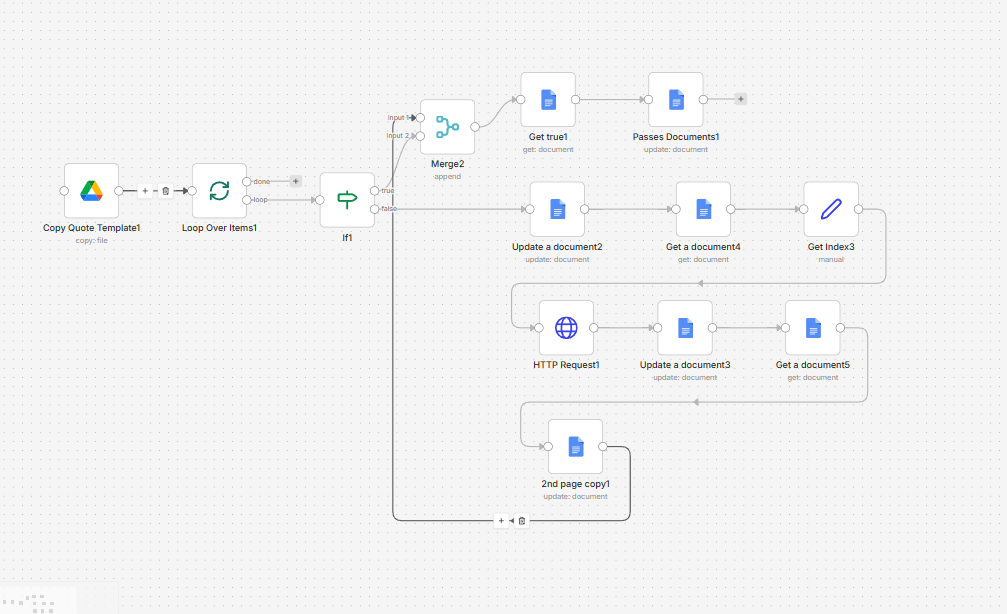
When the loop passes tru the “2nd” or “nth” time i want to use the exact document that the last node uses but everytime i use that ID its just says “The resource you are requesting could not be found” i even tried uploading the file on google drive an copy that and use that copy as a file but coudnt, please help
some context, why i needed the loop. each “loop” has each own unique text and image attached to it. so each loop will be on the 2nd page of the document (already figured out how to do this 2nd page thing but not shown here)
let’s see if we can help you out here. Usually, the best way to receive help is to share the workflow code in your post instead of a screenshot.
But what I can see from the screenshot:
Your “loop over items” node can’t loop over any item, since you’re not connecting your workflow back to its input. So there is no benefit of using it right now.
Usually, a “loop over items” is not required when you’re processing just one item
Please paste your complete workflow here and explain what your final goal is. Then I’m sure I can help you out
Betty, this is a common issue when working with loops in n8n, and it usually comes down to how the document ID is being referenced across iterations.
The main problem is that on the 2nd or subsequent loop runs, the node is still trying to use an ID from a previous execution or from outside the loop context. As a result, n8n attempts to fetch a resource that is no longer valid in that specific iteration, which leads to the “resource not found” error.
To fix this, ensure that you are always using the dynamic ID from the current loop item, not a static value or a reference from another node outside the loop. For example, use an expression like: {{$json["id"]}}
This ensures each loop iteration works with its own correct document.
A common mistake is referencing data from a node that runs before the loop or using a fixed ID. That may work for the first run but will fail on subsequent ones because each loop iteration has its own data context.
A more reliable structure is to keep everything within the loop: generate or retrieve the document, capture its ID immediately, and pass that ID directly to the next node within the same loop.
If you’re working with Google Drive or Google Docs, also be aware that there can be a slight delay before a newly created file becomes accessible. Adding a short wait (1–2 seconds) before using the ID can help avoid intermittent errors.
If you’re able to share your workflow setup, I can help pinpoint exactly where the reference is breaking.
the issue is the doc id reference from outside the loop — gets lost once youre past iteration 1. keep everything in the loop context — the id, the data, all of it. feed the created id straight to the next node in that iteration instead of reaching outside.
Building on what Benjamin said - here’s the exact fix.
The root issue: when you use a node’s output from a previous loop iteration, n8n can’t find it because each loop iteration only has access to the current item’s context.
The fix: pass the document ID forward in the same iteration
hi @Betty
What I think is still missing here is that there are really two different patterns, and the fix depends on which one you want. If each loop iteration should create its own document, then the document ID needs to stay inside that iteration and be passed forward with the current item. But if you are trying to keep updating the same document on the 2nd, 3rd, and later passes, then I wouldn’t rely on “the last node’s ID” at all. I’d store that document ID explicitly on the item right after the copy/create step, and then keep using that same field through the rest of the loop. With a flow that branches and merges like this, item linking can get messy, so carrying something like docId in the item itself is usually much more reliable than reaching back to another node output.
found fix already, i created a Copy document node before merge(almost at the start of the flow) but on a different path so it only copy one document, carried that data to merge and combine, to make that docid for that datas that will come from a different path. so each data will be tied to that one docid, so down the loop the flow will not get confused why there are multiple docid on the loop and im forcing another ID on it since there is already a set program on the loop.