We are building an AI agent that uses MCP Servers for tool use etc.. Ever since I recently updated to the newest version of n8n, the AI agent doesnt seem to be able to use our tools correctly anymore though. It always seems to include a toolcallid as one of the input parameters even if that is never part of the input schema for the tools. Not only that but if any input is given directly to the AI it will also always put those as inputs with its tool call. As you can see in the image of our workflow, I’ve had to add an edit fields node that strips away the inputs so that they are only used indirectly (through the node referencing of previous nodes feature) because otherwise the returned data from the previous node will be included as arguments in the MCP tool call for some reason.
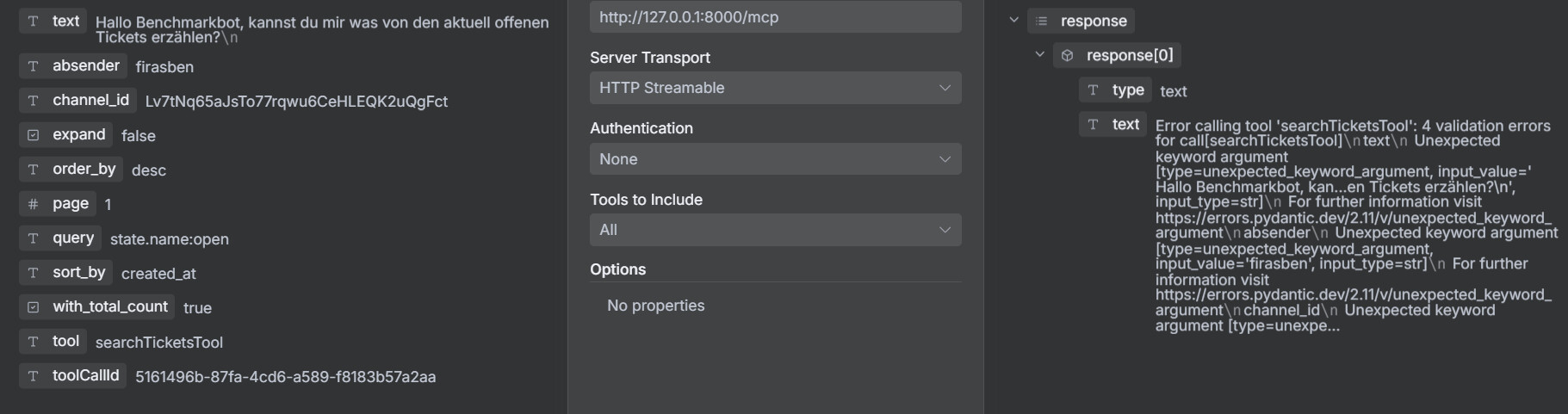
This is the result of one of the tool calls our AI made on one of the MCP Servers. Note that toolCallId is not part of the input schema but it keeps putting it as input anyways.
FYI absender, text and channel_id are inputs of the previous node that the AI node receives (the text it processes) but it always puts them as KV in its tool calls which makes no sense as they’re not part of the schema of any of the tools. But they’re always inputs for MCP tool calls.
Information on your n8n setup
n8n version: 1.118.2
Database (default: SQLite): probably the default then
Running n8n via (Docker, npm, n8n cloud, desktop app): npm
Operating system: Debian 12
We’ve tried different AIs and different tools and different set-ups (specifically not using the “when other workflow calls this” node and instead calling the node directly) but this just keeps happening. If it’s not a bug, is there any way to disable this and stop passing the toolCallId as parameter as we don’t need that data and all our MCP Servers have been built around not having this parameter? Also I don’t know if the update caused it but it correlated pretty well with it. If you have questions please ask and we’d appreciate any help. Thank you
Let me add a few things. The MCP Client tool node invokes the MCP tools and sends sessionId, action, chatInput, and toolCallId. This leads to validation errors. The solution would be not sending these fields.
Yeah exactly but how can that be achieved? I would love not to send these fields but from what I can tell, there is no option to disable this. You got any ideas?
I also had this problem and we finally fixed it! I say “we” because it was really Codex that fixed it with a patch. My part was to tell it to fix the Google Workspace MCP server (workspace-mcp 1.5.5) code to not crap out on the unknown variable. Here is the explanation from the horse’s mouth..
Fix Overview
Root cause: n8n’s MCP Client includes a toolCallId field in every tool invocation, but the Google Workspace MCP server (workspace-mcp 1.5.5) still uses FastMCP/Pydantic schemas that reject unknown arguments, so every CallToolRequest hit ValidationError: Unexpected keyword argument toolCallId.
What we changed
Added a sitecustomize.py in the Workspace MCP image (services/google-workspace-mcp/sitecustomize.py). Python auto-imports this file on startup, letting us patch FastMCP without forking the package.
In sitecustomize.py we monkey-patched fastmcp.tools.tool.FunctionTool.run. The wrapper inspects the underlying tool function’s signature, builds a whitelist of valid parameter names, and strips any unknown keys (like toolCallId) from the arguments dict before FastMCP’s type validation runs. We also log which fields were dropped for debugging.
Rebuilt the google-workspace-mcp Docker image so the new sitecustomize.py is copied into /usr/local/lib/python3.11/site-packages/sitecustomize.py, ensuring the patch loads automatically whenever the container starts.
After that, n8n’s MCP Client could keep sending toolCallId, but the server ignores it, the Pydantic validation passes, and tool execution succeeds.
Python code used..
"""
Runtime patches for the Google Workspace MCP container.

We use sitecustomize so Python automatically imports this module before
`workspace-mcp` bootstraps. The patch strips unknown arguments like
`toolCallId` that n8n's MCP Client adds to tool calls, preventing FastMCP's
Pydantic validation from failing.
"""

from __future__ import annotations

import inspect
import logging
from typing import Any, Dict

from fastmcp.tools.tool import FunctionTool

log = logging.getLogger("workspace_mcp.arg_sanitizer")

_original_run = FunctionTool.run


async def _run_with_arg_sanitizer(self: FunctionTool, arguments: Dict[str, Any]) -> Any:  # type: ignore[override]
    """Sanitize tool arguments before invoking FastMCP's validator."""
    if not isinstance(arguments, dict):
        return await _original_run(self, arguments)

    if not hasattr(self, "_allowed_parameter_names"):
        signature = inspect.signature(self.fn)
        self._allowed_parameter_names = tuple(signature.parameters.keys())  # type: ignore[attr-defined]

    allowed = getattr(self, "_allowed_parameter_names")  # type: ignore[attr-defined]
    sanitized = {k: v for k, v in arguments.items() if k in allowed}

    if len(sanitized) != len(arguments):
        removed = sorted(set(arguments.keys()) - set(allowed))
        log.debug("Dropped unsupported fields for tool '%s': %s", getattr(self, "name", self.fn.__name__), removed)

    return await _original_run(self, sanitized)


FunctionTool.run = _run_with_arg_sanitizer  # type: ignore[assignment]
Hey thanks for your approach! Of course that is one way to tackle the issue and if nothing gets changed on n8ns side that is what we’re gonna have to do at some point anyway… I’m not gonna mark your answer as solution yet though as I’d like to see if there is a fix that allows us to keep our MCP Servers as is as that is honestly my preferred solution. Maybe even for the n8n dev team to see it and help with the matter. But I still am thankful and if nothing else comes up I’m gonna let it go to closure and mark your answer as solution.
We face the same issue which basically breaks our ability to run our MCP server with the latest AI Agent v3.
I’m expecting an answer from n8n.io is this a bug or a feature?
I think this is a bug, since we the tool shouldnt get anything no in his schema.
But if the dev team insists, I guess we have to take the solution above
After upgrade to the mose recent version I am also experiencing this and, unfortunately, it’s breaking a lot of things because I am relying on MCP a lot to call on tavily. Downgrading, on the other hand, also caused other errors. Possibly because I am not even certain to which version I’d need to downgrade. Does anyone know for certain?
Since I was prompted to reply to my post in case a solution was not found, that’s what I am going to do. While there has been somewhat of a solution, I would still like an explanation or statement by the development team as to whether this is intentional or not and if it will be changed in the future. Do we just have to live with a toolCallId parameter in tool calls forever now?
Can you please in general just add a reply like @Oleksii_Horchynskyi in case you have the same problem? Just in order to maintain activity and keep this relevant without me having to answer every time to not get it closed. Higher chance of devs seeing it this way.
Would like to comment here (for tracking purposes) that I’m facing the same issue, even though I did open another case elsewhere. The behavior is unexpected, which forced me to patch my MCP server by adding in these additional parameters.
+1 Same problem here. GitHub issue. It must be breaking lots of things. And the way I see it can be a security concern over-exposing parameters like this.
Thanks Ben, you are amazing. Thank you so much for posting this. I was not aware of sitepackages that can handle the situation here. Thank you so much.