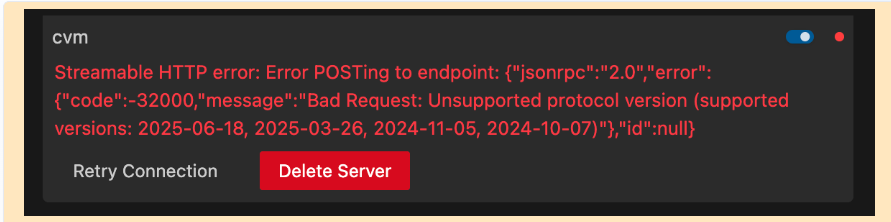
Describe the problem/error/question
When I connect a mcp server of TencentCloud CVM,I execute the mcp node to response failed. what kind may i set the mcp protocol verison?
What is the error message (if any)?
Please share your workflow
(Select the nodes on your canvas and use the keyboard shortcuts CMD+C/CTRL+C and CMD+V/CTRL+V to copy and paste the workflow.)
Share the output returned by the last node
Streamable HTTP error: Error POSTing to endpoint: {“jsonrpc”:“2.0”,“error”:{“code”:-32000,“message”:“Bad Request: Unsupported protocol version (supported versions: 2025-06-18, 2025-03-26, 2024-11-05, 2024-10-07)”},“id”:null}
Information on your n8n setup
- n8n version: 2.12.3
- Database (default: SQLite): default
- n8n EXECUTIONS_PROCESS setting (default: own, main): default
- Running n8n via (Docker, npm, n8n cloud, desktop app): Docker
- Operating system: Centos 7.9
Hi @chong_liu Welcome!
As the error says there is a version mismatch in the n8n MCP and MCP server of that service you are tryna connect to, i recommend using HTTP node if possible as n8n can be upgraded to the latest version if there are some changes to the MCP but in case if the MCP on the server side is on a lowered version there is not much you can do.
The version mismatch error means the TencentCloud CVM MCP server is advertising a protocol version that n8n’s built-in MCP node doesn’t support (or vice versa).
Here’s how to narrow it down:
Step 1: Confirm which side is outdated
The error lists the versions n8n supports (2025-06-18, 2025-03-26, 2024-11-05, 2024-10-07). Check TencentCloud’s MCP server docs to see what protocol version it advertises. If it’s outside that range, that’s the mismatch.
Step 2: Update n8n first
If you’re on an older n8n version, upgrading to the latest might resolve this. The MCP spec has evolved fast and n8n has been keeping pace with updates. Worth trying before anything else.
Step 3: The HTTP fallback that actually works
Most MCP servers also expose their tools via a standard REST pattern. You can call tools/list first to discover available tools, then tools/call directly:
POST [mcp-server-url]/tools/call
Content-Type: application/json

{
  "name": "tool_name",
  "arguments": { ... }
}
This bypasses the protocol version negotiation entirely. Not as clean as using the MCP node, but it works reliably when version negotiation fails.
Step 4: Check if there’s a version override
In the MCP node connection settings, look for a protocol version selector. Some versions of n8n let you pin to a specific MCP protocol version.
What version of n8n are you running? That would help narrow down if an upgrade is likely to fix it.
Yeah, the protocol mismatch is the issue here. Derek’s suggestion about the HTTP fallback is solid — that’s the fastest workaround. But also worth checking if TencentCloud’s MCP server has a version override setting in its config. If it’s stuck on an older protocol version, updating might not help until they push an update on their side.
Thanks,I tried to some documents about TencentCloud’s MCP,but they may not offer the modifying MCP version information.Only wait server side to update mcp version…
1 Like
ok,I will try to execute this way,thanks.
OK, thanks for your help.
@chong_liu As i said, although reaching out to them would be a better take, also if possible you can try using different methods in HTTP if they allow those requests.
My n8n version is stable,so this problem isn’t about version information. I have reached out to them,but they don’t seem to be able to help.
About HTTP node , they don’t offer this way to use tools/call…
@chong_liu So this is a server side issue on their end, and they cannot seem to be updating their MCP servers, not an n8n issue! Currently you cannot override MCP versions in n8n so all you could do is wait for them to update.
at the beginning, I actually said that because I wanted to know if there is any way to set the MCP client version in n8n.
I was wondering if I could set the mcp version specifically on the n8n website.
@chong_liu you can try setting up a different VPS with the same MCP sever version as the tencentCloud and that server should be accessed via an API endpoint which n8n workflow can call and that should work,