Occasionally I am getting failed executions of the official n8n Microsoft Teams Node. This error is inconsistent and can not be reproduced on demand.
Has anyone come across this?
Retrying the workflow (at a later time) allows them to complete successfully with no changes to credentials or the workflow. Indicating it is an issue with n8n OR the MS Graph.
For anyone who also experiences this issue, depending on how important your Teams Notifications are I recommend you go to the settings tab, and enable “Retry on Error”. In addition, you may want to change your Error outcome from “Stop” to “Continue via Error output”. Then route your error output to the next node ensuring your workflow continues in the event the MS Teams API fails like this.
What is the error message (if any)?
Node type
n8n-nodes-base.microsoftTeams
Node version
2 (Latest)
n8n version
1.99.1 (Self Hosted)
Time
6/28/2025, 11:49:03 AM
Stack trace
NodeApiError: No authorization information present on the request. at ExecuteContext.microsoftApiRequest (/app/code/node_modules/n8n-nodes-base/nodes/Microsoft/Teams/v2/transport/index.ts:51:9) at processTicksAndRejections (node:internal/process/task_queues:105:5) at ExecuteContext.execute (/app/code/node_modules/n8n-nodes-base/nodes/Microsoft/Teams/v2/actions/chatMessage/create.operation.ts:87:9) at ExecuteContext.router (/app/code/node_modules/n8n-nodes-base/nodes/Microsoft/Teams/v2/actions/router.ts:59:21) at ExecuteContext.execute (/app/code/node_modules/n8n-nodes-base/nodes/Microsoft/Teams/v2/MicrosoftTeamsV2.node.ts:29:10) at WorkflowExecute.runNode (/app/code/node_modules/n8n-core/src/execution-engine/workflow-execute.ts:1187:9) at /app/code/node_modules/n8n-core/src/execution-engine/workflow-execute.ts:1536:27 at /app/code/node_modules/n8n-core/src/execution-engine/workflow-execute.ts:2100:11
If you are working with Teams in your workflows - be mindful that using the Error/Fallback output so that your flows complete will complete the execution as a “success”. This means you will not know exactly when it has failed.
You can use the “Set Execution Data” node which lets you tag Executions with data when the node is triggered. So attaching a node with “failed” set to “true” will allow you to search for executions where failed is true.
Hopefully someone is able to identify why this issue is happening so we can resolve it.
I also started getting this error a few weeks ago. It’s seemingly random and happens even with retry enabled (at a few seconds delay). Most of my teams nodes are the notification at the end of a workflow so I don’t set the continue option and run them manually when I see the errors come through.
Not sure what the problem is though.
For potential debugging purposes, this happens on Teams nodes and HTTP nodes which connect to teams (to start a 1:1 chat, for example).
NodeApiError: Forbidden - perhaps check your credentials?
at ExecuteContext.requestWithAuthentication (/usr/local/lib/node_modules/n8n/node_modules/.pnpm/n8n-core@[email protected][email protected][email protected][email protected]_/node_modules/n8n-core/src/execution-engine/node-execution-context/utils/request-helper-functions.ts:1476:10)
at processTicksAndRejections (node:internal/process/task_queues:105:5) at ExecuteContext.requestWithAuthentication (/usr/local/lib/node_modules/n8n/node_modules/.pnpm/n8n-core@[email protected][email protected][email protected][email protected]_/node_modules/n8n-core/src/execution-engine/node-execution-context/utils/request-helper-functions.ts:1762:11)
403
{"error":{"code":"Forbidden","message":"No authorization information present on the request.","innerError":{"date":"2025-07-15T05:59:18","request-id":"420fc46a-4af4-b160-82fc-7ddbee370a0a","client-request-id":"420fc46a-4af4-b160-82fc-7ddbee370a0a"}}}
I am still getting this error, the node works perfectly fine most of the times. But occurs few times a day, since im running this nodes for my customer, they sometimes miss important information from my system which is crucial. Hopefully resolved soon, anyone else getting same problems?
For anyone with the same issue, we appear to have found a workaround. A GET to https://graph.microsoft.com/v1.0/me using the same Predefined Credentials appears to force a token refresh. A subsequent call to the same Teams Graph API endpoint that was failing immediately prior now succeeds. I suspect that the HTTP node is not able to retrieve an access token previously refreshed by a built-in Teams node. It’s a theory anyway.
@Martin_North Could work with HTTP nodes, but doesnt wanna work with Teams Nodes.
Writing here again since it doesnt get the love it deserves haha. Since we are using Send and wait for response in many of our workflows and I would like not to change every node to HTTP requests to Graph.
My thought when I read that comment was to just add a http node somewhere before the built in microsoft/teams node.
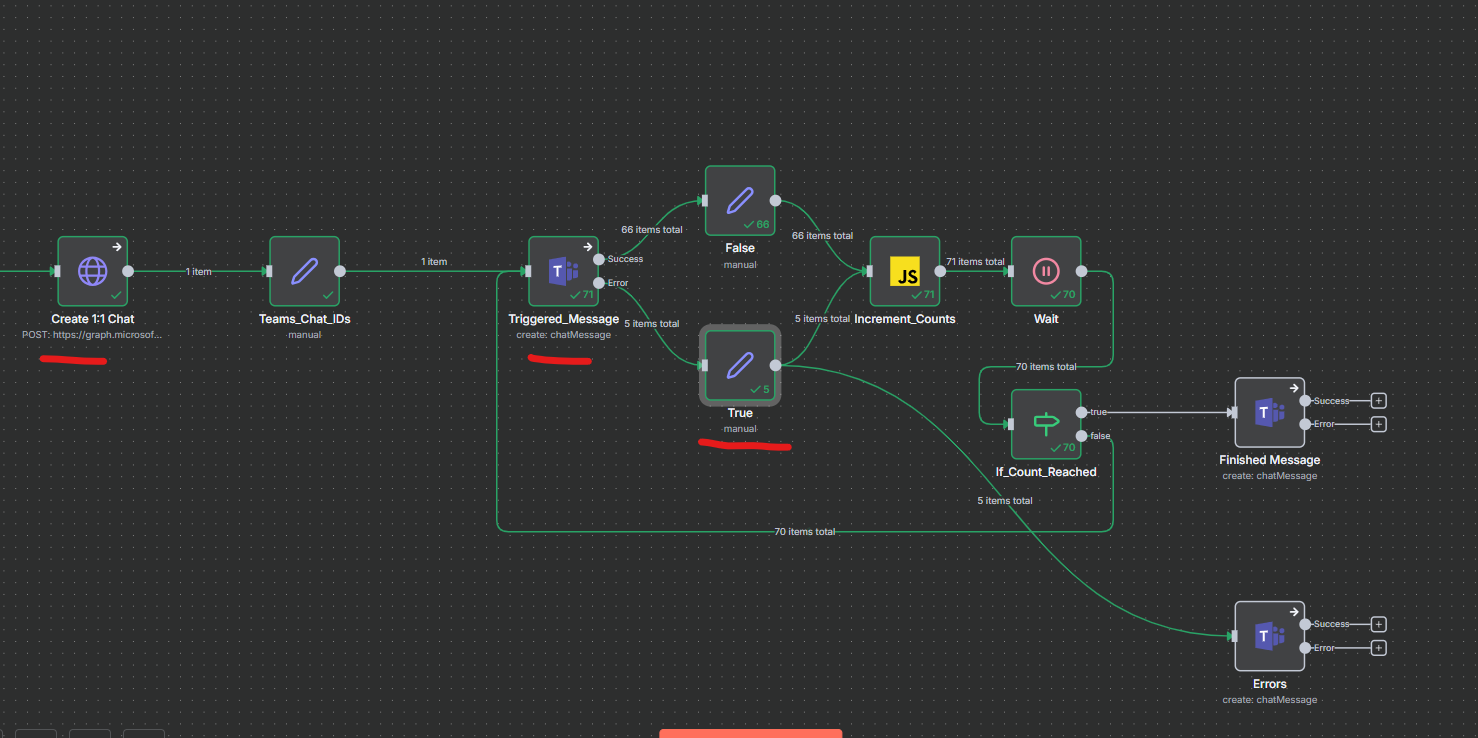
An alternative workaround I’m currently using - which does delay things, but is acceptable in my use cases - is to add a manual loop, with a wait of 10 seconds and loop a max of 10 times.
The ‘If’ node was needed because it was passing, but with an error. In this case, it checks {{ $json.error.message }}
Remember to adjust the nodes to read values from the webhook, not just the previous node. i.e. my Create Chat node takes an input {{ $(‘Webhook’).item.json.body.createChat }}
I’m using - Version 1.119.1 on n8n’s official servers. Microsoft Teams node version 2 (Latest) for context.
I’m getting the same intermittent issues as everyone’s previous mentioned, can’t find any specific fixes that work.
This is super important as it’s the primary mode of communication within the business internally, reliably sending and receiving input is critical. The account is a Microsoft work/organisation account with the Microsoft Teams OAuth2 API predefined credential.
Same thing credentials will randomly stop working then need either an immediate refresh by reconnecting the credential or just waiting for an unspecified amount of time.
I’ve tried @Martin_North’s GET request, but was able to have this be successful and then immediately fail on the following POST request node to create a 1:1 teams chat with the same credential.
I’m creating a workflow that polls the credential until it fails to see if there’s any pattern to it, seems to be a bug where the tokens just don’t refresh properly.
Ok so usually I would get the intermittent 403 errors on the native teams nodes version 2.0 as previously mentioned.
Recreating the issue - Approach 1
I updated to the latest stable Version 1.120.4 and ran a test where I loop sending messages from the same ID created via a custom HTTP call once to generate a 1:1 chat between my two teams accounts/users. Then using this chat ID to send messages via the native ‘Teams:CreateChatmessage’ node with a wait node of 1 minute between cycles.
I ran this every minute for 71 cycles/minutes until I triggered the 403 “No authorization information present on the request.” error for four cycles between cycle 58 to 61. The messages then resumed sending correctly after these 4 attempts and 4 minutes of outage for the remainder of the test.
Refreshing the 1:1 chat for each loop - Approach 2
**
Looping back to creating a new 1:1 chat via the HTTP post request. So every time I sent a message to the user I would first create a new “1:1” chat POST request and thus teams ID which with theory this might keep the token/chat ID valid for the following n8n native teams nodes where we seem to be getting the error:
**
Create 1:1 chat POST request
JSON Body: { “chatType”: “oneOnOne”, “members”: [ { “@odata.type”: “microsoft.graph.aadUserConversationMember”, “roles”: [“owner”], “[email protected]”: “``https://graph.microsoft.com/v1.0/users``(‘{{ $node[‘BOT_Sender_ID’].json.botSenderId }}’)” }, { “@odata.type”: “microsoft.graph.aadUserConversationMember”, “roles”: [“owner”], “[email protected]”: “``https://graph.microsoft.com/v1.0/users``(‘{{ $node[‘Target_User_ID’].json.targetUserId }}’)” } ] } { “chatType”: “oneOnOne”, “members”: [ { “@odata.type”: “microsoft.graph.aadUserConversationMember”, “roles”: [“owner”], “[email protected]”: “``https://graph.microsoft.com/v1.0/users``(‘{{ $node[‘BOT_Sender_ID’].json.botSenderId }}’)” }, { “@odata.type”: “microsoft.graph.aadUserConversationMember”, “roles”: [“owner”], “[email protected]”: “``https://graph.microsoft.com/v1.0/users``(‘{{ $node[‘Target_User_ID’].json.targetUserId }}’)” } ] }
I tested this with 1 minute polling for 8 hours (480 cycles) with 29 errors of which 11 appear to be the dreaded 403 error and the others are “429 API calls quota exceeded!” in the following native n8n teams nodes.
Thoughts what it might be - Issue with the predefined credential auth?
So it seems to be an issue with how the n8n default predefined ‘Microsoft Teams OAuth2 API’ credential is linked and refreshes to Microsoft’s graph API whether it is any custom HTTP request or the n8n native teams nodes, the auth times out and takes a significant amount of time to come back online.
This was a very useful test, thanks! I ran another test: I set a “Teams Chat” node on the output of the “error logger” workflow as well. When, in the process running every 3 minutes, the “Teams Get” node throws an error and signals this to the “error logger” workflow, the “Teams Chat” node on the error logger’s output also fails. I set different “Retry” values in each case, with varying repeat counts and intervals, and despite that, all of them were dead during that time window.
Another observation: I switched to n8n because Microsoft Power Automate sometimes didn’t forward messages to the Teams channel for up to an hour, and I couldn’t find any reason for it. I think Microsoft’s side can’t handle too many requests and simply drops third‑party attempts, and even its own cloud services suffer from this. So I don’t think this is an n8n‑side issue, but Microsoft.