Multi-employee appointment booking with overlapping appointments// How to solve?
I am stuck and I need a booking system which handels
Multiple employees (e.g. 3 staff members)
The same time slot can be booked multiple times, up to the number of available employees
Each employee has individual working hours
Currently, my n8n-based workflow only supports a single shared calendar, what works with VAPI (gives name, Start-/Endtime, number), calendar (checkavailability, create, update, cancel), airtable (create, search, update event). What is the best way to solve this problem? Really appreciate it, i find almost nothing in the internet abt it.
//in the meantime i got a tip from another user, he told me to keep an Airtable ‘Staff Pool’ with each employee’s working hours. “On a booking request, first query this table to find ‘which employee is free’ at that time. Then book the appointment to that specific employee’s calendar slot. The key is changing the question from ‘Is the slot free?’ to ‘Which resource is free?’.” So that´s my mission to first try that out. Anyways, I´m grateful for evaluaitons and help
Your current flow checks “Is this slot free?” (single-resource model), but with multiple staff you need to ask “Which staff member is available at this time?” instead.
Stop checking “if the time is free” and start checking “which staff member is free.”
Key rule: The same time slot can be booked up to the number of available staff members. Overbooking happens per staff member, not per slot.
Hi @Stefan_Sinz Welcome!
Just add an AI Agent for that, which will validate who is free and who is not and which resource is free at what time, with this you will be in control and there will no gap for errors like cross scheduling, just let the AI agent handle the booking so it can validate accordingly, i would recommend not using a shared calendar, it works but not recommended when dealing with multiple member assignment, hope this helps!
Hello @tamy.santos , thanks a lot for the warm welcoming and the helpful advise. I get it and it makes sense to do it that way. Currently I try to implement it as you suggested, but I struggle a bit as a non professional (yet ). Is there a template or step-by-step guide that explains how to fetch calendar and Airtable/database data based on staff member availability, as you described? Would be amazing but otherwise I hope i get it done somehow.
Another question is, if I still need google calendar at all when I get all the Data I need from airtable. I think airtable would function well as a calender also.

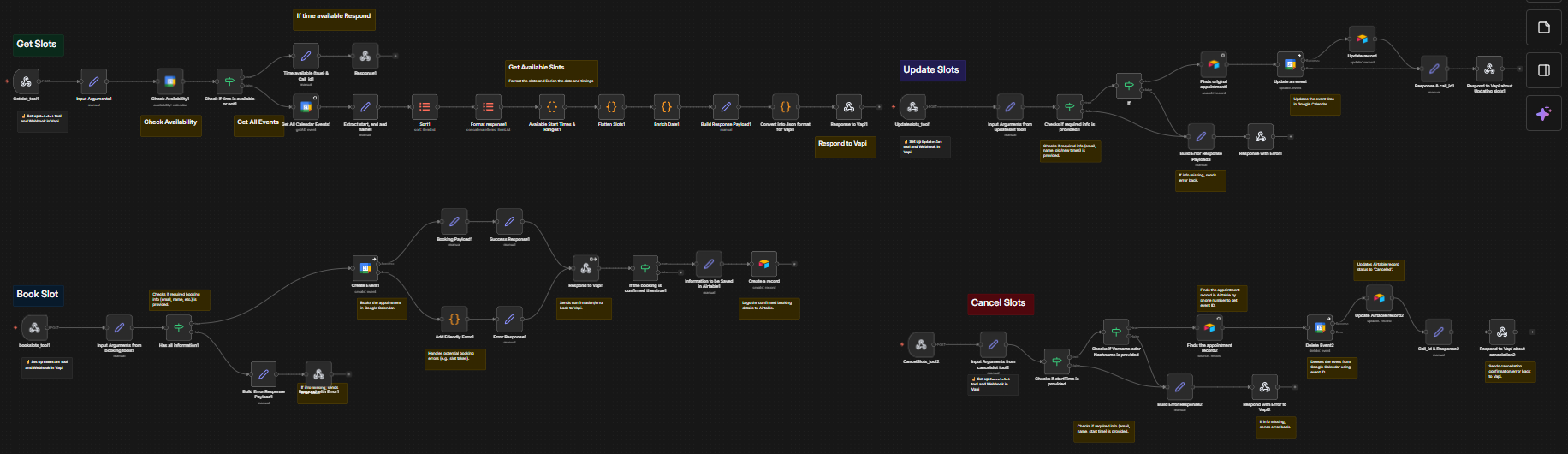

 ). Is there a template or step-by-step guide that explains how to fetch calendar and Airtable/database data based on staff member availability, as you described? Would be amazing but otherwise I hope i get it done somehow.