 Hey everyone,
A buddy of mine (let’s call him Mike) called me a few weeks ago, pretty frustrated. He’d just realized his company paid a software invoice twice – and getting that money back from the vendor turned into a multi-week nightmare of awkward emails, receipt hunting, and internal finger-pointing. Not a great look.
The Problem: The “Who Got the Invoice?” Guessing Game
Here’s how it happened: Mike is on the road a lot. Some of his software vendors send invoices to the shared billing@ address, which gets managed by the finance department. But they also CC Mike’s personal mike@ inbox. Sometimes it’s both. Sometimes it’s just one.
The issue is that Mike never knows which invoices already made it to billing@ and which ones only landed in his inbox. So whenever he sees an invoice, he forwards it to finance “just to be safe.” And finance, not knowing he’s double-sending, logs it and pays it. Again.
One vendor. One invoice. Paid twice. It took him weeks to claw that money back, and the whole thing made him look unprofessional – both internally and to the vendor. He told me: “There has to be a better way.”
The Solution: An Automatic Invoice Duplicate Checker
I told him to give me an afternoon. I jumped into n8n and built him a workflow that makes duplicate payments basically impossible.
The setup is dead simple on Mike’s end: whenever he gets an invoice email, he slaps a Gmail label on it called “invoice.” That’s it. That’s his entire job. The rest is fully automated.
How it works:
-
The Label – Mike sees an invoice in his inbox and labels it “invoice.” Takes one second.
-
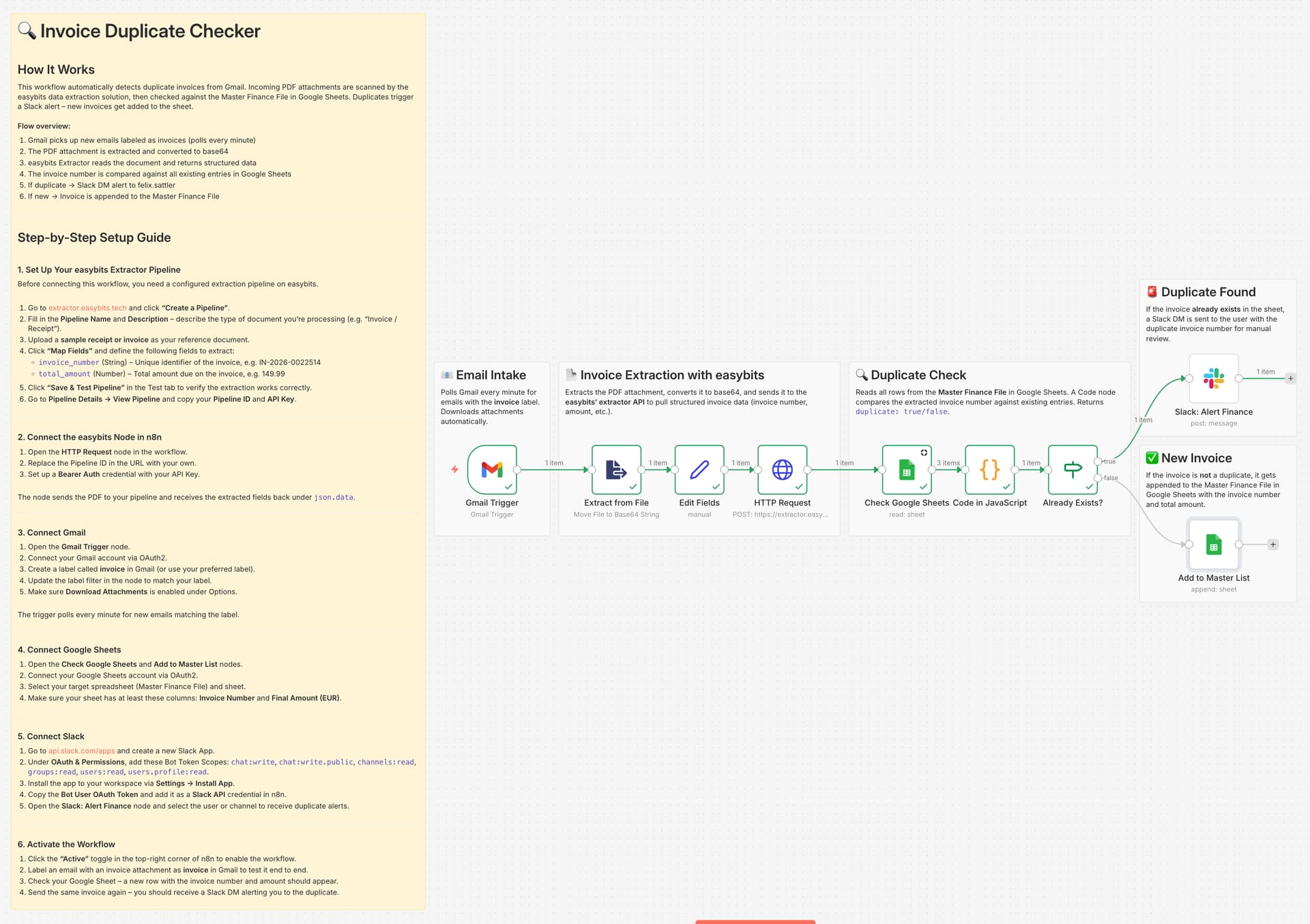
The Extraction – n8n picks up the email, grabs the PDF attachment, and sends it to the easybits Extractor, which pulls out the invoice number and total amount.
-
The Cross-Check – The workflow reads the Master Finance File in Google Sheets and compares the extracted invoice number against every existing entry.
-
The Verdict – If it’s new, the invoice gets added to the sheet automatically. If it’s a duplicate, Mike gets a Slack DM: “Invoice IN-2026-0022514 was already submitted. Please review before processing.”
No more double payments. No more awkward vendor calls. No more guessing.
Why Mike loves this:
He told me last week that he hasn’t thought about duplicate invoices once since we set this up. He just labels and forgets. Finance only sees clean, deduplicated data in the sheet. And that Slack ping? It’s caught three duplicates in the first two weeks alone – three payments that would have gone out the door twice.
The Workflow Logic
Gmail Trigger (Downloads PDF) → Extract from File (Base64 conversion) → easybits Extractor (Extracts invoice data) → Google Sheets (Cross-checks existing entries) → Code Node (Duplicate detection) → IF Node → Slack DM (Duplicate alert) or Google Sheets (Adds new entry)
I’ve attached the workflow JSON below, just import it into n8n and follow the setup guide in the sticky notes to connect your own credentials.
For anyone managing invoices across multiple inboxes or shared email addresses – how are you preventing duplicates today? Curious if anyone else has run into Mike’s problem.