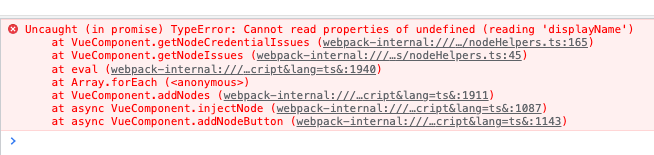
I’m experiencing this issue, as well. I’m following the node creation guide, and it works fine through the first step, but once I add the credentials to the node, it breaks as documented here.
I checked to see if I could create credentials separate from the node, but my custom credential type doesn’t even appear in the list. I can confirm that the .credentials.js file is appearing in the dist directory, and it’s not throwing any errors on build. The correct path is in the package.json file
I tried deleting my ~/.n8n directory and starting over, but this did not help.
So, for some reason, my custom credential type is not getting registered with N8N.
I tried copying the code structure from a different credential source (the Trello API instead of the FriendGrid example) and changing the name to be unique, but no go.
I also tried editing the Trello API typescript file to see if it’s changes would be reflected, and they were, so it’s not a blanket problem with credentials, just my custom type… and it doesn’t seem to be the code within that type that’s problematic, either.
Perhaps some kind of caching of the old list of credential types that doesn’t reflect the new entry?
Adding the “Api” after the service in the file name resolved the issue!
@Jon Once I get this new service working, I’ll get it published to my public repo, and if the community is interested, I can send a pull request. Thank you!