Grant announcements arrive by email as PDF attachments. Each one is a 20-40 page RFP with funding amounts, eligibility rules, a list of required documents, evaluation criteria weights, and two critical dates — the Letter of Intent deadline and the full proposal deadline. If you’re at a nonprofit or research institution receiving dozens of these a month, someone has to open every single one and log the key details before deciding whether to pursue it.
The ones that don’t get logged properly get missed. A $50K federal grant arrived during a busy grant writing period. It sat in the inbox unread. The deadline passed 2 days before anyone noticed it.
Built a workflow that processes every grant email the moment it arrives.
What it does
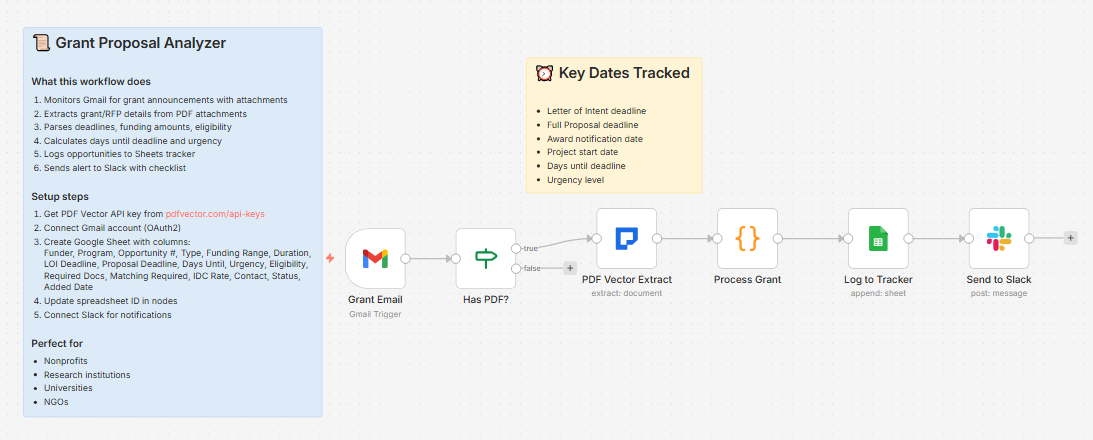
Grant email with PDF attachment arrives in Gmail → detects PDF → extracts all opportunity details → calculates days until deadline and urgency → logs to grants tracker → posts Slack alert with required documents checklist
About 12-15 seconds per announcement. Gmail filter pre-screens for emails with subject lines containing “grant,” “funding,” “RFP,” or “RFA” — so only relevant emails get processed.
What gets extracted
Opportunity basics:
-
Funder name, grant program name
-
Funding opportunity number
-
Funding type (federal, foundation, corporate, etc.)
-
Funding amount range — min and max
-
Project duration
Eligibility:
-
Eligible organization types
-
Geographic restrictions
Key dates:
-
Letter of Intent (LOI) deadline
-
Full proposal deadline
-
Award notification date
-
Project start date
-
Days until deadline — calculated automatically
Urgency levels:
-
14 days or less → Urgent
-
15-30 days → High
-
More than 30 days → Normal
Requirements:
-
Required documents list
-
Evaluation criteria with percentage weights
-
Matching funds required (Yes/No)
-
Indirect cost rate allowed
Contact:
- Program officer name, email, phone
What lands in Slack
📜 New Grant Opportunity

Funder: National Institutes of Health

Program: R01 Research Project Grant

Type: Federal Grant

💰 Funding: $250,000 - $500,000

📅 Duration: 3-5 years

⏰ Key Dates:

• LOI Deadline: April 15, 2025

• Proposal Deadline: May 30, 2025

• Days Until: 22 (High)

📋 Required Documents (8):

- Project Narrative, Budget Justification,

Biosketch, Letters of Support, IRB Approval,

Facilities Statement, Human Subjects,

Data Management Plan

🎯 Evaluation: Scientific Merit: 50% | Innovation: 20% | Investigator: 15% | Approach: 15%
The team sees the deadline countdown and required docs list without opening the PDF.
What lands in Google Sheets
Each row: Funder, Program, Opportunity #, Type, Funding Range, Duration, LOI Deadline, Proposal Deadline, Days Until, Urgency, Eligibility, Required Docs (count), Matching Required, IDC Rate, Contact, Status, Added Date
Status defaults to “New” for every incoming opportunity. Filter by Urgency to see what needs immediate attention. Sort by Days Until to build your monthly grant calendar.
Setup
You’ll need:
-
Gmail (where grant announcements arrive)
-
Google Sheets (free)
-
n8n instance (self-hosted — uses PDF Vector community node)
-
PDF Vector account (free tier: 100 credits/month)
-
Slack (for opportunity alerts)
About 15 minutes to configure.
Download
Workflow JSON:
Full workflow collection:
Setup Guide
Step 1: Get your PDF Vector API key
Sign up at pdfvector.com — free plan works for testing.
Step 2: Create your Sheet
Headers in Row 1:
Funder | Program | Opportunity # | Type | Funding Range | Duration | LOI Deadline | Proposal Deadline | Days Until | Urgency | Eligibility | Required Docs | Matching Required | IDC Rate | Contact | Status | Added Date
Step 3: Import and configure
Download JSON → n8n → Import from File.
Grant Email (Gmail Trigger):
-
Connect Gmail account (OAuth2)
-
Pre-configured search filter:
subject:(grant OR funding OR RFP OR RFA OR proposal) has:attachment filename:pdf newer_than:1d -
Adjust search query to match your inbox patterns
Has PDF? (IF node):
- No config needed — automatically filters non-PDF attachments
PDF Vector Extract:
-
Add PDF Vector credential (Bearer Token), paste API key
-
Automatically finds the PDF attachment regardless of filename
Log to Tracker:
- Connect Google Sheets, paste Sheet ID
Send to Slack:
- Connect Slack, select your grants team channel
Accuracy
Tested on federal grant announcements (NIH, NSF, USDA, HUD), foundation RFPs, and corporate giving guidelines.
-
Funder name and program title: ~97%
-
Funding amounts: ~94% — reliable when clearly stated as a range
-
Proposal deadline: ~96% — the most prominently listed date in any RFP
-
LOI deadline: ~91% — present when LOI is required; skipped otherwise
-
Required documents list: ~89% — depends on how explicitly the RFP lists them
-
Evaluation criteria with weights: ~86% — strong on federal grants with standard scoring tables; weaker on foundation RFPs that describe criteria narratively
Cost
3-4 credits per grant PDF. Free tier covers ~25 announcements per month.
Customizing it
Eligibility pre-screening:
Add an IF node after Process Grant — check if your organization type appears in eligibilityText. If not, skip logging and alert with “Not eligible” flag instead.
Weekly pipeline digest:
Add a scheduled workflow that reads your Sheets tracker every Monday and posts all opportunities with fewer than 30 days remaining — your weekly grant calendar in one Slack message.
Assign to team members:
After the Slack alert, add a step that tags a specific team member based on funding type — federal grants go to one person, foundation grants to another.
Limitations
-
Requires self-hosted n8n (PDF Vector is a community node)
-
Gmail filter catches most grant emails but may miss unusually formatted subject lines — adjust the search query for your inbox
-
Deadline calculation is point-in-time — doesn’t automatically send reminders as deadlines approach
-
Some RFPs embed deadlines in tables or headers that extract inconsistently
Questions? Drop a comment.