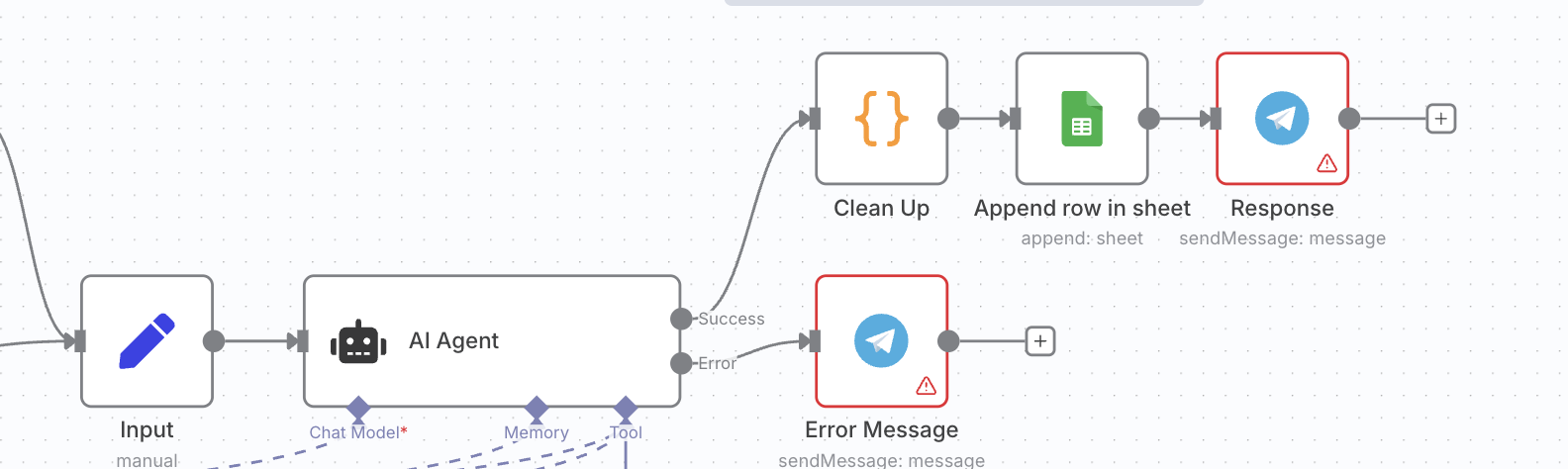
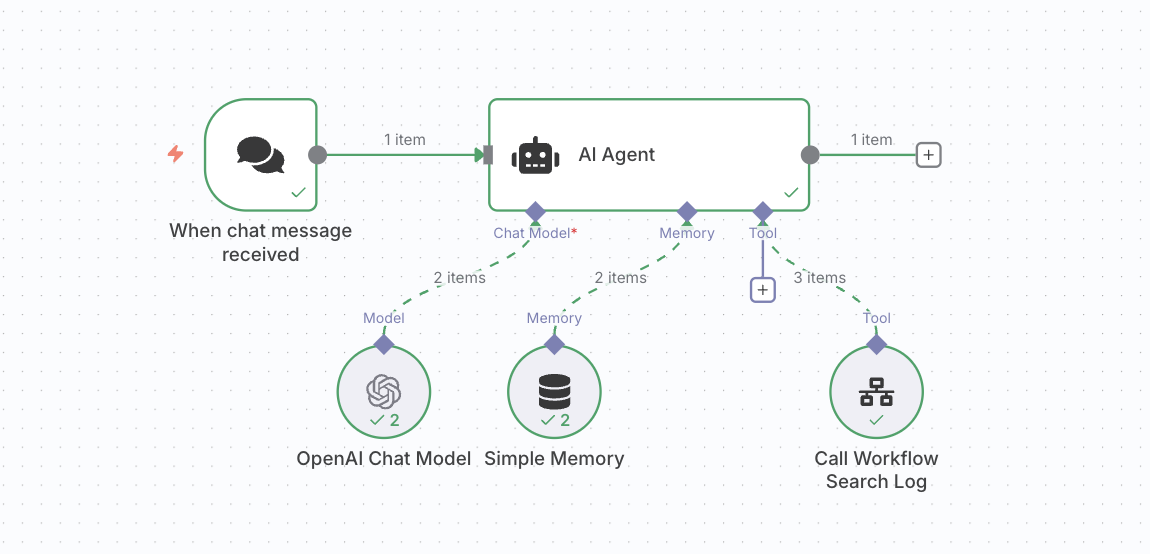
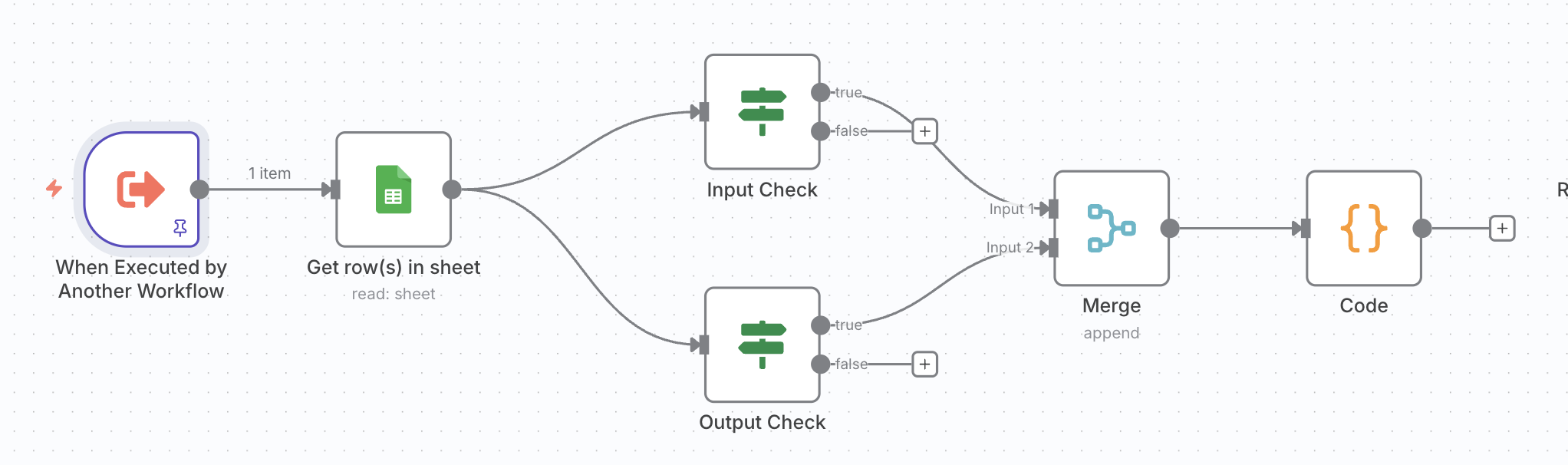
This is my attempt to solve this:
{
  "nodes": [
    {
      "parameters": {
        "options": {}
      },
      "type": "@n8n/n8n-nodes-langchain.chatTrigger",
      "typeVersion": 1.3,
      "position": [
        0,
        0
      ],
      "id": "168a1870-138f-4475-9279-1bbd40fb1d97",
      "name": "When chat message received",
      "webhookId": "1312a0bc-fd68-4c30-bea2-6f8b2373b8c7"
    },
    {
      "parameters": {
        "options": {
          "systemMessage": "=# Role\nYou are a precise, tool-using AI agent that answers questions about past conversations recorded in a Google Sheet. You must not invent information. Only use data returned by the tool.\n\n# Data Source\n- Use the Get Logs tool to fetch all rows from the Google Sheet.\n- The sheet has columns: Timestamp, Input, Output, Actions\n\nExample rows (for reference):\n\nTimestamp | Input                                   | Output                                 | Actions\n08/04     | write an email to Elon Musk             | I wrote an Email to Elon Musk          |\n08/01     | What is the current status of project…  | Last contact with Atpuri was on 07/29… |\n\nDate Handling:\n- Today is {{ $now }}.\n- Treat “this week”, “last week”, “past 7 days”, “last 7 days”, “today”, “yesterday” as explicit ranges.\n- If the user provides a date or range, use exactly that.\n- If no date/range is provided, search all logs (no date filter).\n- Default week-window (e.g., “this week”): interpret as last 7 days including today.\n- Parse Timestamp robustly:\n  - Accept MM/DD, MM/DD/YYYY, ISO YYYY-MM-DD, or other common formats.\n  - If the year is missing, assume the current year.\n- Use the timezone of the n8n server unless otherwise specified.\n\n# Keyword / Entity Matching\n- Extract the core subject from the user question (e.g., “Elon” in “What was discussed about customer Elon…”).\n- Search case-insensitively across both Input and Output.\n- Support light fuzzy matching (e.g., “Elon” matches “Elon Musk”), but do not overgeneralize (avoid matching unrelated words).\n- If multiple customer names are present, prefer exact matches and then close variants.\n\n# Required Procedure (every request)\n- Call Get Logs → retrieve all rows.\n- Normalize timestamps → convert to comparable date objects.\n- Determine date range from the user’s request:\n  - If specified → filter to that range.\n  - If unspecified → do not filter by date (use all logs).\n- Filter rows to the selected date range (if any).\n- Scan kept rows for the requested subject/keywords in Input and Output.\n- Compose the answer using only matched entries.\n- If nothing matches:\n  - Say no matching entries were found for the given range.\n  - If a range was used, also report closest matches outside the range (top 3 by recency).\n\n# Output Requirements\n- If one entry found: return a concise freeform answer that mentions the date and what was discussed/done.\n- If multiple entries found: return a bullet list, each item with:\n  - Date (YYYY-MM-DD) — short description (derived from Input/Output).\n- Always include dates.\n- Keep it factual and minimal. No speculation.\n\n# Style & Constraints\n- Be deterministic, concise, and factual.\n- Never fabricate content or dates.\n- If the user’s query is ambiguous (e.g., multiple possible customers), ask one clarifying question after attempting a best-effort answer using the most likely interpretation.\n- Do not expose internal tool names/parameters in the final answer.\n\n# Examples\n\n## Example A — Explicit 7 days\nUser: “What was discussed about customer Elon last conversations this week.”\n\nAgent plan:\nGet Logs → normalize dates → filter to last 7 days incl. today → keyword “Elon”.\nAnswer (multiple hits):\n\n2025-08-04 — Wrote and sent an email to Elon Musk.\n(If more: list each similarly.)\n\n## Example B — No date provided\nUser: “Show me everything about GreenMedia.”\nAgent plan:\n\nGet Logs → no date filter → keyword “GreenMedia”.\nAnswer (list):\n\n2025-07-30 — Sent the offer to GreenMedia via email.\n\n2025-07-26 — GreenMedia opened the offer on 07/25 but hasn’t signed yet.\n(…and so on.)\n\n## Example C — No matches in range\nUser: “Anything about Dr. Hoffmann this week?”\nAnswer:\n\nNo entries found for Dr. Hoffmann in the last 7 days.\nClosest outside range:\n\n2025-07-29 — Scheduled a callback for 07/30 at 3 PM.\n\n# Validation Checklist (before answering)\n- Tool called and rows obtained.\n- Date range logic applied correctly (or intentionally not applied).\n- Keyword scan done on Input & Output (case-insensitive).\n- Dates included in the final answer.\n- No invented details.\n- If empty in-range result and a range was requested → show nearest matches outside range (if any)."
        }
      },
      "type": "@n8n/n8n-nodes-langchain.agent",
      "typeVersion": 2.2,
      "position": [
        208,
        0
      ],
      "id": "e5a1f5de-a619-4627-99fe-360181f4567a",
      "name": "AI Agent"
    },
    {
      "parameters": {
        "model": {
          "__rl": true,
          "mode": "list",
          "value": "gpt-4.1-mini"
        },
        "options": {}
      },
      "type": "@n8n/n8n-nodes-langchain.lmChatOpenAi",
      "typeVersion": 1.2,
      "position": [
        208,
        208
      ],
      "id": "ad62d13b-fb3c-4b75-8e52-986fe1d795b2",
      "name": "OpenAI Chat Model",
      "credentials": {
        "openAiApi": {
          "id": "KaC9RLJhAWVyQE8j",
          "name": "OpenAi account"
        }
      }
    },
    {
      "parameters": {
        "documentId": {
          "__rl": true,
          "value": "1QwImGdnm-0oTWAX1b80McgFxPvVg4U79LXNQUM-LjZk",
          "mode": "list",
          "cachedResultName": "KI Agent Chat Log",
          "cachedResultUrl": "https://docs.google.com/spreadsheets/d/1QwImGdnm-0oTWAX1b80McgFxPvVg4U79LXNQUM-LjZk/edit?usp=drivesdk"
        },
        "sheetName": {
          "__rl": true,
          "value": "gid=0",
          "mode": "list",
          "cachedResultName": "Sheet1",
          "cachedResultUrl": "https://docs.google.com/spreadsheets/d/1QwImGdnm-0oTWAX1b80McgFxPvVg4U79LXNQUM-LjZk/edit#gid=0"
        },
        "options": {}
      },
      "type": "n8n-nodes-base.googleSheetsTool",
      "typeVersion": 4.6,
      "position": [
        352,
        208
      ],
      "id": "0a2cbf6e-6924-4b4b-8814-04817b54e986",
      "name": "Get Logs",
      "credentials": {
        "googleSheetsOAuth2Api": {
          "id": "0l1bfrdMPUiDTEDI",
          "name": "Google Sheets MAIN account"
        }
      }
    }
  ],
  "connections": {
    "When chat message received": {
      "main": [
        [
          {
            "node": "AI Agent",
            "type": "main",
            "index": 0
          }
        ]
      ]
    },
    "OpenAI Chat Model": {
      "ai_languageModel": [
        [
          {
            "node": "AI Agent",
            "type": "ai_languageModel",
            "index": 0
          }
        ]
      ]
    },
    "Get Logs": {
      "ai_tool": [
        [
          {
            "node": "AI Agent",
            "type": "ai_tool",
            "index": 0
          }
        ]
      ]
    }
  },
  "pinData": {},
  "meta": {
    "templateCredsSetupCompleted": true,
    "instanceId": "9423335a0111216c302866f5fc1752af6da6042c706e1cc46ecd439bca874130"
  }
}
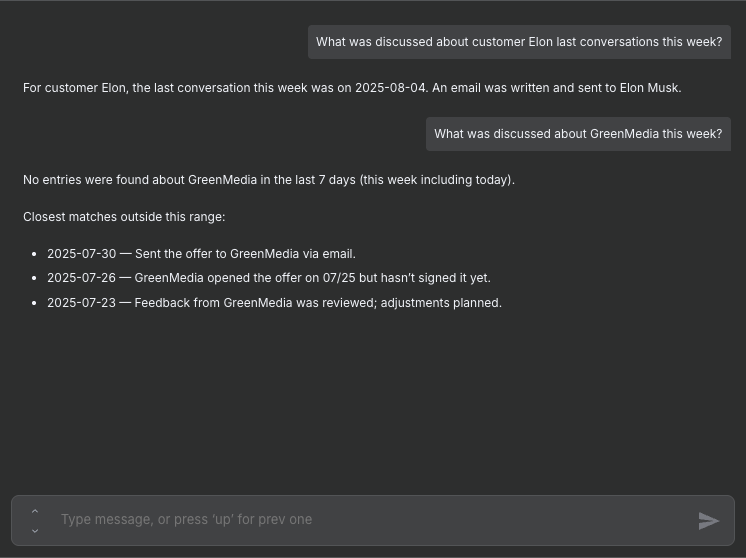
Here is an example of our conversation with the agent:

 Setup: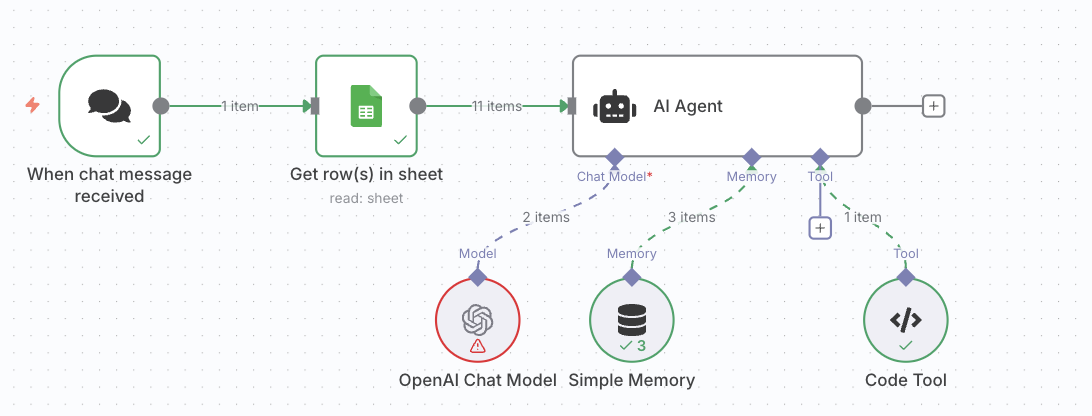
 Problem:
 What I’ve already tried:
 Question: