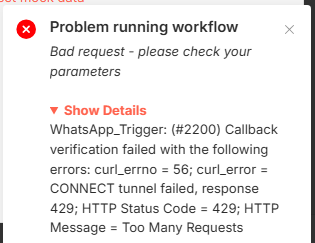
Problem running workflow
Bad request - please check your parameters
Show Details
WhatsApp_Trigger: (#2200) Callback verification failed with the following errors: curl_errno = 56; curl_error = CONNECT tunnel failed, response 429; HTTP Status Code = 429; HTTP Message = Too Many Requests
That’s great! So you want to set up a WhatsApp Trigger in n8n for your Ordering Management System!
Don’t worry, this error is very common in n8n and easy to fix. The error 429 Too Many Requests means WhatsApp API is getting too many verification requests at once. So first stop clicking the verify button and wait for 2 to 5 minutes before trying again.
In n8n, make sure your workflow is activated before verifying the webhook. If your workflow is not active, WhatsApp cannot connect to it. Go to your n8n WhatsApp Trigger node and check your Phone Number ID, Access Token and App Secret. Make sure your Access Token is not expired because Meta Access Tokens expire every 24 hours. Use a Permanent Token from your Meta Business Account to avoid this issue.
Also make sure your n8n instance is hosted on a public URL with HTTPS. If you are running n8n on localhost then WhatsApp cannot reach your webhook. You can use n8n Cloud or host it on a server like Railway, Render or VPS to get a public URL.
After all this go to developers.facebook.com, open your App, go to WhatsApp Configuration and re-enter your Webhook URL and Verify Token. Then save and try again.
Just reply with these answers and we will fix this together!
Is your n8n hosted on cloud or running on localhost?
I have Hostinger VPS for this, which has built in n8n installed. Now my problem is not with meta verification, but my problem is “When I’m trying to publish my workflow” on hostinger, it gives me this error and it stops me to publish and gives this error. But after few tries, like sometimes, 3-5 or some time 20-30, it allow me to publish.