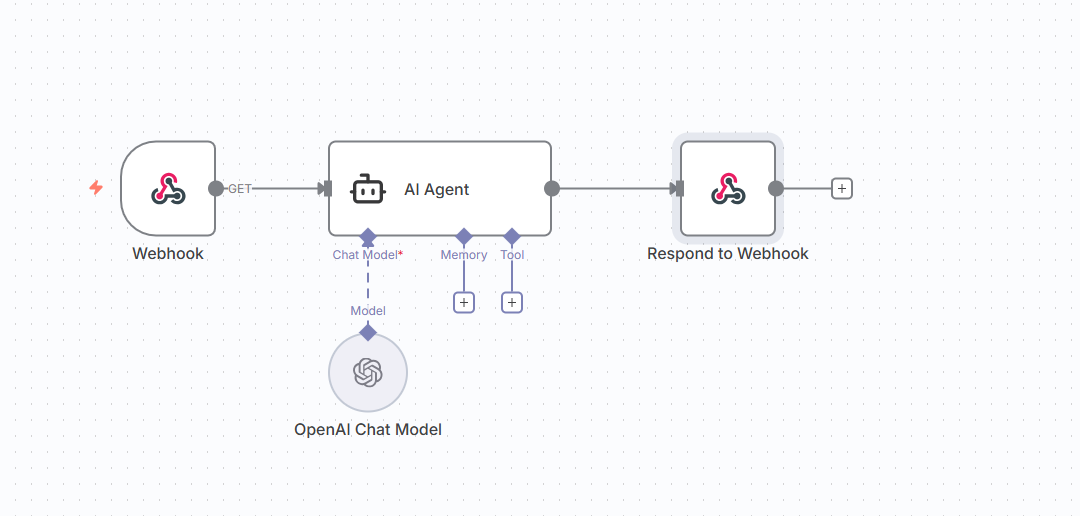
Hey guys, I just have a quick question when it comes to n8n auto-reply for leads when I get a new message.
For n8n, when I receive the lead, I’ll get a webhook notification. This will then be passed down to the AI agent to generate a reply, which would then be put back onto the webhook to respond to the webhook. Is this the right workflow? Do I need to use an HTTP request to make an API request at the end after the AI agent node? Can anyone help? I’m using Instantly.ai.
You do NOT need to use an HTTP Request node at the end unless you want to send the result to a different external API. The Respond to Webhook node is specifically designed to send the response back to the original webhook caller (in this case, Instantly.ai or whatever service triggered the webhook).
Just pay attetnion what options you define in the webhook trigger (streaming or respond to webhook[as in your case]… or where last node finish)
Thank you so much. This is applied to the campaigns that get sent automatically. So basically, the response that comes from a specific campaign or for a specific lead, does it route it back to that original one? Is that what you’re saying?
This means that if Instantly.ai sends a webhook notification for a specific campaign or lead, the response generated by your workflow (for example, by the AI agent) will be routed back to that exact request, not to a different campaign or lead.
HTTP node is the most powerfull nod ein n8n(in my opinion)…
At the core function most triggers and responders are kind of a http node for me lol.
So yes, use whichever you are confortable.
But what would you say you would use the HTTP node or the respond to webhook? Like I said, ultimately, the goal is once you’ve got the response from the AI agent, you want that response to be put onto Instantlyai for that to be then sent to that lead, if that makes sense.
Honestly i use HTTP or none(if is set the webhhok trigger to streaming).
Its a matter of choice, depending on what do you wanna achive, there s no “perfect combination for all the jobs“.
Trigger node has some options, (streaming, respond with the last node, respond to webhook), and each has its capabilietes.