Describe the problem/error/question
So. I'm using a Oracle VPS ubuntu with docker. I'm try create a folder in the tmp folder using this command mkdir /host_tem/documents. The node run withou error but don't create a folder.
My docker-compose.yml has this lines
volumes:
      - /home/ubuntu/.n8n:/home/node/.n8n
      - /tmp:/host_tmp
and
# --- NOVAS CONFIGURAÇÕES ---
      - NODES_EXCLUDE=[]
      - N8N_EXECUTE_COMMAND_ENABLED=true
      - NODE_FUNCTION_ALLOW_EXTERNAL=*
What is the error message (if any)?
The node run successfull
Please share your workflow
(Select the nodes on your canvas and use the keyboard shortcuts CMD+C/CTRL+C and CMD+V/CTRL+V to copy and paste the workflow.)
Share the output returned by the last node
Information on your n8n setup
- n8n version: latest
- Database (default: SQLite):
- n8n EXECUTIONS_PROCESS setting (default: own, main):
- Running n8n via (Docker, npm, n8n cloud, desktop app): docker
- Operating system: Ubuntu 24
Hi, @filgueira!
So the issue is permissions - the container user can’t write to your /tmp mount.
Quick fix: run sudo chmod 777 /tmp on your Ubuntu server and your command should work.
But honestly, I’d suggest a better approach: create a dedicated data folder instead.
Then update your docker-compose:
volumes:
- ~/.n8n:/home/node/.n8n
- ~/n8n-data:/data
environment:
- N8N_EXECUTE_COMMAND_ENABLED=true
- NODE_FUNCTION_ALLOW_EXTERNAL=*
And in your n8n workflow, just use: mkdir -p /data/documents
The /tmp approach technically works, but having a dedicated folder is cleaner and you’ll avoid permission headaches down the line.
Let me know if this work or not!
Hi @filgueira
Regardless the fact that there are some incorrect env vars here,
to fix the issue i guess you need to add:
- N8N_RESTRICT_FILE_ACCESS_TO=/host_tmp
Hy. Tks.. I folow yours instruction but do not work… Is the same. I print my home dir and my docker-compose to you see how is figth now.
Hi @filgueira
There is a typo here:
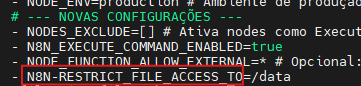
It should be N8N_RESTRICT_FILE_ACCESS_TO (with an underscore _ not -),
fix the typo and you’re okay 
no. the problem continue. I receive “Node Execute Successfuly” but nothing change.
Hy people.. Any more tips..
hi @filgueira !
The command is executing correctly, but nothing changes because /tmp is not mounted and file access is restricted to /data. Use /data as the target path (e.g. mkdir -p /data/documents) and it will work as expected.
It’s work well now. Tks a lot.
@filgueira
I’m really happy to hear this helped 
If this solution solved the issue for you, please consider leaving a like or marking the reply as the solution ( it helps others find the answer more easily and also supports community contributors.)
Thanks a lot, and feel free to reach out if you have any follow-up questions!
