Hi,
Hi everyone,
I’m experiencing an intermittent issue with the Microsoft Excel node in n8n.
Setup
-
Node: Microsoft Excel
-
Operation: Append row to table
-
n8n: 2.4.6 (self-hosted)
-
Node version: v2.2
-
Storage: OneDrive / SharePoint (Microsoft Graph)
Issue 1 – Random error (blocking)
From time to time, the workflow fails with:
Error 400: ObjectHandle is Invalid
innerError.code: invalidResourceId
What’s confusing is that:
-
The same workflow sometimes works
-
Sometimes fails
-
No changes are made to the file, table, or node configuration
This makes the behavior feel random and difficult to rely on in production.
Issue 2 – Excel file not visible in picker (non-blocking, FYI)
This is not blocking, but worth mentioning:
-
The Excel file never appears in the file selection dropdown
-
Even when the workflow runs successfully
-
I have to manually provide the file ID for the node to work
So the file is accessible and functional, just not selectable via the UI.
Questions
-
Is this a known issue or limitation with Microsoft Graph / Excel in n8n?
-
Any recommended best practices to avoid
ObjectHandleinvalidation in production workflows?
Thanks in advance for any insights 
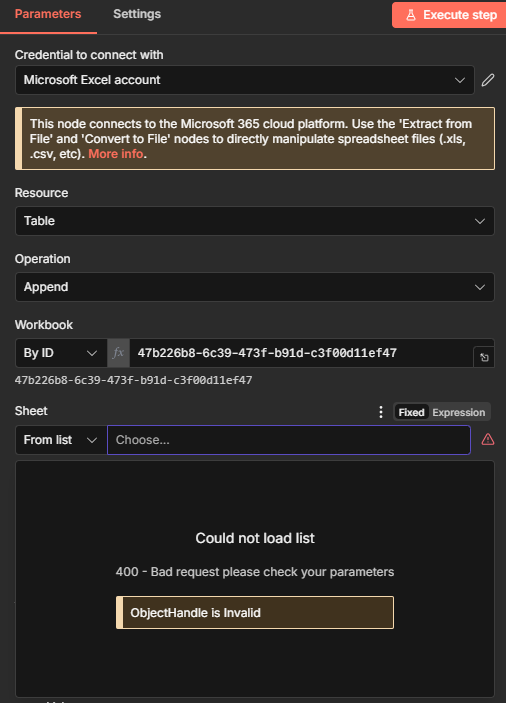
 4C2827D5DBACC3BA!s47b226b86c39473fb91dc3f00d11ef47
 47b226b8-6c39-473f-b91d-c3f00d11ef47