Hi n8n community,
I’m building a workflow that processes incoming emails using the Outlook node (specifically the ‘Get a Message’ operation or the trigger). My workflow logic needs to differentiate between an email sent directly by a user and an email sent ‘on behalf of’ that user by someone else (e.g., a delegate with permissions).
My problem is that I haven’t been able to replicate a “sent on behalf of” scenario in my own testing environment, so I can’t inspect the JSON output to see what it looks like. Without knowing the specific field name and data structure, I can’t build the conditional logic (e.g., in an IF or Code node) to handle these cases correctly.
My question is: Could someone who has handled this scenario please tell me what the output from the Outlook node looks like for an email sent ‘on behalf of’ someone?
I’m trying to find the field that identifies the actual sender. For example:
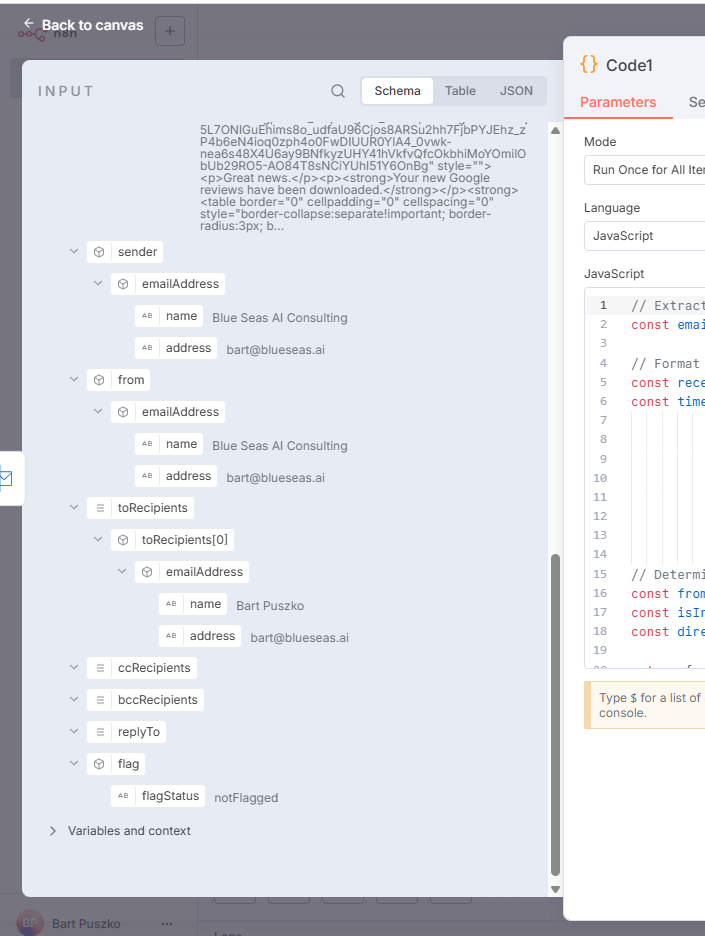
Do the sender and from fields contain different information in this case?
Is there a separate object or field, like trueSender or actualSender, that appears in the output?
For context, here is a screenshot of the output for a standard email I’m currently working with, where the sender and from fields are identical. I need to know what this looks like when it’s a “sent on behalf of” email.
Any help, example JSON, or pointers to the correct field would be hugely appreciated. It’s the last piece of the puzzle for my workflow!
Thanks in advance