I am building a RAG workflow for my company.
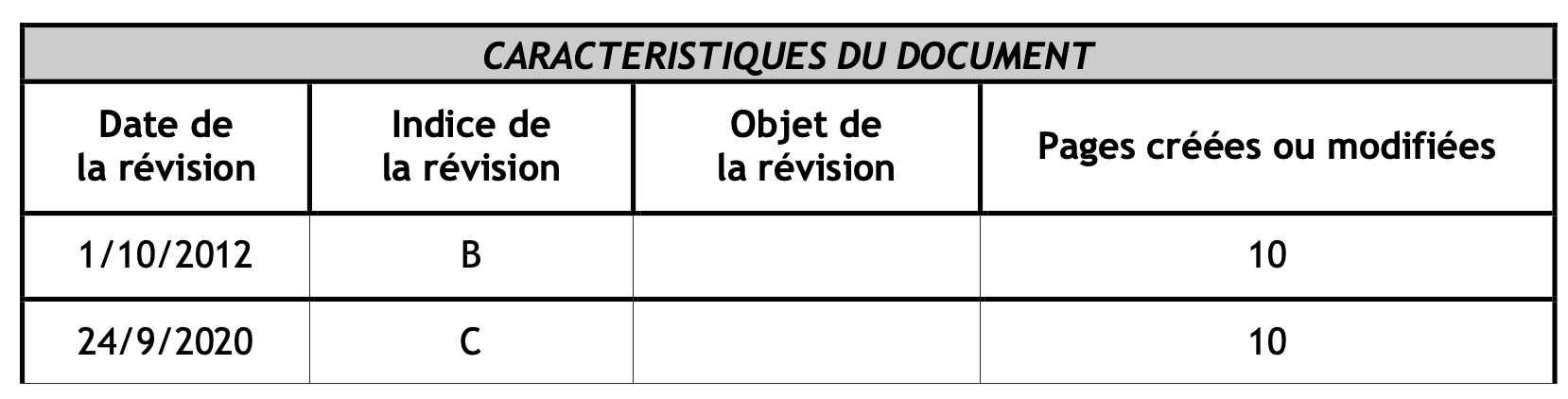
I am testing it with a couple of standard reports pdf documents that all contain one or more tables. Below is a screenshot of one of these tables:
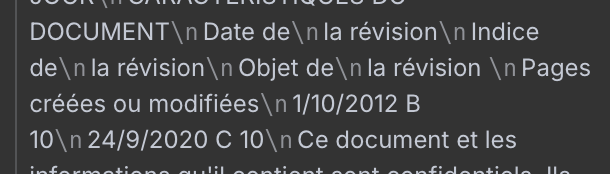
I first started parsing my PDFs with the “Extract from PDF” node but my tables get flattened in the process. As a consequence, the values are separated from their respective columns. I am not sure how the Agent/LLM is able to understand the information conveyed by these tables, if it even can. Below is a screenshot of the output of this parsing node:
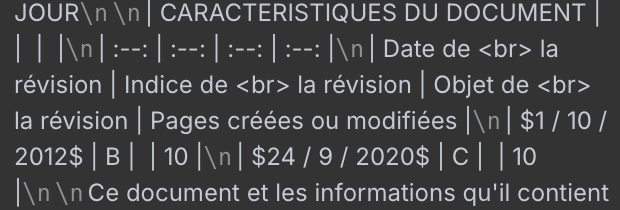
I then tried to implement OCR parsing with Mistral OCR, thinking it would solve my problem. Below is a screenshot of the output I get. It still is flattened but it comes with markdowns this time.
Is the Agent/LLM fine with flattened tables like that and do markdowns help in a way?
Are there alternative techniques I could use to better parse tables in order to keep the relationship between column headers and values?
This table maybe isn’t the best one but you could imagine asking questions like: “When was the C revision of such document created/revised?” The dates and revision letters are lined up far from the headers in both cases. It is not striking in this example as there aren’t many columns but it would be more obvious with more complex tables. And depending on chunk sizes and overlaps, values could be separated from their respective headers. You get the point.
Flattened tables are tough for any LLM - even with Markdown, the column/value relationships get lost. If you need to preserve structure, try a tool like Mathpix (https://mathpix.com). It extracts tables from PDFs into structured JSON or Markdown with clear header‑value mapping, even for complex tables with merged cells. That way you can feed the structured data into your RAG pipeline instead of hoping the model reconstructs it from flattened text.
Thanks for your reply!
In my case, asking something like: “What is the date of revision of the C revision?” works fine, in both cases it seems (with or without markdown).
But it is a very small table.
I will try with a more complex one spanning at least two chunks to see how it performs.
Thanks for your reply!
And thanks for sharing this tool. I will have a look. Does it still keep the formatted table as part of the parsed document? Or is it separated?
I see it is based on OCR and I have troubles fully understanding how it keeps the relationship between the table and the document.
What I understood is that images, when using OCR parsing, are transcribed and the transcription is included inline within the chunk in place of the image, maybe with a reference to the image path which is stored elsewhere.
Am I correct or not at all?
If I am, is it any similar with tables?
When Mathpix extracts a table from a PDF, it keeps both the structure and the position in the document. In formats like Markdown or HTML, the table appears inline where it was in the original document. In JSON output, you get a dedicated tables object, and the main document structure includes a reference showing exactly where that table occurs.
So you can use it two ways:
Keep it inline with the surrounding text for readability.
Pull the structured table data separately for processing in your workflow.
Table structure preservation is tough - you’re right that flattened tables break the column-value relationship.
About your questions:
Markdown helps but isn’t enough - LLMs understand markdown tables better than flat text, but if your chunks split across rows, headers still get separated from values.
Better table parsing:
The issue is both Extract from PDF and Mistral OCR do text extraction, not structure preservation.
What’s worked for me:
Use a parser that preserves table structure as markdown with proper column alignment
Or extract tables as structured data (JSON) instead of text
Then embed each table row WITH its headers (so chunks are self-contained)
For RAG specifically:
Instead of chunking the whole document, extract tables separately:
Parse tables to structured format (preserving headers)
Convert each row to “Header: Value” format
Embed these as separate chunks
Regular text chunks for non-table content
This way your retrieval gets “Revision C was created on [date]” as a complete unit.
What’s your chunk size currently? That affects whether headers survive.