 Overview
This workflow automatically sends Telegram messages to parents when their child’s semester fee status is updated in Google Sheets — eliminating the need for manual follow-ups. It runs every hour, checks for new status changes, and sends the right message (payment confirmation or payment reminder) without sending duplicates.
Built for schools, coaching centers, and educational institutions that want to automate fee communication professionally.
 How It Works
-
Google Sheets Trigger — Polls the
student_datasheet every hour for new/updated rows -
Filter: Paid & Unsent — Checks if
payment_status = paidANDmessage_sent ≠ true -
Payment Confirmation Message — Sends a Telegram thank-you message to the parent
-
Mark Paid Notified — Updates
message_sent = truein the sheet to prevent duplicates -
Filter: Unpaid & Unsent — Checks if
payment_statusis empty ANDmessage_sent ≠ true -
Payment Reminder Message — Sends a Telegram fee reminder to the parent with student name, ID, and fee amount
-
Mark Unpaid Notified — Updates
message_sent = truefor reminder tracking -
Error Trigger + Error Alert — Catches any workflow errors and sends an instant Telegram alert
 Nodes Used
| Node | Purpose |
|---|---|
| Google Sheets Trigger | Polls student data every hour |
| IF (×2) | Filters paid/unpaid and unsent messages |
| Telegram (×3) | Sends confirmation, reminder & error alerts |
| Google Sheets Update (×2) | Marks rows as notified |
| Error Trigger | Catches execution errors |
 Google Sheets Column Structure
Your student_data sheet should have these columns:
| Column | Description |
|---|---|
student_name |
Student’s full name |
student_id |
Unique student ID |
semester_fee |
Fee amount due |
payment_status |
paid or leave empty |
telegra_chat_id |
Parent’s Telegram Chat ID |
message_sent |
Set to true after notification is sent |
 Setup Instructions
-
Import the workflow JSON into your n8n instance
-
Connect Google Sheets credential and link your spreadsheet
-
Connect Telegram Bot credential (create a bot via @BotFather)
-
Fill in parent Telegram Chat IDs in your Google Sheet
-
Activate the workflow — it will run automatically every hour
 Key Features
-
 Duplicate prevention via
 message_sentflag -
Separate messages for paid confirmation and unpaid reminders
-
Built-in error alerting via Telegram
-
Zero manual effort after setup
 Author
Md Mustakim Ali (siratal) | Built with n8n + Google Sheets + Telegram | v1.0
https://github.com/Siratalm/n8n_school_automation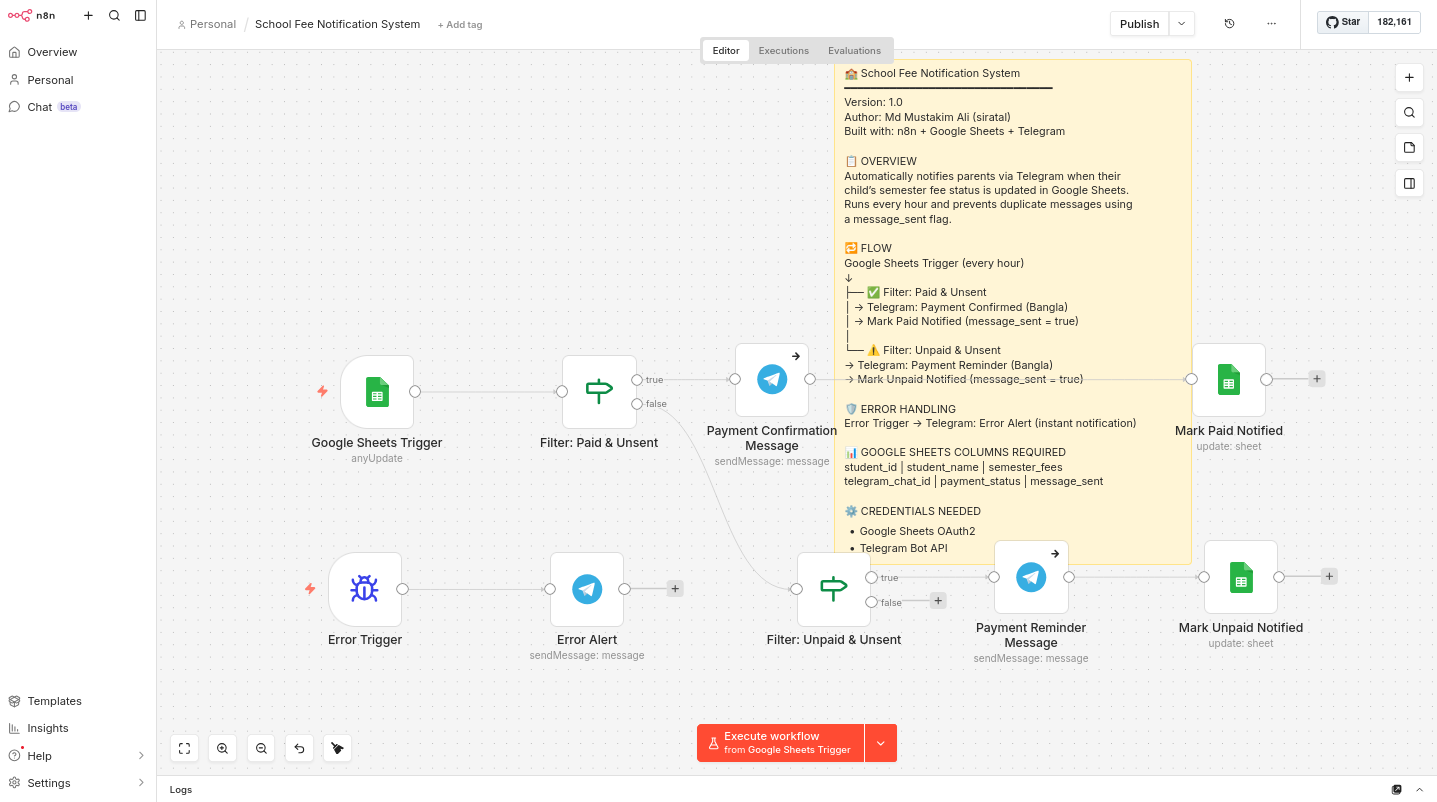
 I understand your concern.if you add some sheet & add a code node instead of if node (solved). Thank you for your feedback.Please feel free to reach out if you have any other questions or suggestions!