Hello!!
I would like to know if there is any way to send data in a form of a table as a message to Telegram.
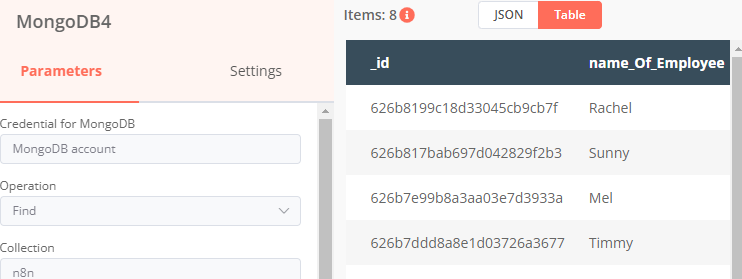
I want to send the view of the data (in table form) to the user in Telegram as a message.
Hello!!
I would like to know if there is any way to send data in a form of a table as a message to Telegram.
I want to send the view of the data (in table form) to the user in Telegram as a message.
Hey @ruby09, from reading this comment it seems Telegram doesn’t support actual tables (while it supports HTML it doesn’t support nested tags).
The easiest way seems to be to sending your data wrapped in <pre> tags and then send the result through with a HTML parse mode. This isn’t something n8n offers out of the box though, so you’d need to write a bit of custom code for this transformation, for example like so:
The linked comment also suggests this doesn’t look great on smartphones and that converting the table into an image might be the better option. Though at this stage you might as well send an email with a proper table.
@MutedJam,
Can you help me with this issue?
Sure and sorry I didn’t get back to you sooner. Any chance you can share the JSON output of your MongoDB node so I have some example data to work with?
Hey, @MutedJam ,
Here you go
[{
    "_id": "626b8199c18d33045cb9cb7f",
    "name_Of_Employee": "Rachel",
    "chat_From_Id": 912662559,
    "timestamp": 1651212691,
    "email_Of_Employee": "[email protected]",
    "name_Of_Requester": "Tom"
}, {
    "_id": "626f8a20f1cf500029f2a350",
    "name_Of_Employee": "Test",
    "chat_From_Id": 912662559,
    "timestamp": 1651477022,
    "email_Of_Employee": "[email protected]",
    "name_Of_Requester": "Janice"
}]
Thanks! I had a quick look at your existing Function code just now and it seems you’re almost there 
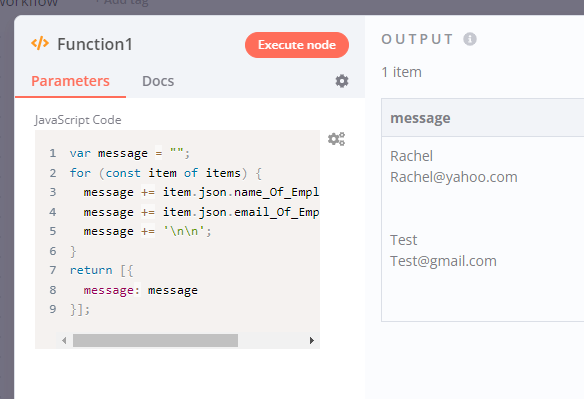
The one thing it was missing was the json key that’s part of the n8n data structure and a return value. So instead of items.name_Of_Employee you’d need to use something like item.json.name_Of_Employee if you want to read the name_Of_Employee field.
I’ve also added a return statement to return the result. This is the updated workflow:
Function node output:
Hope this helps!
Thank you so much for your help @MutedJam !!
But I have a question since I’m still new to javascript, what does this line mean/do?
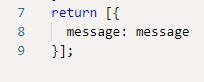
specifically, line 8
Also, is there any way I can sort the data in descending order (the latest data in the db shown the last)?
So this part returns an array with a single JSON object looking like so:
[{
  message: "<the value of our message variable>"
}]
You can then read the message field from our single item in subsequent nodes (like your Telegram node).
This is a simplification n8n allows since a while, you don’t have to return the full data structure anymore but can simply return a single object or array of objects without the json key used by n8n internally.
As for sorting your data, you would want to do that before building your message, for example using the Item Lists node like so:
Hi @MutedJam,
Thank you so much for your explanation. Really appreciate your help!
An alternative solution could be sending table as an image. the image itself could be generated by the service such as QuickChart Table Image API. While n8n has native integration with QuickChart, it does not support Table API. This limitation could be overcome with HTTP Request node: