Sending audio file to OpenAI for voice analysis not transcription

I’m trying to set up a flow that catches audio files of voice actors from emails/forms/whatever and sends them to GPT for voice analysis.

I don’t want to transcribe the text, I want GPT to tell me how the voice sounds in terms of tone, timbre, gender, pitch, etc.

Now it’s been a pain so far because it seems every audio related node or flow I try is about audio. transcription or generation, but not to simply listen to the audio. I have accomplished this in ChatGPT manually and it works, now I want to automate it in n8n.

I’ve tried various OpenAI methods, like message a model, upload a file, etc. but it seems mp3 is not an accepted file format (or any other audio format) or, depending on which model I chose, it tells me “The requested model ‘gpt-4o-audio-preview’ is not supported with the Responses API.”

Does anyone know a way to submit audio files to any GPT model for this purpose?

Please share your workflow

Share the output returned by the last node

Bad request - please check your parameters
Invalid input: Expected context stuffing file type to be a supported format: .art, .bat, .brf, .c, .cls, .css, .diff, .eml, .es, .h, .hs, .htm, .html, .ics, .ifb, .java, .js, .json, .ksh, .ltx, .mail, .markdown, .md, .mht, .mhtml, .mjs, .nws, .patch, .pdf, .pl, .pm, .pot, .py, .scala, .sh, .shtml, .srt, .sty, .tex, .text, .txt, .vcf, .vtt, .xml, .yaml, .yml but got .mp3.

Information on your n8n setup

  • n8n version: self-hosted
  • Database (default: SQLite): default
  • n8n EXECUTIONS_PROCESS setting (default: own, main):
  • Running n8n via (Docker, npm, n8n cloud, desktop app): npm
  • Operating system: macOS

@kuno Unfortunately, no. ChatGPT’s audio API does not support the audio previewing at this time. I looked into uploading the file first then using the vector store search tool with the message a model node, but mp3 files are not supported for vector storage. There may be other AI models in n8n that do support direct mp3 uploads, but I haven’t looked into them.

@NCione How come it is not supported when there is even a model for it that is promoted for this specific task?

Such as in https://techcommunity.microsoft.com/blog/azure-ai-foundry-blog/introducing-the-gpt-4o-audio-preview-a-new-era-of-audio-enhanced-ai-interaction/4369643 or Audio support in the Chat Completions API - Announcements - OpenAI Developer Community

Anyway, thanks for the reply, will try with other models

Hey @kuno !

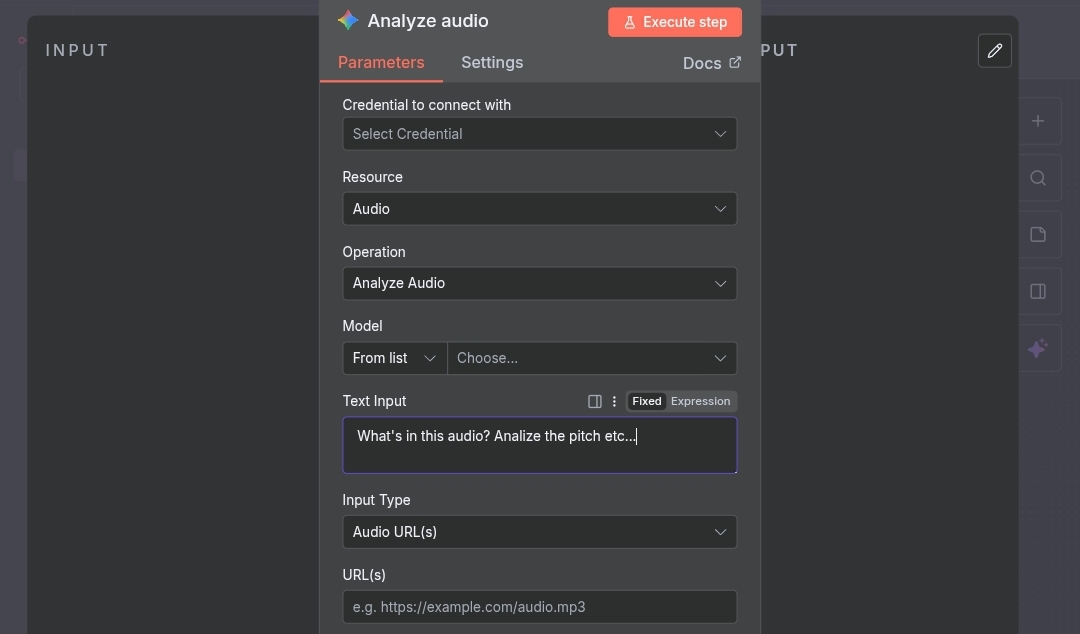
I think Gemini can handle that :

Here is a preview of the node:

Worth trying…

Cheers!

:slight_smile:

My apologies, on second look I do think I actually found a solution for you by using ChatGPT, it just takes a slight work around. The OpenAI docs outline how to upload and process audio here: https://platform.openai.com/docs/guides/audio?api-mode=chat&example=audio-in&lang=curl You need to use this request in an HTTP request node:

curl "https://api.openai.com/v1/chat/completions" \
    -H "Content-Type: application/json" \
    -H "Authorization: Bearer $OPENAI_API_KEY" \
    -d '{
      "model": "gpt-4o-audio-preview",
      "modalities": ["text", "audio"],
      "audio": { "voice": "alloy", "format": "wav" },
      "messages": [
        {
          "role": "user",
          "content": [
            { "type": "text", "text": "What is in this recording?" },
            { 
              "type": "input_audio", 
              "input_audio": { 
                "data": "<base64 bytes here>", 
                "format": "wav" 
              }
            }
          ]
        }
      ]
    }

Just keep in mind, you need to convert the audio file to base64 first in accordance with the API’s input and you’ll have to change the “What is in this recording?” prompt to fit your workflow. Hope this helps!