juajua
January 8, 2026, 7:47am
1
I’m trying to send HTTP request without wrapping the data in body {}. I searched this forum and found an older message that had attached YAML, and when I add this node to my workflow I get this:
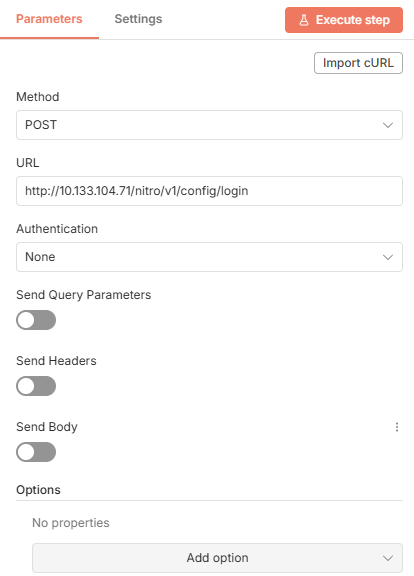
It seems to be version 1. However when I add HTTP node from the library, it is version 4.3 and looks like this:
It doesn’t seem to have that JSON/RAW capability anymore or am I just looking in the wrong place? If I need to add the older node, how do I do that without always importing it from that other users YAML and then modifying my workflow?
n8n version: 2.1.5 Database (default: SQLite): n8n EXECUTIONS_PROCESS setting (default: own, main): Running n8n via (Docker, npm, n8n cloud, desktop app): docker Operating system: linux
Hi @juajua
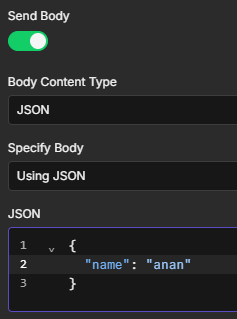
I’m not sure if I understand you correctly, but maybe try this:
Enable “Send Body”
Set “Body Content Type” to “JSON”
Set “Specify Body” to “Using JSON”
I hope this is what you need.
juajua
January 8, 2026, 8:05am
3
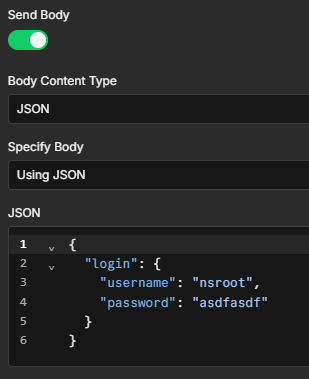
That wraps it in a body and sends a request:
{ "body": { "login": { "username": "nsroot", "password": "asdfasdf" } }, "headers": { "accept": "application/json,text/html,application/xhtml+xml,application/xml,text/*;q=0.9, image/*;q=0.8, */*;q=0.7" }, "method": "POST", "uri": "http://10.133.104.71/nitro/v1/config/login", "gzip": true, "rejectUnauthorized": true, "followRedirect": true, "resolveWithFullResponse": true, "followAllRedirects": true, "timeout": 300000, "encoding": null, "json": false, "useStream": true }
Version 1 of the HTTP node in my workflow works and sends only this:
{“login”:{“username”:“nsroot”,“password”:“asdfasdf”}}
With curl I would send this and it works:
curl -X POST -H "Content-Type:application/json" http://10.133.104.71/nitro/v1/config/login -d '{"login":{"username":"nsroot","password":"asdfasdf"}}'
Using Import cURL this curl command is translated to:
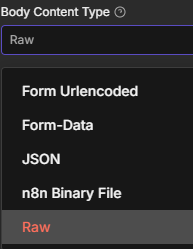
btw, there is also a “Raw” option and many others:
I’m sure you can get what you need with the correct configuration..
1 Like
system
January 15, 2026, 8:10am
5
This topic was automatically closed 7 days after the last reply. New replies are no longer allowed.