Describe the problem/error/question
Hi there, I am trying to use the Sharepoint node to fetch data from a folder but the node does not seem to have access to the Microsoft tenant site. I tried to grant all permissions but found that I have two n8n one in “enterprise app” set up from n8n and another n8n in the app registration section. The latter has all permissions but I feel all app connections use the former to fetch data and that’s why I still get the 403 Forbidden error. Any clue of how to solve this?
That’s my view on Entrerprise applications from Microsoft Entra Admin Center.

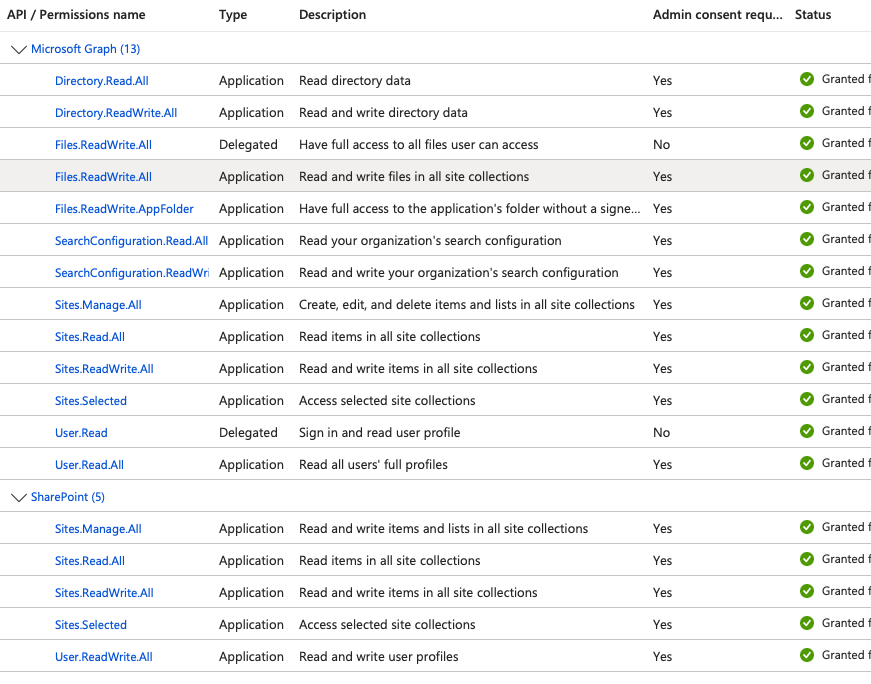
These are the permissions I granted manually creating the app manually with n8n client ID.
What is the error message?

Please share your workflow
(Select the nodes on your canvas and use the keyboard shortcuts CMD+C/CTRL+C and CMD+V/CTRL+V to copy and paste the workflow.)
Share the output returned by the last node
Information on your n8n setup
- n8n version: [email protected]
- Database (default: SQLite):
- n8n EXECUTIONS_PROCESS setting (default: own, main):
- Running n8n via (Docker, npm, n8n cloud, desktop app):
- Operating system: MacOS