hi @XCS
Based on what you described, I can’t be certain which one fixed it, but since the waiting executions resumed after the service restart, the restart is the more direct explanation than the downgrade itself.
Have you checked your scheduler logs around the point where the waiting nodes got stuck? Sometimes it’s a scheduler state memory leak where the waiting jobs get removed from the in-memory queue but aren’t properly cleaned up from persistence. If it’s consistently 2.16+, might be worth checking the release notes for scheduler changes. Quick test: do new waiting nodes work properly or is everything stuck?
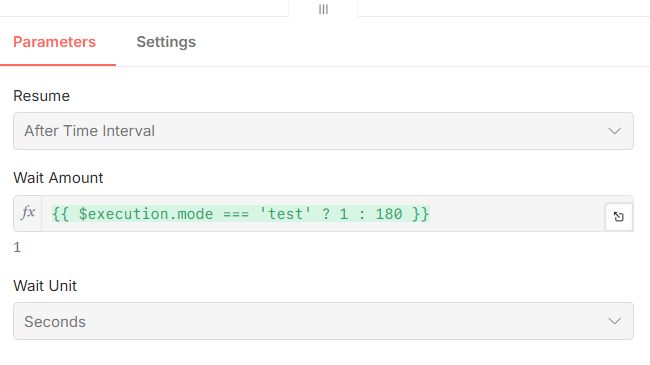
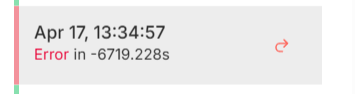
@XCS that negative execution time (-6719s) is a dead giveaway — the resume timestamp is getting calculated wrong, likely a timezone or clock drift issue between your DB and n8n process. check your GENERIC_TIMEZONE env var matches your system clock and DB server timezone, that expression on the Wait node evaluates at trigger time not resume time so a mismatch there would explain the stuck state exactly
Adding to what the others mentioned, if you are using the default SQLite database and handling a large volume of executions, the database lock can sometimes silently fail to update the “resume” status of Wait nodes under heavy load.
I ran into a similar “ghost waiting” issue a while back. Moving to PostgreSQL completely solved it for me, as it handles concurrent read/writes for the execution logs much better than SQLite. If you are already on Postgres, checking the execution_entity table directly when a node gets stuck might show you if the waitTill column is actually getting written correctly or if it’s an application-level failure like Benjamin suggested
I had a similar issue after upgrading. In my case the problem was the n8n worker process not picking up queued executions properly. A few things that helped:
Restart all n8n workers and main process after upgrade (not just the main instance)
Check if you’re running in queue mode - if so, make sure Redis connection is stable
Run n8n db:revert and re-run migrations if the schema wasn’t updated cleanly
Also worth checking the execution_entity table directly - if waitTill is null for stuck executions, it’s likely a worker not picking them up rather than a wait node issue. Hope this helps narrow it down.