Describe the problem/error/question
I am encountering an issue with the Slack node when using the “Send and Wait for Response” operation (and standard “Send a Message” in some cases).
The Scenario:
- I send a Direct Message (DM) to my Slack Bot.
- An
n8n Trigger (Slack Trigger)detects the message and captures the sender’susername(user_resolved). - I use the Slack Node with the operation “Send and Wait for Response”.
- I set the configuration to “Send Message - To User - By Username” using the username captured in step 2.
The Bug:
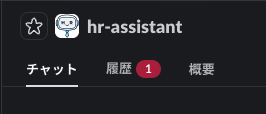
The workflow executes successfully, but the message from the bot does not appear in the active DM conversation stream. Instead, it only appears in the “History” tab within the Bot’s channel, making it invisible to the user unless they specifically check the Bot’s channel.
Additional Findings:
- The same behavior occurs when using “Send Message - To Channel - By ID” (using the DM channel ID).
- The standard “Send a Message” operation exhibits the same behavior (message goes to History).
- However, if I use “Send a Message” and specifically enable the “Reply to a Message” option and map the
Message Timestamp to Reply To, the message correctly appears in the flow.
- However, if I use “Send a Message” and specifically enable the “Reply to a Message” option and map the
- The “Send and Wait for Response” operation does not seem to have an “Reply to Timestamp” option, causing the prompt to be “lost” to the user.
I expected the “Send and Wait for Response” message to appear directly in the DM chat where the trigger occurred, similar to how a standard user reply works.
What is the error message (if any)?
There is no error message. The node execution status is Success.
Please share your workflow
Share the output returned by the last node
As a result, the message does not appear in the main Chat tab; it is only visible if the user manually navigates to the History tab to check it.
Information on your n8n setup
- n8n version:2.3.5
- Cloud: Starter plan