Hi everyone,
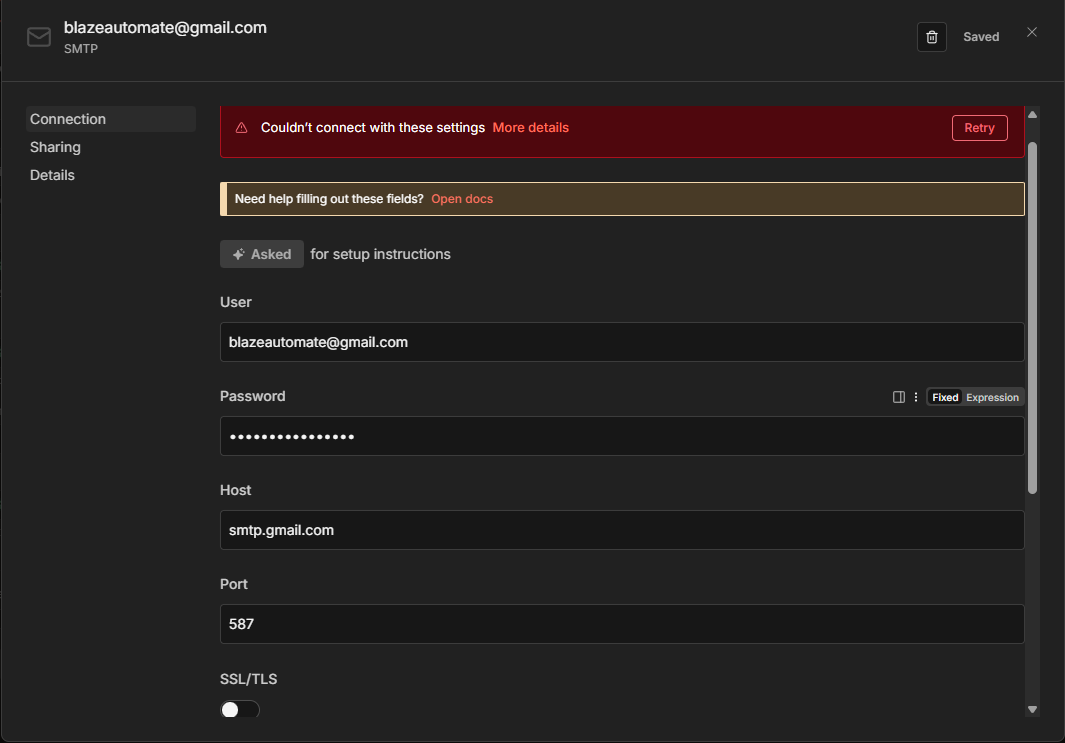
I am running into a persistent issue trying to set up the Send Email node using Gmail SMTP on n8n Cloud.
I have verified my credentials multiple times, and they work perfectly in external SMTP testing tools (GMass), but I keep getting a Connection closed unexpectedly error inside n8n.
My Goal
I want to send emails via the SMTP node using a custom domain alias ([email protected]) that I have set up in my Gmail account. I prefer the SMTP node over the Gmail node to ensure I can strictly control the “From” address for my business domain.
The Setup
-
Platform: n8n Cloud
-
SMTP Host:
smtp.gmail.com -
Username:
[email protected](My main Gmail account) -
Password: A fresh 16-digit Google App Password (2FA is on)
Evidence that Credentials work
I tested these exact credentials in GMass (SMTP Test Tool), and the connection was successful. I was able to send a test email from [email protected] to another address without issues.
-
GMass Config: Port 587, TLS, Auth Plain.
-
Result:
250 2.0.0 OK(Email sent successfully).
What I have tried in n8n (and failed)
I have tried every combination of ports and SSL/TLS toggles in the n8n credential settings, but nothing works:
Attempt 1 (Standard TLS):
-
Port:
587 -
Secure: OFF (Toggled OFF because 587 uses STARTTLS)
-
Ignore SSL Issues: ON
-
Result:
Connection closed unexpectedly
Attempt 2 (SSL):
-
Port:
465 -
Secure: ON (Toggled ON for SSL)
-
Ignore SSL Issues: ON
-
Result:
Connection closed unexpectedly/ Timeout
Steps taken so far
-
Deleted and recreated the App Password in Google.
-
Verified that
[email protected]is set up correctly as a “Send mail as” alias in Gmail settings. -
Confirmed that I am using the main Gmail address (
[email protected]) in the User field of the credentials, not the alias. -
Tried toggling “Ignore SSL Issues” both on and off.
Since I am on n8n Cloud, I assume ports 587/465 shouldn’t be blocked (unlike self-hosted AWS/DigitalOcean).
Has anyone else faced this “Connection closed unexpectedly” error specifically on n8n Cloud with Gmail recently? Is there a specific hidden setting I am missing?
Any help would be appreciated!