I need help with an issue in my n8n workflow. I have the following setup:
When chat message received → AI Agent → OpenAI Chat Model → Simple Memory → Get many documents in Elasticsearch
The main problem is that when I ask questions through the chat, the AI model always tries to answer using its own knowledge base instead of first searching in the Elasticsearch data (from the “Get many documents in Elasticsearch” node).
How can I configure the workflow to force the model to first look for answers in the Elasticsearch data before falling back to its own knowledge?
Hi @VitaminPC, welcome to the n8n community !
From your screenshot, Elasticsearch is connected as a tool, but the Agent is not required to use it. The model will only call the tool if it thinks it needs external data. If your question can be answered from general knowledge, it will skip If you need it to always search first, don’t rely on the Agent’s decision. Run the Elasticsearch node before the Agent and pass the retrieved documents into the promp or If you prefer to keep it as a tool, you’ll need to strengthen the system prompt to explicitly require searching before answering, but even then, tool calling is still model-driven and not guaranteed.
In this case, you probably don’t need an Agent at all. The Agent decides whether to call a tool, so it won’t guarantee a search every time. Instead, run the Elasticsearch node first, pass the retrieved documents into the model, and let the model answer strictly based on that context. That gives you deterministic behavior instead of relying on the model’s decision.
Hi @VitaminPC Welcome to the community!
Very classic problem and this always comes down to the prompting just consider tighten your prompts and everything would work just fine, also if that tool’s job is just to get contents do not consider letting AI decide that just place that node after the chat and let the AI agent have it as a AI prompt and you curate your system prompt better to handle it!
@VitaminPC Consider setting your tool column options, what i mean is that if you want the AI agent to fetch some exact data stored in the row/columns in that:
And also tighten your system prompt and AI prompt so the AI agent knows exactly how to handle your inputs and also how to actually use the tool, and also set descriptions in that tool.
@VitaminPC I guess this is again the system prompt problem as the AI is not trying to search into the specific field, consider explaining your situation to:
and explain your problems also then try again. As in this case the workflow runs fine but the AI agent is not taking right decisions and not searching the field.
change the operation from “get many” to “search”, a query field will appear. you’ll see the option AI and you can enable “Allow AI to set value.” After that, the Agent will be able to pass the search term dynamically and the node will execute properly.
If I understand correctly, in your case the Agent is trying to pass a search query like match text equals WQ2-320, but the node is configured only to retrieve documents, not to perform a search.
I’ve resolved the connection issue with Elasticsearch by using the “HTTP Request” node.
However, I’m now facing another issue with my workflow:
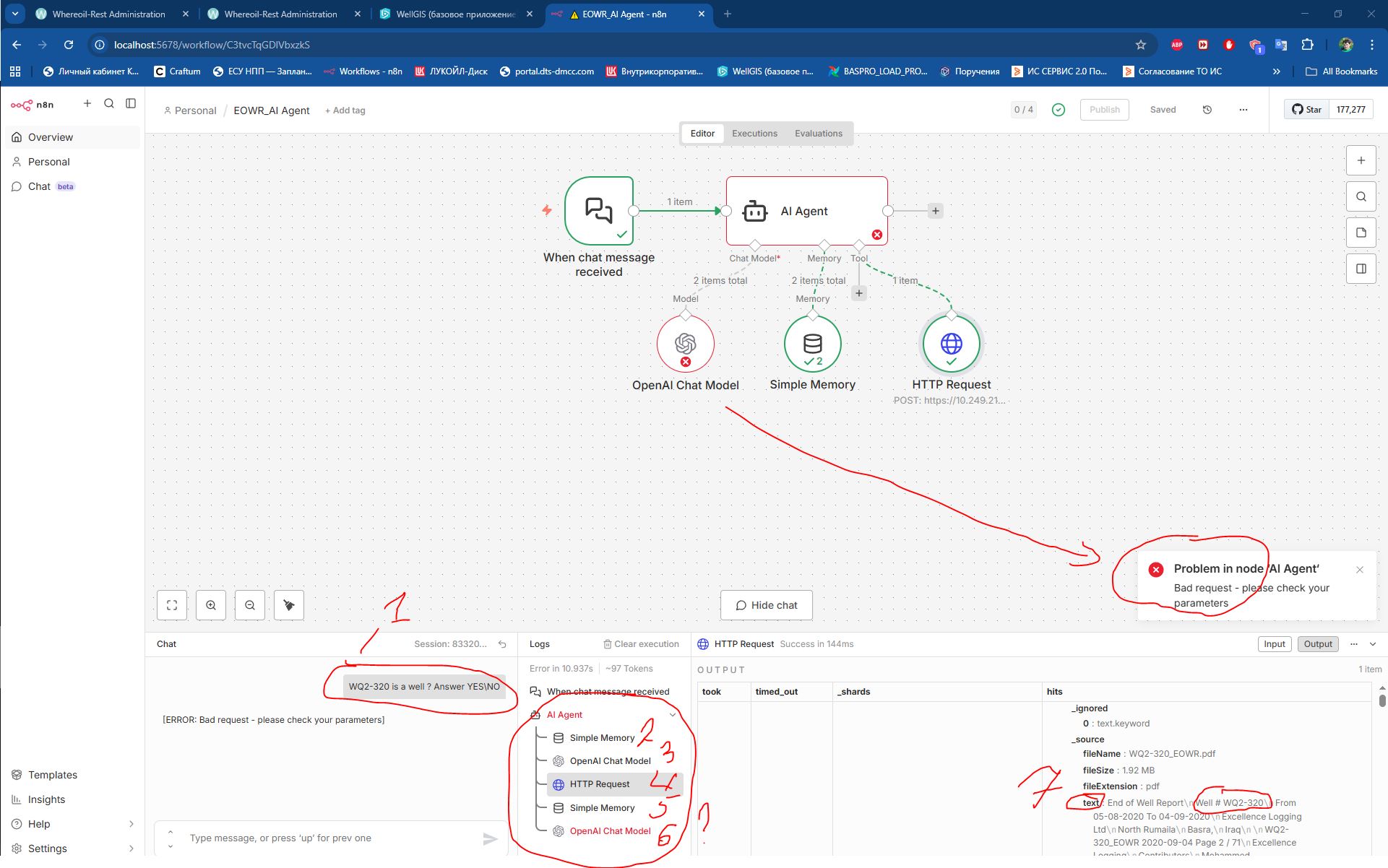
Workflow structure: When chat message received → AI Agent → OpenAI Chat Model → Simple Memory → HTTP Request
When I send a simple query in the chat, e.g., *“WQ2-320 is a well? Answer YES/NO”*, I receive the following error: “Problem in node ‘AI Agent’ - Bad request. Please check your parameters.”
It seems that the AI Agent is attempting to fetch all data from Elasticsearch without first filtering or processing it through the AI model.
Has anyone experienced a similar issue or can suggest how to ensure the AI Agent only retrieves relevant data from Elasticsearch, rather than querying everything?
Error in “Open Chat Model“ -(Bad request - please check your parameters
This endpoint’s maximum context length is 64000 tokens. However, you requested about 301504 tokens (300846 of text input, 158 of tool input, 500 in the output). Please reduce the length of either one, or use the “middle-out” transform to compress your prompt automatically.)
@VitaminPC You need to limit your data from the elastic search as GPT-4o would have been a solution here, but your context is way too high, consider limiting the input from that elastic search node, as everything used to work fine until it hits the limit. So for now limit the input from where you are receiving the most tokens from.


 !
!