SSH tool not finding commands

Describe the problem/error/question

I’ve successfully connected a server to my n8n instance which is running some docker containers I would like to check on using the docker ps command. While some basic commands like echo or hostname work, this particular one doesn’t, even though the credentials are for a user in the docker group (so no need for sudo or anything like that).

What is the error message (if any)?

ash: docker: command not found

Please share your workflow

Share the output returned by the last node

[
{
“code”: 127,
“signal”: null,
“stdout”: “”,
“stderr”: “ash: docker: command not found”
}
]

Information on your n8n setup

  • n8n version: 1.113.3
  • Database (default: SQLite): postgres15
  • n8n EXECUTIONS_PROCESS setting (default: own, main): default
  • Running n8n via (Docker, npm, n8n cloud, desktop app): docker
  • Operating system: Synology DSM

You’re already inside a Docker container, so it makes sense that docker ps doesn’t work

If you are running n8n in Docker, then the command you are running in Execute a command node is running inside that docker container, not on your host, where docker command is available.

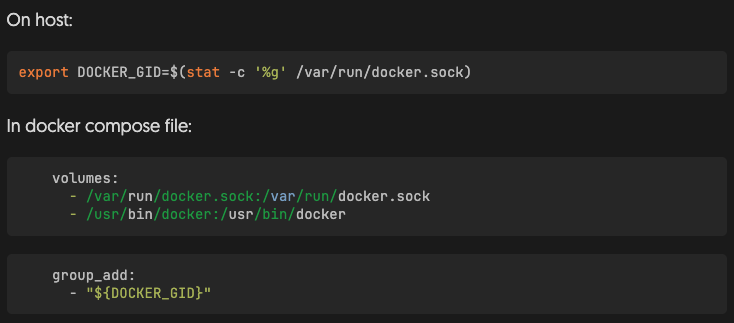
What you could try is this:

Export docker’s group and bind docker socket inside the container

Then restart your container with docker compose down and up again.

Thanks for the detail, I’ll try this and report back. Also guess I need to revisit my understanding of connecting to a server via SSH from a container - wasn’t anticipating a difference between connecting from a container vs connecting via terminal or other any CLI
This topic was automatically closed 90 days after the last reply. New replies are no longer allowed.