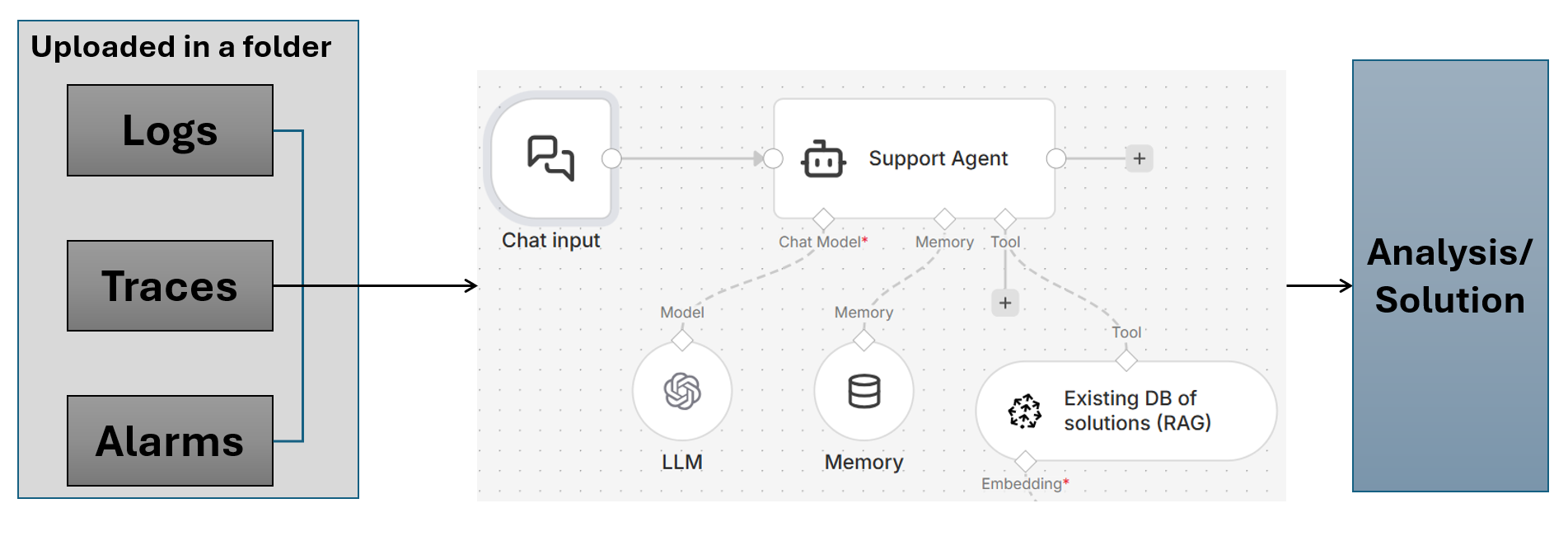
I am requesting help creating a “Technical support agent” for K8s clusters in a private datacenter environment, where the support engineers get logs/traces/alarms from the customer to troubleshoot live K8s/OpenShift clusters.
I have a workflow in mind, as shown below, but I am not sure how exactly this can be deployed on a self-hosted N8N. Remember, the RAG shown here is an API call towards the existing solutions database from a CRM system like Salesforce/Jira, etc.
My honest answer is yes, this is deployable on self-hosted n8n, and your diagram is directionally right. n8n’s AI features are supported on self-hosted setups, and the usual pattern here is Chat Trigger + AI Agent + tool/API calls.
The main adjustment I’d make is to separate ingestion from chat, keep Salesforce/Jira/CRM search as the primary retrieval path, and only add a vector store if you later see a real retrieval gap.
The docs I’d start with are the Advanced AI overview, the Chat Trigger / AI workflow tutorial, and the Vector Store docs if you decide to add RAG later.
to add some practical details for the K8s private datacenter setup:
on LLM choice (@Benjamin_Behrens asked): for log analysis Claude Sonnet or GPT-4o work well because log dumps are often large and noisy — you need a model that can reason about stack traces and error patterns without hallucinating fixes. if the datacenter is air-gapped, look at self-hosted options like Llama 3.1 70B via Ollama.
on the log token problem: don’t pass raw log files to the agent directly. add a pre-processing step before the AI Agent:
split logs into chunks by time window or severity (ERROR/WARN only)
extract structured fields (timestamp, pod name, namespace, error code) with a Code node
pass only the last N errors + the relevant context window to the LLM
this alone can cut token usage by 80%+ and makes the agent’s reasoning much more reliable.
on tool structure for this use case: treat each data source as a separate tool — one for Jira (search similar past incidents), one for Salesforce (customer context), one for K8s API (live cluster state if you have network access). the agent will naturally chain them: “customer X reported error Y → search Jira for Y → check cluster state → suggest fix based on past incidents.”
You’re perfectly right. The problem is how to parse large log folders to the LLM for analysis. These logs could be in MegaBytes (at least). I am planning to use openAI initially because it has least cost for tokens