Medical billing errors are common and expensive. Duplicate charges, unbundled services that should be billed together, upcoded procedures, phantom supply charges, medications billed at 10x retail price. Most patients pay without questioning because reading a hospital bill properly requires knowing CPT codes, understanding what services should cost, and spotting patterns across dozens of line items.
Hospitals count on that complexity. Most people just pay.
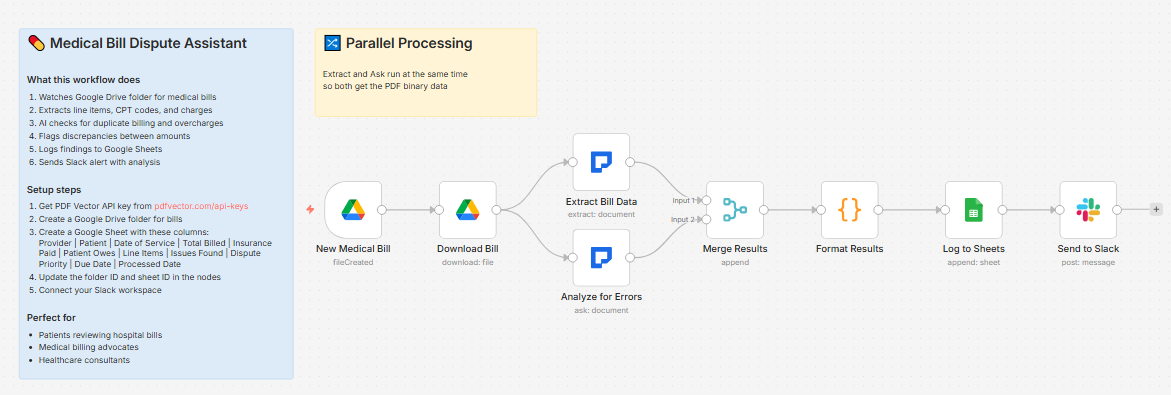
Built a workflow that runs two parallel passes on any medical bill PDF — one to extract all structured data, one to analyze every line item for the eight most common billing errors — and delivers a full dispute report in about 20 seconds.
What it does
Medical bill PDF dropped in Drive → two parallel passes (structured extraction + error analysis) → merges results → counts issues and assigns priority → logs to bill tracker → posts full report to Slack
Two passes run simultaneously. Total time about 15-20 seconds.
Two parallel passes
Pass 1 — Structured extraction:
-
Provider name and address
-
Patient name, account number
-
Date of service, admission date, discharge date
-
All line items — CPT/HCPCS code, description, quantity, unit charge, total charge, category
-
Diagnosis codes (ICD-10) with descriptions
-
Total billed, insurance adjustments, insurance paid, patient responsibility
-
Payment due date
-
Facility charges, physician charges, pharmacy charges, supply charges (broken out)
Pass 2 — Error analysis:
Checks for 8 common billing errors:
-
Duplicate billing — same service billed multiple times on same date
-
Unbundling — services that should be billed together but separated to inflate cost
-
Upcoding — higher procedure codes than the service warrants
-
Phantom charges — services not associated with the actual procedure
-
Balance billing — charges exceeding allowed amounts for in-network providers
-
Itemized discrepancies — unit prices that are excessive
-
Date errors — services billed outside admission dates
-
Quantity errors — excessive quantities for supplies or medications
For each issue found: issue type, specific charge affected, estimated overcharge amount, recommended dispute action, priority level (High/Medium/Low). Ends with an overall bill health score (1-10) and total potential savings estimate.
What lands in Slack
💊 Medical Bill Analysis Complete

Provider: Memorial Hospital System

Patient: James Holloway

Account: 2024-MH-089234

📅 Service Details:

• Date: February 14, 2025

• Admission: February 14 | Discharge: February 17

💰 Charges:

• Total Billed: $24,847

• Insurance Paid: $18,200

• Patient Owes: $6,647

• Due: March 15, 2025

🔍 Analysis:

• Issues Found: 4

• Priority: High

📝 AI Report:

Bill Health Score: 4/10 — Multiple issues identified

DUPLICATE BILLING (High):

Room and board charge (Rev Code 0120) appears twice

on February 15 — $1,840 overcharge. Dispute both

and request itemized room charges per date.

UPCODING (High):

CPT 99233 (high complexity visit) billed for what

notes describe as a brief follow-up. CPT 99231

more appropriate — estimated overcharge $180.

PHANTOM CHARGES (Medium):

Surgical pack charge ($340) billed for a procedure

that uses disposable supplies covered under facility fee.

QUANTITY ERROR (Medium):

Acetaminophen 500mg — 48 units at $12.40/unit = $595.

Retail cost $4. Flag for itemized pharmacy review.

Total Potential Savings: ~$2,955
What lands in Google Sheets
Each row: Provider, Patient, Date of Service, Total Billed, Insurance Paid, Patient Owes, Line Items (count), Issues Found (count), Dispute Priority, Due Date, Processed Date
Filter by Dispute Priority = High to see which bills need immediate action. Sort by Issues Found to prioritize disputes.
Setup
You’ll need:
-
Google Drive (folder for medical bill PDFs)
-
Google Sheets (free)
-
n8n instance (self-hosted — medical bills contain PHI)
-
PDF Vector account (~6-8 credits per bill for two passes)
-
Slack (for dispute reports)
About 15 minutes to configure.
Download
Workflow JSON:
Full workflow collection:
Setup Guide
Step 1: Get your PDF Vector API key
Sign up at pdfvector.com — free plan works for testing.
Step 2: Create Drive folder and Sheet
Folder: “Medical Bills” — copy folder ID.
Sheet headers:
Provider | Patient | Date of Service | Total Billed | Insurance Paid | Patient Owes | Line Items | Issues Found | Dispute Priority | Due Date | Processed Date
Step 3: Import and configure
Download JSON → n8n → Import from File.
New Medical Bill (Drive Trigger):
- Connect Google Drive (OAuth2), paste folder ID
Extract Bill Data + Analyze for Errors:
-
Both run in parallel from Download Bill
-
Add PDF Vector credential to both nodes
Log to Sheets:
- Connect Google Sheets, paste Sheet ID
Send to Slack:
- Connect Slack, select your billing review channel
Accuracy
Tested on hospital itemized bills, EOBs, and physician billing statements.
-
Provider, patient, account number: ~97%
-
Line items with CPT codes: ~94% on itemized digital bills
-
Total billed, insurance paid, patient responsibility: ~96%
-
Error detection — duplicate charges: ~88%
-
Error detection — quantity anomalies: ~85%
-
Error detection — upcoding/unbundling: ~75% — these require clinical context the AI approximates but can’t definitively confirm
Important: this is a triage tool, not a medical billing audit. Flagged issues should be reviewed by a patient advocate or billing specialist before disputing. Not every flag will be a confirmed error.
Cost
~6-8 credits per bill. Free tier covers ~12-15 bills per month.
Customizing it
For medical billing advocates:
Add a column for Dispute Outcome and build a second workflow that tracks which disputed items were resolved and by how much — lets you measure actual savings over time.
Payment due date alert:
Add a scheduled workflow that checks your Sheets tracker daily and Slacks any bill due within 7 days that still has unresolved high-priority issues.
Important notes
Medical bills contain Protected Health Information (PHI). Run this on a self-hosted n8n instance with proper access controls only. This workflow flags potential issues for review — it is not a substitute for advice from a certified medical billing advocate or patient rights organization.
Questions? Drop a comment.