I’ve come across references to the TOON format (Token-Oriented Object Notation) , but I can’t find any discussions or documentation how it’s used inside n8n.
Could someone please clarify:
Is there a way to convert a JSON object into TOON format (and vice versa)?
Has anyone here actually used TOON in a workflow? Did you have good/better results than JSON?
I haven’t tried it myself, but considering the limitations, you’ll probably only be able to use it in a Code node, HTTP Request, or anywhere you can manually handle or input your data.
The built-in n8n architecture itself uses an JSON array of objects as its core data structure.
For AI Agent nodes, since you can’t modify this core design or the structure they return, you’d likely need to implement a workaround to integrate TOON properly, for example, by encoding or decoding the data as needed.
I’m not entirely sure if I’ve understood it correctly, but that’s how I imagine it could work.
Actually for me is not production ready…we need to understand how to convert without issue and without change all the communication from other platform to IA and viceversa.
Ai dont “know” this format actually so is very complex to handle without issue.
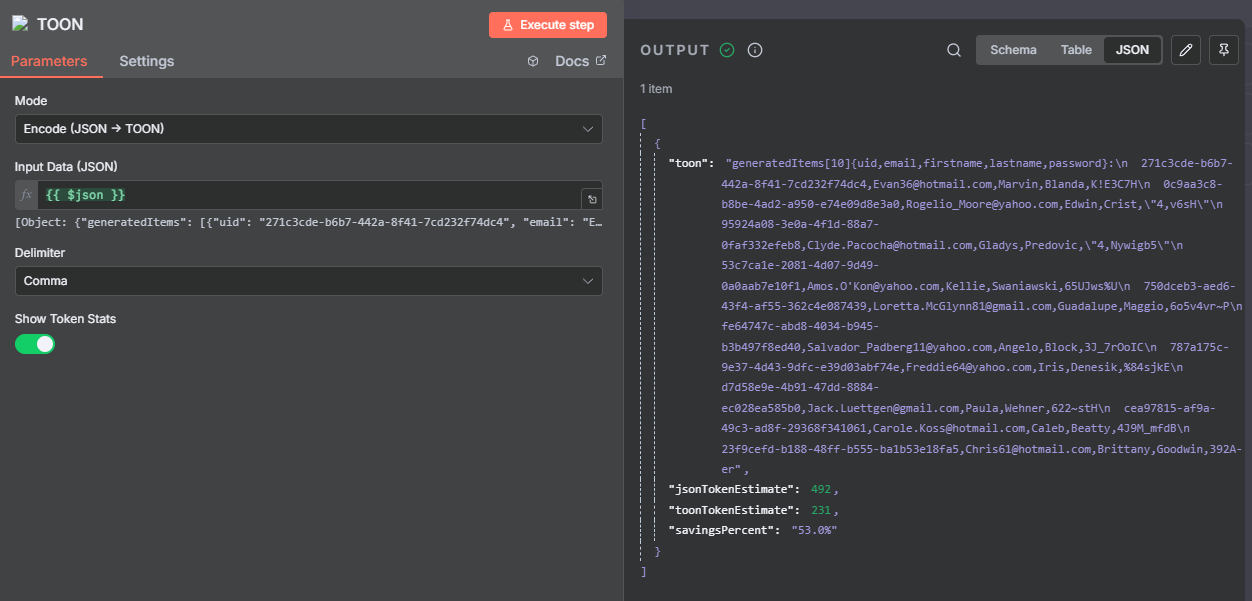
Hey, coincidentally I just built an n8n node for TOON conversion!
You can install it right now via Community Nodes in n8n:
Settings → Community Nodes → Install → @tehw0lf/n8n-nodes-toon
It’s currently pending verification, but fully functional. Supports both JSON→TOON and TOON→JSON conversion with configurable delimiters, key folding, and strict mode
parsing.
Hi guys!!
Why in my “community nodes” section there isn’t “install” button? i do all the update possible, but i can’t see. I use cloud version. the toggle Verified community nodes is on
I have submitted the node to n8n but they typically take up to 7 days for review. In the meantime, if you want to install the node you would have to switch the toggle Verified community nodes to off.
Just to note, when you toggle off “Verified community nodes,” you’ll be able to access my node (and others that are pending verification), but keep in mind that these nodes haven’t been fully reviewed by n8n yet. Once it’s verified, you’ll just need to toggle “Verified community nodes” back on.
I made a small online tool a few days ago. If there is interest, i can also release an api for n8n. But for now you might still want to use it for your initial json prompts.
Yes there is one way . Refer to below website. Genrate your api token. Add one api node and pass whole json to this one. It will convert your json to toon Runtime and pass the toon to next node. Hope This Will Help You Thanks.
TOON is pretty interesting - it works with JSON, YAML, and CSV, though the biggest differences show up with JSON. YAML and CSV conversions are much closer to the original.
You can only install verified community nodes if you are on n8n Cloud. If the node isn’t verified, you can’t install it into your workflow.
However for verified nodes, you can install them from the code editor directly by typing their name. Similar to how you add other nodes(agent, IF, edit fields etc.).
Indeed, that’s another n8n community node which wraps the official toon library. This also means it will stay unverified since it has a dependency, while my goal was to build a verifiable n8n community node.
Thanks a lot for the your reply though and for clearing up the confusion regarding the missing logo, I was not aware that other package existed.