Describe the problem/error/question
I’m building an n8n workflow that scrapes ads from the Meta Ad Library. The goal is to extract relevant details from each ad and route them based on whether they are video, image, or text-based ads. This is done using a Switch node that checks properties of each ad and sends it down the appropriate path for further processing.
For image ads, I extract the image URL and send it to an OpenAI node for image analysis. I’m using this expression to grab the URL:
{{ $json.snapshot.images[0].original_image_url }}
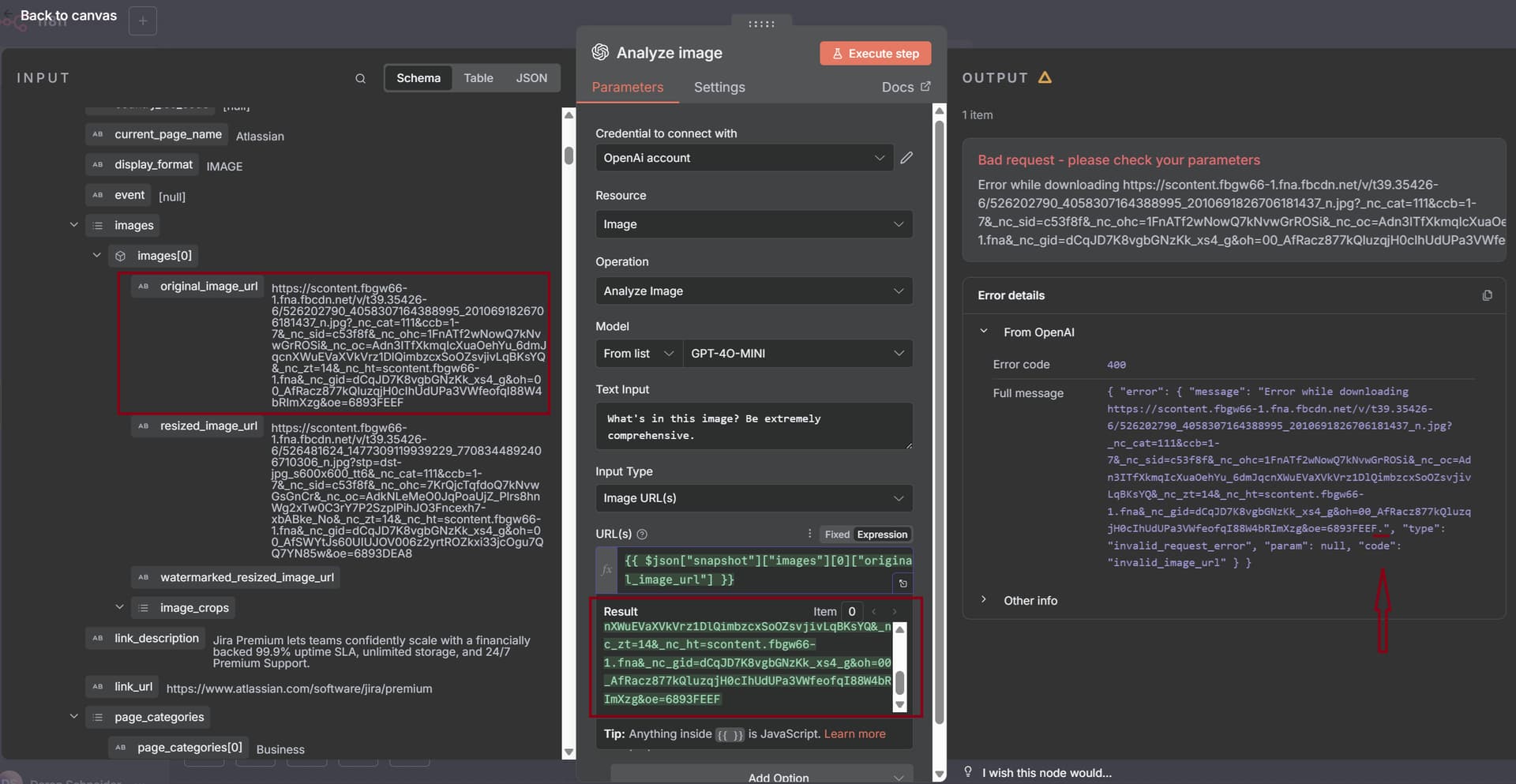
The issue I’m running into is that when this URL is passed into a text field (e.g., part of a prompt to OpenAI), the final rendered value includes a period at the end, which breaks the request. For example:
As shown in the image above, the original_image_url value in the Input matches the result of the expression {{ $json.snapshot.images[0].original_image_url }} — both are correct and do not include a period. However, the Output clearly shows a period being appended to the URL, which breaks the syntax and results in a failed request.
What is the error message (if any)?
Bad request - please check your parameters
Please share your workflow
{
“nodes”: [
{
“parameters”: {},
“type”: “n8n-nodes-base.manualTrigger”,
“typeVersion”: 1,
“position”: [
32,
432
],
“id”: “ebb529d7-1f3c-469e-b62e-1c48a288c6a1”,
“name”: “When clicking ‘Execute workflow’”
},
{
“parameters”: {
“rules”: {
“values”: [
{
“conditions”: {
“options”: {
“caseSensitive”: true,
“leftValue”: “”,
“typeValidation”: “strict”,
“version”: 2
},
“conditions”: [
{
“leftValue”: “={{ $json.snapshot.videos[0].video_sd_url }}”,
“rightValue”: “=https://video-”,
“operator”: {
“type”: “string”,
“operation”: “exists”,
“singleValue”: true
},
“id”: “9dbbe6e7-fd80-44ab-88f0-ab438cfd997e”
}
],
“combinator”: “and”
},
“renameOutput”: true,
“outputKey”: “Video”
},
{
“conditions”: {
“options”: {
“caseSensitive”: true,
“leftValue”: “”,
“typeValidation”: “strict”,
“version”: 2
},
“conditions”: [
{
“id”: “0b7cee75-ca57-4946-971e-1f526b49324f”,
“leftValue”: “={{ $json.snapshot.images[0].original_image_url }}”,
“rightValue”: “https://scontent-ho”,
“operator”: {
“type”: “string”,
“operation”: “exists”,
“singleValue”: true
}
}
],
“combinator”: “and”
},
“renameOutput”: true,
“outputKey”: “Image”
}
]
},
“options”: {
“fallbackOutput”: “extra”,
“renameFallbackOutput”: “Text”
}
},
“type”: “n8n-nodes-base.switch”,
“typeVersion”: 3.2,
“position”: [
688,
432
],
“id”: “982dd382-4144-4a04-8bb7-53cd2a14c264”,
“name”: “Switch”
},
{
“parameters”: {
“conditions”: {
“options”: {
“caseSensitive”: true,
“leftValue”: “”,
“typeValidation”: “strict”,
“version”: 2
},
“conditions”: [
{
“id”: “c1d74591-13e8-4c79-9a34-117cc6816dfb”,
“leftValue”: “={{ $json.advertiser.ad_library_page_info.page_info.likes }}”,
“rightValue”: 1000,
“operator”: {
“type”: “number”,
“operation”: “gt”
}
}
],
“combinator”: “and”
},
“options”: {}
},
“type”: “n8n-nodes-base.filter”,
“typeVersion”: 2.2,
“position”: [
464,
432
],
“id”: “005a1194-9a14-4fb7-8a88-a221037bb638”,
“name”: “Filter For Likes”
},
{
“parameters”: {
“method”: “POST”,
“url”: “https://api.apify.com/v2/acts/XtaWFhbtfxyzqrFmd/run-sync-get-dataset-items”,
“sendHeaders”: true,
“headerParameters”: {
“parameters”: [
{
“name”: “Authorization”,
“value”: “Bearer apify_api_CdE7DRiSfg1R22uhmo5eRaxQWAqm8f48AbE3”
},
{
“name”: “Accept”,
“value”: “application/json”
}
]
},
“sendBody”: true,
“specifyBody”: “json”,
“jsonBody”: “{\n "count": 200,\n "period": "last7d",\n "scrapeAdDetails": true,\n "scrapePageAds.activeStatus": "active",\n "urls": [\n {\n "url": "https://www.facebook.com/ads/library/?active_status=active&ad_type=all&country=US&is_targeted_country=false&media_type=all&q=“ai%20automation”&search_type=keyword_exact_phrase&start_date[min]=2025-06-12&start_date[max]\”,\n "method": "GET"\n }\n ]\n}",
“options”: {}
},
“type”: “n8n-nodes-base.httpRequest”,
“typeVersion”: 4.2,
“position”: [
240,
432
],
“id”: “c06a8b07-8233-4ec5-9a2c-d7c9dff2faa5”,
“name”: “Run Ad Library Scraper”,
“notes”: “home insurance”
},
{
“parameters”: {
“options”: {}
},
“type”: “n8n-nodes-base.splitInBatches”,
“typeVersion”: 3,
“position”: [
912,
432
],
“id”: “8447118b-be20-4828-a74b-2c6050165a03”,
“name”: “Loop Over Image Ads”
},
{
“parameters”: {
“resource”: “image”,
“operation”: “analyze”,
“modelId”: {
“__rl”: true,
“value”: “gpt-4o-mini”,
“mode”: “list”,
“cachedResultName”: “GPT-4O-MINI”
},
“text”: “What’s in this image? Be extremely comprehensive.”,
“imageUrls”: “={{ $json["snapshot"]["images"][0]["original_image_url"] }}”,
“simplify”: “={{ true }}”,
“options”: {}
},
“type”: “@n8n/n8n-nodes-langchain.openAi”,
“typeVersion”: 1.8,
“position”: [
1200,
432
],
“id”: “ccf064a5-2ec8-42f8-9448-6b71a1dc5942”,
“name”: “Analyze image”,
“credentials”: {
“openAiApi”: {
“id”: “MVeOyinqsFojSLrt”,
“name”: “OpenAi account”
}
}
}
],
“connections”: {
“When clicking ‘Execute workflow’”: {
“main”: [
[
{
“node”: “Run Ad Library Scraper”,
“type”: “main”,
“index”: 0
}
]
]
},
“Switch”: {
“main”: [
,
[
{
“node”: “Loop Over Image Ads”,
“type”: “main”,
“index”: 0
}
],
]
},
“Filter For Likes”: {
“main”: [
[
{
“node”: “Switch”,
“type”: “main”,
“index”: 0
}
]
]
},
“Run Ad Library Scraper”: {
“main”: [
[
{
“node”: “Filter For Likes”,
“type”: “main”,
“index”: 0
}
]
]
},
“Loop Over Image Ads”: {
“main”: [
,
[
{
“node”: “Analyze image”,
“type”: “main”,
“index”: 0
}
]
]
},
“Analyze image”: {
“main”: [
]
}
},
“pinData”: {},
“meta”: {
“templateCredsSetupCompleted”: true,
“instanceId”: “c4d5f3f8ae7d67bc107cc5de0e2fd8f41266ba3f46025bfdd490d442eeab23b2”
}
}
Share the output returned by the last node
{ “error”: { “message”: “Error while downloading https://scontent.fbgw66-1.fna.fbcdn.net/v/t39.35426-6/526202790_4058307164388995_2010691826706181437_n.jpg?_nc_cat=111&ccb=1-7&_nc_sid=c53f8f&_nc_ohc=1FnATf2wNowQ7kNvwGrROSi&_nc_oc=Adn3ITfXkmqIcXuaOehYu_6dmJqcnXWuEVaXVkVrz1DlQimbzcxSoOZsvjivLqBKsYQ&_nc_zt=14&_nc_ht=scontent.fbgw66-1.fna&_nc_gid=dCqJD7K8vgbGNzKk_xs4_g&oh=00_AfRacz877kQluzqjH0cIhUdUPa3VWfeofqI88W4bRImXzg&oe=6893FEEF.”, “type”: “invalid_request_error”, “param”: null, “code”: “invalid_image_url” } }
- n8n version: = 1.104.1
- Database (default: SQLite):: Nothing outside of default has been set.
- n8n EXECUTIONS_PROCESS setting. This is not set when the docker container runs.
- Running n8n via Desktop Docker
- Windows 11: