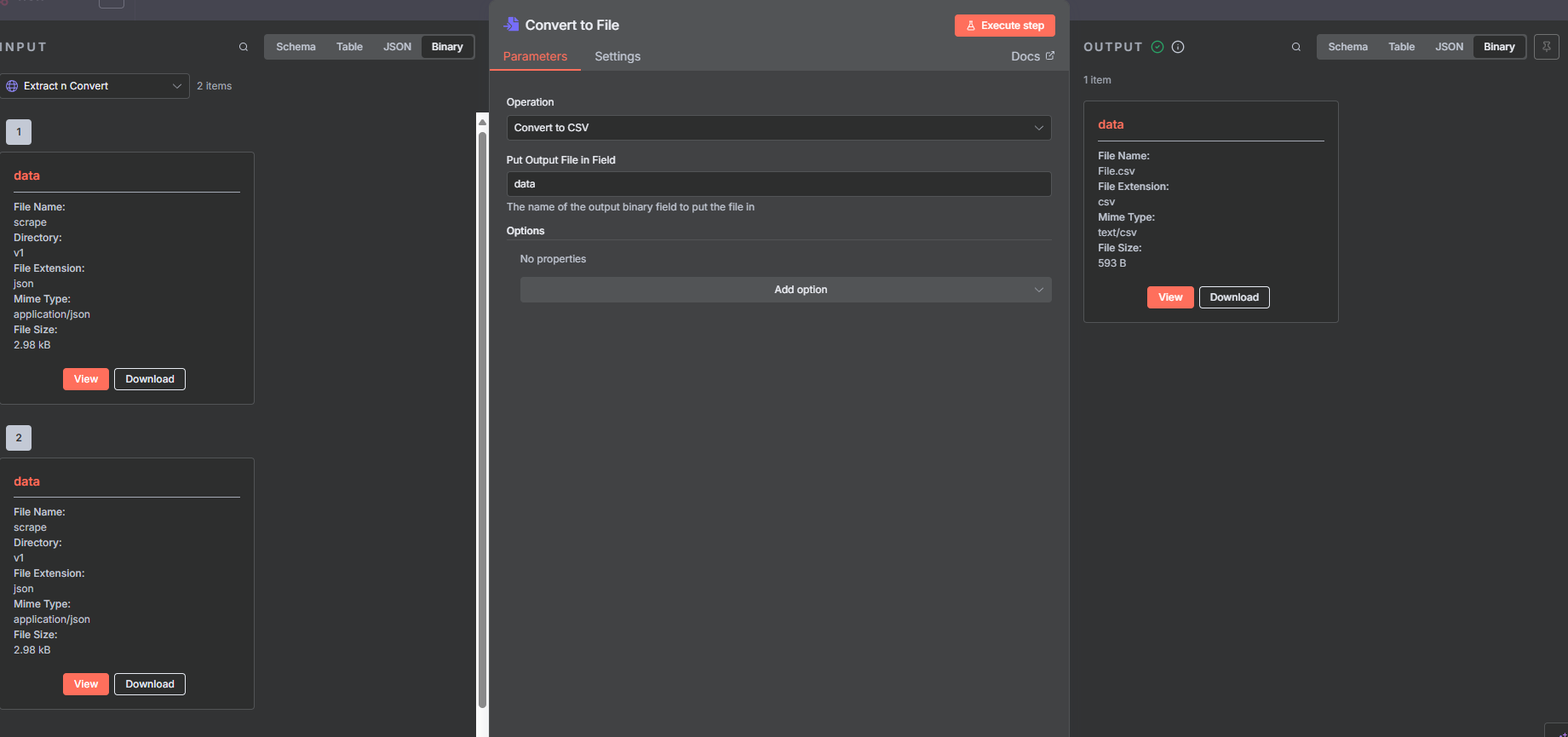
Describe the problem/error/question
So, I set up a workflow so that when someone uploads a website, it automatically converts to a PDF; however, when I execute the workflow, the PDF comes out as corrupt. I tried changing the format and request, but it’s still coming over as corrupt.
What is the error message (if any)?
File coming over as corrupt
Please share your workflow
Share the output returned by the last node
{
“nodes”: [
{
“parameters”: {
“pollTimes”: {
“item”: [
{
“mode”: “everyMinute”
}
]
},
“documentId”: {
“__rl”: true,
“value”: “1eyX4SrEmlGe-wANg5-Bbq6tqC2_Dzt28hE2OybLn6LU”,
“mode”: “id”
},
“sheetName”: {
“__rl”: true,
“value”: “gid=0”,
“mode”: “list”,
“cachedResultName”: “Sheet1”,
“cachedResultUrl”: “https://docs.google.com/spreadsheets/d/1eyX4SrEmlGe-wANg5-Bbq6tqC2_Dzt28hE2OybLn6LU/edit#gid=0”
},
“event”: “rowUpdate”,
“options”: {}
},
“type”: “n8n-nodes-base.googleSheetsTrigger”,
“typeVersion”: 1,
“position”: [
16,
-112
],
“id”: “6077d4fd-3d01-4cc7-b51b-0939c6a7764f”,
“name”: “Google Sheets Trigger”,
“credentials”: {
“googleSheetsTriggerOAuth2Api”: {
“id”: “iUeU75mHXW1tR9FE”,
“name”: “Google Sheets Trigger account 2”
}
}
},
{
“parameters”: {
“assignments”: {
“assignments”: [
{
“id”: “59493c86-dcfa-4e05-b980-18a91ac6a264”,
“name”: “Full Name”,
“value”: “={{ $json[‘First Name|name-1’] }} {{ $json[‘Last Name|name-2’] }}”,
“type”: “string”
},
{
“id”: “ddd3afef-737b-48ed-b103-ce5ea775b386”,
“name”: "Email ",
“value”: “={{ $json[‘Email Address|email-1’] }}”,
“type”: “string”
},
{
“id”: “0f019a63-b588-4793-9250-6326bf1cf471”,
“name”: “URL”,
“value”: “={{ $json[‘URL|url-1’] }}”,
“type”: “string”
}
]
},
“options”: {}
},
“type”: “n8n-nodes-base.set”,
“typeVersion”: 3.4,
“position”: [
192,
-240
],
“id”: “807a09e4-54a2-43ff-9a6b-6df567fbffd9”,
“name”: “Clean Up”
},
{
“parameters”: {
“method”: “POST”,
“url”: “https://api.firecrawl.dev/v1/scrape”,
“authentication”: “genericCredentialType”,
“genericAuthType”: “httpHeaderAuth”,
“sendHeaders”: true,
“headerParameters”: {
“parameters”: [
{
“name”: “Authorization”,
“value”: “Bearer fc-b767ef3e16a04f6e807ace871a9e63db”
}
]
},
“sendBody”: true,
“specifyBody”: “json”,
“jsonBody”: “={\n "url": "{{ $json.URL }}",\n "formats": ["json"],\n "jsonOptions": {\n "schema": {\n "type": "object",\n "properties": {\n "url": { "type": "string" },\n "title": { "type": "string" },\n "body": { "type": "string" }\n },\n "required": ["url", "title", "body"]\n }\n }\n}”,
“options”: {
“response”: {
“response”: {
“fullResponse”: true,
“responseFormat”: “json”
}
}
}
},
“type”: “n8n-nodes-base.httpRequest”,
“typeVersion”: 4.2,
“position”: [
400,
-368
],
“id”: “426632f0-7ec2-4495-a96d-5686a26c7e0e”,
“name”: “Extract n Convert”,
“credentials”: {
“httpHeaderAuth”: {
“id”: “zE8sKGFBwx2cDeq5”,
“name”: “Header Auth account”
}
}
},
{
“parameters”: {
“operation”: “xlsx”,
“options”: {}
},
“type”: “n8n-nodes-base.convertToFile”,
“typeVersion”: 1.1,
“position”: [
608,
-368
],
“id”: “0184ab87-6a3f-40c5-bbc5-2c4941b4831c”,
“name”: “Convert to File”
},
{
“parameters”: {
“operation”: “Convert To PDF”,
“advancedOptions”: {}
},
“type”: “n8n-nodes-pdf4me.pdf4me”,
“typeVersion”: 1,
“position”: [
816,
-368
],
“id”: “f5fb744b-b678-4a94-87c1-05e5816297ac”,
“name”: “PDF4ME”,
“credentials”: {
“pdf4meApi”: {
“id”: “Q4OckR7sGwGSA4k5”,
“name”: “PDF4ME account”
}
}
}
],
“connections”: {
“Google Sheets Trigger”: {
“main”: [
[
{
“node”: “Clean Up”,
“type”: “main”,
“index”: 0
}
]
]
},
“Clean Up”: {
“main”: [
[
{
“node”: “Extract n Convert”,
“type”: “main”,
“index”: 0
}
]
]
},
“Extract n Convert”: {
“main”: [
[
{
“node”: “Convert to File”,
“type”: “main”,
“index”: 0
}
]
]
},
“Convert to File”: {
“main”: [
[
{
“node”: “PDF4ME”,
“type”: “main”,
“index”: 0
}
]
]
}
},
“pinData”: {},
“meta”: {
“instanceId”: “82b31d42a861c823d633d8f4a1e67953b415488fa4df57b9aac7496163ec196b”
}
}
Information on your n8n setup
- n8n version: latest
- Database (default: SQLite):
- n8n EXECUTIONS_PROCESS setting (default: own, main):
- Running n8n via (Docker, npm, n8n cloud, desktop app):
- Operating system: 11