UI not reporting errors (N8N BUG)

Describe the problem/error/question

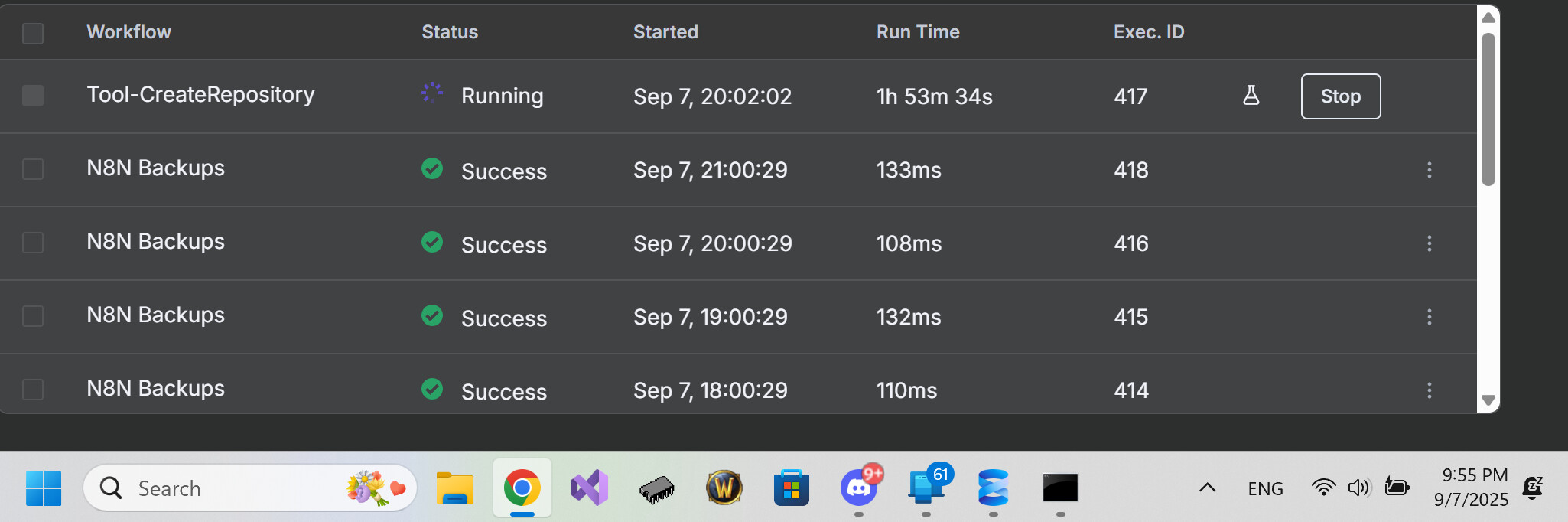
Logs say workflow had an error, but UI still shows as running indefinitely.
What is the error message (if any)?

{
  "__type": "$$EventMessageNode",
  "id": "2b5a004f-4ba2-4fdd-8281-cd8b46bcd520",
  "ts": "2025-09-07T21:08:17.548-04:00",
  "eventName": "n8n.node.finished",
  "message": "n8n.node.finished",
  "payload": {
    "workflowId": "qqGtGPAExcyvurQ0",
    "workflowName": "Tool-CreateRepository",
    "executionId": "417",
    "nodeType": "n8n-nodes-base.code",
    "nodeName": "CreateQuery",
    "nodeId": "34ce8222-417a-4dba-950e-fa580a37f005"
  }
}
{
  "__type": "$$EventMessageWorkflow",
  "id": "4d8e00f6-4e6c-4f44-9333-088112563cc2",
  "ts": "2025-09-07T21:08:17.653-04:00",
  "eventName": "n8n.workflow.failed",
  "message": "n8n.workflow.failed",
  "payload": {
    "userId": "56ceca28-fded-4c1e-80b9-7bb70ac506e9",
    "executionId": "417",
    "success": false,
    "isManual": true,
    "workflowId": "qqGtGPAExcyvurQ0",
    "workflowName": "Tool-CreateRepository",
    "lastNodeExecuted": "CreateQuery",
    "errorNodeType": "n8n-nodes-base.code",
    "errorMessage": "r.json.chunk.replace is not a function [line 5]"
  }
}
{
  "__type": "$$EventMessageWorkflow",
  "id": "42921af6-2e2e-4c2b-abf7-f2b23cc30865",
  "ts": "2025-09-07T21:08:31.450-04:00",
  "eventName": "n8n.workflow.failed",
  "message": "n8n.workflow.failed",
  "payload": {
    "userId": "56ceca28-fded-4c1e-80b9-7bb70ac506e9",
    "executionId": "417",
    "success": false,
    "isManual": true,
    "workflowId": "qqGtGPAExcyvurQ0",
    "workflowName": "Tool-CreateRepository",
    "lastNodeExecuted": "CreateQuery",
    "errorMessage": "Invalid string length"
  }
}

Share the output returned by the last node

Invalid string length"

Information on your n8n setup

  • n8n version: 1.109.2
  • Database (default: SQLite): Postgres
  • n8n EXECUTIONS_PROCESS setting (default: own, main): default
  • Running n8n via (Docker, npm, n8n cloud, desktop app): npm
  • Operating system: Debian 12 Bookworm

You mentioned that the workflow is running infinitely, and this may be generating a huge amount of data being manipulated in memory (e.g. giant strings being passed from node to node).

  • Possible causes:

1- Infinite loop caused by Webhook calling himself

Example: a Webhook that, when triggered, makes an HTTP request to the same endpoint - causing a loop.

2- Function node (Function or FunctionItem) with poorly managed concatenation

Gigantic strings being concatenated in a loop.

3- Use of Set node with very large fields (e.g. huge JSON or mass logs)

4- Very large API responses (e.g. taking 1 million records in an HTTP Request)

This breaks the internal Node.js string limit.

  • What does “Invalid string length” mean?

    In JavaScript (and n8n runs on Node.js), there is a size limit for strings. If you try to create a string with a larger size than allowed (about ~1GB), it gives this error.

*How to solve*

1- Stop the infinite loop

Go to the “Executions” tab and stop the workflow manually, if it is still running.

Disable the trigger (e.g. Webhook, Cron, etc.) temporarily.

2- Identify where the problem is

Go to the Execution History and open the execution with error.

See which node is causing the exception.

See the input/output data of that node.

3- Add limitations/conditions

If the loop is being caused by a recursive webhook, add a condition:

IF: headers[“X-Loop-Prevention”]! == “true”

Or add logic to interrupt loops.

4- Use the “Slice” or “Item Lists” node to split large data

If you are dealing with a lot of data, divide it into smaller parts.

I apologize for any confusion. I am not asking for my workflow error to be solved. My expectation is that when an error occurs, the workflow should stop and the error should be reported by n8n, rather than continuing to run as if it is still processing—especially when the logs clearly indicate that an error occurred some time ago.

1 Like

This topic was automatically closed 90 days after the last reply. New replies are no longer allowed.