Describe the problem/error/question
I have a workflow that can upload image to Facebook using the Graph API. I just created a copy of the flow and use a video instead, updating the node parameter accordingly.
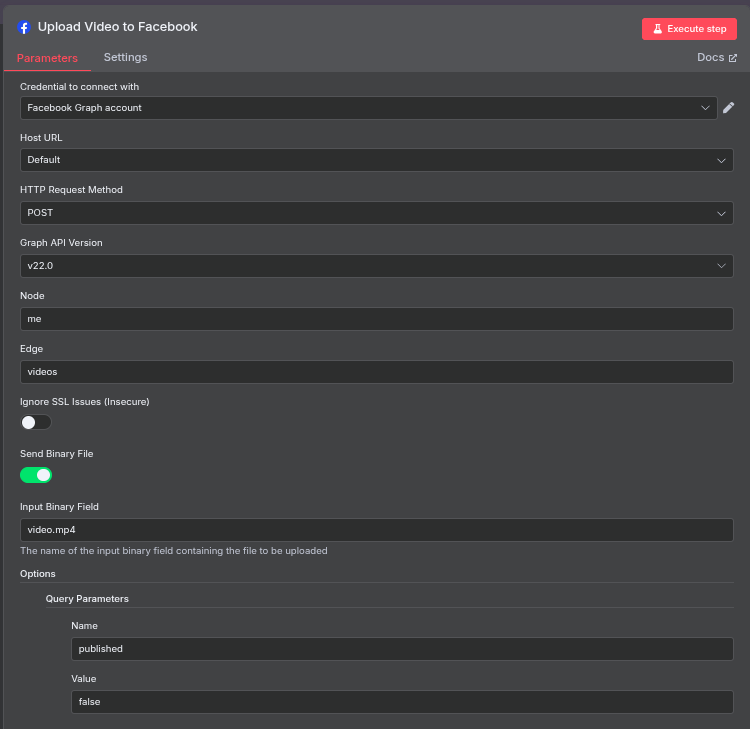
This is the associated input

What is the error message (if any)?
The error is
“The video file you selected is in a format that we don’t support.”
I used curl in CLI to upload the same video and it works fine, and it is appearing on my FB wall (I didn’t set the published=false parameter)
Please share your workflow
Share the output returned by the last node

I tried using file:video.mp4 and source:video.mp4 and simply video.mp4 but none is working. My FB API Token is valid and not expired. I can view/download the video from previous node and upload it to FB with curl command so the video file is good.
I suspect the node cannot take the video and upload it.
What setting is wrong in my node that it can’t find or process the file? Is it too big? It’s only 1MB
Information on your n8n setup
- n8n version: 1.100.1
- Database (default: SQLite): PostgreSQL
- n8n EXECUTIONS_PROCESS setting (default: own, main): default
- Running n8n via (Docker, npm, n8n cloud, desktop app): docker
- Operating system: Linux Ubuntu
