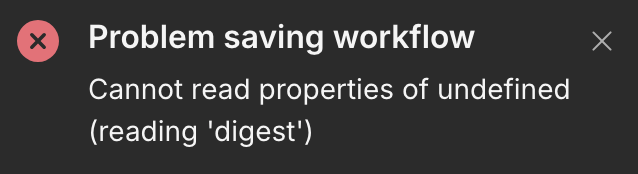
Either the workflow gets saved but I can’t access it (the simplest manual trigger node is all the workflow), or I can’t save a complex workflow at all.
Running a fresh new installation of 2.0.0 in a cloud VM, under a custom HTTP port, and accessing with the IP PORT url.
The same scenario is not failing in a fresh installation of version 1.123.4
(node:7) [DEP0060] DeprecationWarning: The `util._extend` API is deprecated. Please use Object.assign() instead.
(Use `node --trace-deprecation ...` to show where the warning was created)
But these logs are not coming when I am saving or accessing the workflows. I just see the UI errors.
Your local network ip is treated as insecure. The ‘digest’ should refer to “crypto.subtle.digest’“ from “Web APIs”. From the configuration, it looks like you’re using http and not https. So, usage of http and local ip is causing this.
You would need to force chrome or whatever browser to treat the local network ip as secure.
In the text box below it, enter your n8n URLs (comma separated): http://IP:5678,http://IP:5679
Then, “Relaunch” button at the bottom to restart Chrome.
This should work now– should be able to save and view workflows.
More info
localhost is treated as secure, that’s why you’re not seeing the issue. I used your docker-compose to standup n8n the same way you did. The issue appeared when I hit my local network ip 192.168.50.*
If IP is not your local network IP and actually is something that is publically accessible, you should just go ahead and setup HTTPS. I would avoid this entirely.
If you want to avoid the above, you would need to use https.
Thanks for your help. The question now would be why the 1.123.4 version running in the same machine, with the same IP, but a different port, works fine, not having the issue of “crypto.subtle.digest“. Not big deal, but just to understand what is different with the version 2