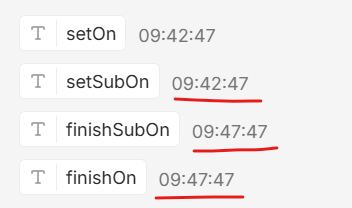
I can confirm that the sub-workflow is getting treated as complete even with a JS code node after a Wait node. Any ideas on how to deal with it? Should it be considered a bug? To me personally, I expect it to wait for any kind of node to complete to conside a sub-workflow to be complete, that’s the way it should be in my opinion.
I do like the idea of the main workflow to loop infinitely BUT in that case I’m getting some kind of memory issue after some time. This is pretty much why I opted for this sub-workflow workaround, maybe the memory issue can be fixed somehow as well? Then I would just use the infinite loop in my main workflow. Any help would be highly appreciated.
yeah thats a known one — the issue is that sub-workflows entering a Wait node are marked “complete” by the parent even tho the wait is still active. frustrating design choice, but theres a few workarounds.
the simplest: use a Merge node in the sub-workflow after the Wait, so the sub-workflow technically doesnt “end” until the Merge finishes. or if youre on v2.15+, theres been some improvements around async handling (worth checking the changelog).
for the memory issue with infinite loops — thats usually from execution logs stacking up. try setting a cleanup window in your main workflow (prune logs older than N days) or use the execute-subworkflow pattern instead of the loop to isolate memory contexts.
lmk if either workaround helps or if youre seeing something else in the logs.
I will definitely try the Merge node workaround, thank you. Can’t see anything related to this issue in the 2.15 release notes, it’s only MCP-related but will update anyway to see if it changes anything…
For the cleanup, do you mean theEXECUTIONS_DATA_MAX_AGEenv variable? But I don’t actually understand, I mean why the memory doesn’t get overwhelmed by every-minute executions but for some reason does by basically the same but in the loop, that feels like some kind of memory leak issue…
Yeah, EXECUTIONS_DATA_MAX_AGE controls log retention — but you’re right to be skeptical. The memory leak with infinite loops in the parent workflow is different from periodic executions because the loop keeps creating intermediate execution states that aren’t cleaned up between iterations. Try the Merge node workaround first — that should fix the sub-workflow issue. If memory still spikes with the loop, check your n8n logs for “maxExecutionSize” warnings, which indicate execution payloads getting too large.
Yeah I get what you’re seeing. That behavior is pretty in line with how n8n handles Wait nodes. Once it reaches the Wait, the execution is effectively persisted and detached, so the parent workflow can treat the sub workflow as finished even if there are still nodes after it.
So it feels wrong from a workflow logic perspective, but it is more of an execution model limitation than a clear bug.
The memory issue with the infinite loop also makes sense. Long running executions on self hosted n8n can start piling up over time, especially if the workflow keeps carrying data through each cycle.
What usually works better is keeping anything with a Wait in the main flow, or breaking the loop into smaller fresh executions instead of one long running one.
You’re definitely not thinking about it wrong though. It is one of those n8n behaviors that only starts showing up once the workflows get more advanced.
That’s a very bad practice. Instead of running the execution endlessly, use a relatively small schedule (1-2 minutes each) + state entry in the Data Table.
The logic would be:
main WF - check if the data table entry state is waiting. If not, proceed to the sub workflow. Set the Execute WF option “Wait For Sub-Workflow Completion” to false. Set the state in the data table to waiting.
In the sub workflow, set the completed state in the data table once the flow finishes.
In the main WF, check if the state is completed. Then do the logic related to the completed state. Make sure to set the state to anything else (e.g. processing), so the next run won’t be executed with the same completed state, while the first one is still working.
The data table may be like
state
last_exec_id
unique_id
waiting/completed/processing
$executon.id
my_loop
And you can get the row by filtering on the unique_id field with the ‘my_loop’ value
PS, by checking the updatedAt field of the data table you can set a fallback behavior to clear the state if isn’t changed for the desired time (e.g. the sub-wf timed out or has an error)
Isn’t all this exactly how the ‘Wait For Sub-Workflow Completion’ option supposed to work? What’s the point of the option if I have to create all this myself?
Too be honest I never run into this as in my opinion it is bad design having flows wait for a longer period of time. Better to offload to a “processing table” and then take it from there when it should continue.
but this option is supposed to work exactly like that, just without the need to reinvent the wheel aka create all this structure manually… well at least in my opinion I wonder if it should be reported to devs or maybe I’m just not getting something here and this option actually works as intended?
 and updating to the latest version also didn’t fix anything…