We're sorry but the n8n Editor-UI doesn't work properly without JavaScript enabled. Please enable it to continue

Describe the problem/error/question

What is the error message (if any)?

Currently busy with an upgrade to n8n docker version 1.122.5 however when I click the site link i am greeted with a blank page and when I curl the url i get this message:

“We’re sorry but the n8n Editor-UI doesn’t work properly without JavaScript enabled. Please
enable it to continue”

I have check the docker logs for the container and it shows a working n8n even with some of the workflows kicking off.

I am not sure how to solve this as I have not change anything regarding javascript and I have looked at similar issues but the changes recommended there did not work unfortunately.

This is my docker run command to startup n8n:

docker run -d \

--name n8n \

-p 443:5678 \

-e N8N_SECURE_COOKIE=true \

-e N8N_BASIC_AUTH_ACTIVE=true \

-e N8N_BASIC_AUTH_USER=admin \

-e N8N_BASIC_AUTH_PASSWORD=changeme \

-e WEBHOOK_URL=https://example.com \

-e N8N_EDITOR_BASE_URL=https://example.com \

-v n8n_data:/home/node/.n8n \

I have tried adding these environment variables as well:

-e N8N_RUN_MIGRATIONS=true\

-e DB_SQLITE_POOL_SIZE=2 \

-e N8N_BLOCK_ENV_ACCESS_IN_NODE=true \

-e N8N_GIT_NODE_DISABLE_BARE_REPOS=true \

-e N8N_ENFORCE_SETTINGS_FILE_PERMISSIONS=true \

Information on your n8n setup

  • n8n version: 1.122.5
  • Database (default: SQLite): SQLite
  • n8n EXECUTIONS_PROCESS setting (default: own, main): n/a
  • Running n8n via (Docker, npm, n8n cloud, desktop app): Docker
  • Operating system: Amazon Linux

Hi @angeo,

if this is an upgrade then I assume this did work before. Can you share the exact steps you followed to try and update your n8n instance? The blank page suggests that the n8n instance did not start up in docker and that there is likely an error or the migration failed (I hope you made backups of your previous instance). The curl response is likely correct as you are not mimicking a browser when using curl and the n8n UI requires javascript. Check the docker container logs to see what is happening.

docker logs -f n8n

This is the docker log output:

Initializing n8n process
n8n ready on ::, port 5678
n8n Task Broker ready on 127.0.0.1, port 5679
[license SDK] Skipping renewal on init: license cert is not initialized
Registered runner “JS Task Runner” (506ZN8o7S2-_5KV4bBRfg)
Version: 1.122.5
Start Active Workflows:
Activated workflow “Daily n8n Workflow Backup” (ID: 3rSIfS0U0dh26E6K)

Editor is now accessible via:

example-site-name

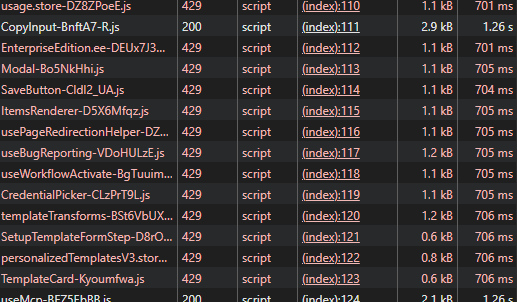
The backend starts up but when accessing the site some of the javascript components come back with a 429 status code

when i downgrade back to the old version it works fine

Please can you share your docker command or compose file you used to start the instance. Also try and clear your browser cache for this url or try a different browser or use incognito mode just to eliminate any browser caching issues.

If the above does not work, I want you to roll back to the old version using whatever backup you have. Then try the upgrade again and share the logs of the migration running.

Found the issue.

I investigated the status code 429 which the site was getting and increased the rate limit on the reverse proxy to a more suitable number for the n8n site
2 Likes