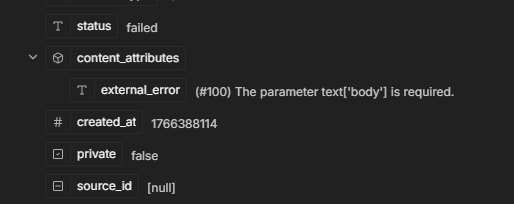
getting this error from chatwoot while calling whatsapp template in n8n , i am calling a marketing api which is configured in chatwoot through meta api , now while calling the conversation api , in body for template i am using like this :
{
“content”: " ",
“message_type”: “outgoing”,
“private”: false,
“content_type”: “text”,
“content_attributes”: {},
“template_params”: {
“name”: “order_confirmation_wiimage”,
“category”: “MARKETING”,
“language”: “en”,
“processed_params”: {
“body”: {
“1”: “{{ String($node[‘Webhook’].json.body.data.body_variables[0]) }}”,
“2”: “{{ String($node[‘Webhook’].json.body.data.body_variables[1]) }}”,
“3”: “{{ String($node[‘Webhook’].json.body.data.body_variables[2]) }}”,
“4”: “{{ String($node[‘Webhook’].json.body.data.body_variables[3]) }}”,
“5”: “{{ String($node[‘Webhook’].json.body.data.body_variables[4]) }}”,
“6”: “{{ String($node[‘Webhook’].json.body.data.body_variables[5]) }}”,
“7”: “{{ String($node[‘Webhook’].json.body.data.body_variables[6]) }}”,
“8”: “{{ String($node[‘Webhook’].json.body.data.body_variables[7]) }}”,
“9”: “{{ String($node[‘Webhook’].json.body.data.body_variables[8]) }}”
}
}
}
}
but getting this error message : (#100) The parameter text[‘body’] is required.
How to fix this?
السلام عليكم و رحمة الله و بركاته مرحبا برهان the error is because processed_params structure is wrong for WhatsApp API. Change your template_params to this format instead:
json
"template_params": {
  "name": "order_confirmation_wiimage",
  "category": "MARKETING",
  "language": "en",
  "namespace": "your_namespace_here",
  "params": [
    {
      "type": "body",
      "parameters": [
        {"type": "text", "text": "{{ $node['Webhook'].json.body.data.body_variables[0] }}"},
        {"type": "text", "text": "{{ $node['Webhook'].json.body.data.body_variables[1] }}"},
        {"type": "text", "text": "{{ $node['Webhook'].json.body.data.body_variables[2] }}"}
      ]
    }
  ]
}
The key is using params array with parameters inside not processed_params. Also make sure your template name matches exactly what you have in Meta Business Manager. Test with just 2-3 variables first to see if it works then add the rest.
what to enter in namespace?
i am using chatwoot and got this error:
{
“errorMessage”: “JSON parameter needs to be valid JSON”,
“errorDetails”: {},
“n8nDetails”: {
“nodeName”: “HTTP Request6”,
“nodeType”: “n8n-nodes-base.httpRequest”,
“nodeVersion”: 4.3,
“itemIndex”: 0,
“time”: “22/12/2025, 23:35:51”,
“n8nVersion”: “1.123.5 (Self Hosted)”,
“binaryDataMode”: “default”,
“stackTrace”: [
“NodeOperationError: JSON parameter needs to be valid JSON”,
" at ExecuteContext.execute (/usr/local/lib/node_modules/n8n/node_modules/.pnpm/n8n-nodes-base@file+packages+nodes-base_@[email protected]_asn1.js@5_8da18263ca0574b0db58d4fefd8173ce/node_modules/n8n-nodes-base/nodes/HttpRequest/V3/HttpRequestV3.node.ts:442:15)“,
" at WorkflowExecute.executeNode (/usr/local/lib/node_modules/n8n/node_modules/.pnpm/n8n-core@file+packages+core_@[email protected]_@[email protected]_ec37920eb95917b28efaa783206b20f3/node_modules/n8n-core/src/execution-engine/workflow-execute.ts:1045:31)”,
" at WorkflowExecute.runNode (/usr/local/lib/node_modules/n8n/node_modules/.pnpm/n8n-core@file+packages+core_@[email protected]_@[email protected]_ec37920eb95917b28efaa783206b20f3/node_modules/n8n-core/src/execution-engine/workflow-execute.ts:1226:22)“,
" at /usr/local/lib/node_modules/n8n/node_modules/.pnpm/n8n-core@file+packages+core_@[email protected]_@[email protected]_ec37920eb95917b28efaa783206b20f3/node_modules/n8n-core/src/execution-engine/workflow-execute.ts:1662:38”,
" at /usr/local/lib/node_modules/n8n/node_modules/.pnpm/n8n-core@file+packages+core_@[email protected]_@[email protected]_ec37920eb95917b28efaa783206b20f3/node_modules/n8n-core/src/execution-engine/workflow-execute.ts:2274:11"
]
}
}
Asslam o elaukum
I tried the same integration between n8n and Chatwoot for WhatsApp and the issue I faced was that templates need to be approved by Meta first before you can send them. Make sure you’ve gotten approval for your template in Meta Business Suite and that it’s in approved status not pending. Second thing, when you send the template from n8n you need to use the correct API, meaning go to Chatwoot API documentation and check the endpoint specifically for sending template messages not regular messages. Usually there are specific parameters you need to send like template_name and language_code and variables if your template has placeholders. Try using the HTTP Request node in n8n and set the URL and headers and body in the format Chatwoot requires. If it doesn’t work for you check the logs in Chatwoot itself because it gives you more details about why the message didn’t go through.
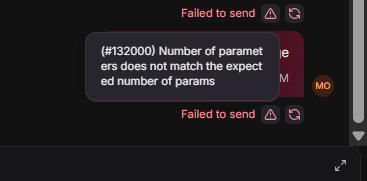
my template are already approved and when sending through message api , in chatwoot the message is red and it shows number of parameters are not matched:
the json i am using :
{
“message_type”: “outgoing”,
“private”: false,
“content”: “order_confirmation_wiimage”,
“content_type”: “text”,
“template_params”: {
“name”: “order_confirmation_wiimage”,
“category”: “MARKETING”,
“language”: “ar”,
“processed_params”: {
“body”: [
“OID-1”,
“Product A”,
“2”,
“500”,
“John”,
“OID-2”,
“Product B”,
“1”,
“300”
]
}
}
}, what the issue here? can you help
The error is clear - you’re sending 9 parameters but your template expects a different number.
Quick fix:
Open your WhatsApp template order_confirmation_wiimage in Business Manager
Count how many {{1}}, {{2}}, {{3}} etc. placeholders are in it
Send EXACTLY that many parameters
For example, if your template looks like:
Hello {{1}}, your order {{2}} for {{3}} items is confirmed. Total: {{4}}
Then send only 4 parameters:
“body”: [“John”, “OID-1”, “2”, “500”]
You’re currently sending 9 parameters. Either:
Reduce to match your template, OR
Update your WhatsApp template to accept 9 parameters
Can you share what your actual template text looks like? Then I can tell you exactly what to send
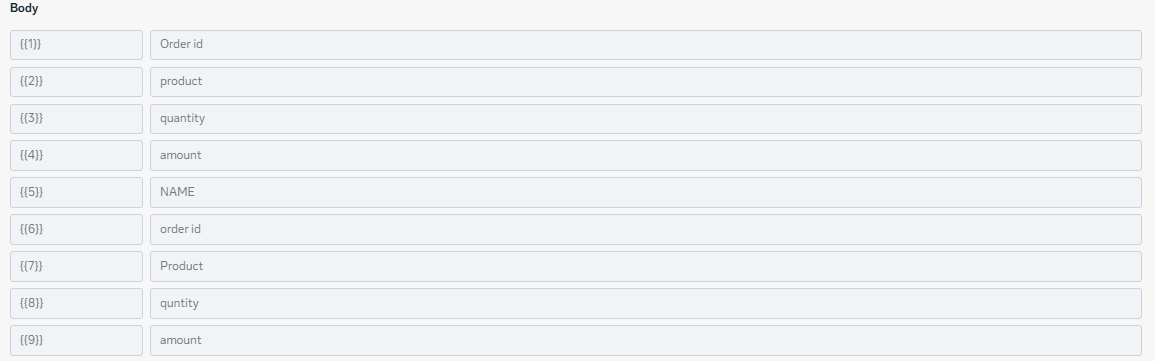
see this is the body of my template there are total 9 variable.
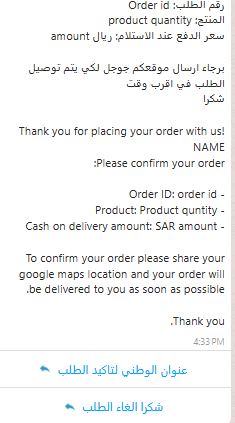
Sharing the template Preview
1 Like