“Due to Facebook API limitations, you can use just one WhatsApp trigger for each Facebook App”
I have already created a second WhatsApp Business App, with new credentials, but the error stays the same! I have seen that many people have the same problem. Is there any solution in sight?
Alternative Trigger Methods or Multi-Workflow Handling with a Single Trigger:
Use a single WhatsApp trigger to handle incoming messages or events and manage multiple workflows within your own system.
In other words, instead of using multiple triggers, manage everything through a single webhook.
This limitation has been set by Facebook and currently, there is no known way to bypass it. Creating a new app or credentials does not solve the issue. The only solution is to use a single trigger and manage all operations through it, or to use a different Business Account.
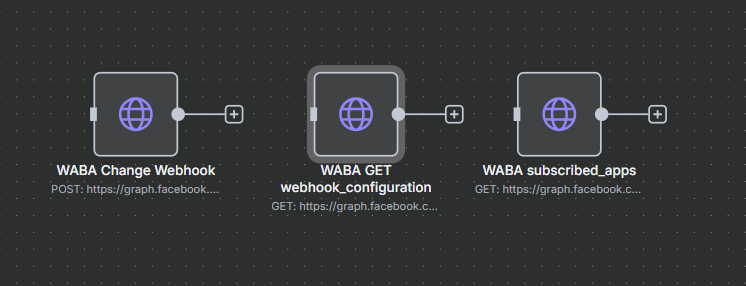
Hi, I encountered the same issue before, but I can tell you it’s not due to n8n’s rules, but because you need to configure it via HTTP request to point a new webhook on your second number.
“Can I have only ONE WhatsApp trigger in my entire n8n server setup?”
No, there is no limitation on the n8n side.
The limitation is on Meta (Facebook)'s side: the same Facebook App does not allow multiple webhook endpoints. “Can I have only ONE WhatsApp trigger per workflow?”
Yes, technically a workflow should have only one trigger (this is an n8n rule). This is not specific to WhatsApp, but part of n8n’s general logic.
However, you can branch based on different message types. In other words, you can use one WhatsApp trigger with multiple conditional paths (using if, switch, etc.) to create as many flows as you want. “What about webhooks? Do they count as well? Where do they count?”
Yes, webhooks are also included in this limitation.
Facebook only allows you to register a single webhook URL for your app.
Messages, statuses, etc., are sent to this webhook URL.
You should be able to attach multi trigger to the first node in the workflow, and each one can have different credentials etc, so different webhook for direct account, u can also probably then use a switch node or similar to filter the flow depending on which one its from etc.
Hey, same issue here but didn’t quite understand the first answer. Does that means I can only have ONE trigger from Whatsapp on all of my workflows? I am doing lots of tests and in every new workflow I create a new whatsapp trigger…it had worked properly but now it can’t receive the inputs. It always says " Output: No fields - node executed, but no items were sent on this branch" even though I message through my test number.
The WhatsApp App ID 1089147136473334 already has a webhook subscription. Delete it or use another App before executing the trigger. Due to WhatsApp API limitations, you can have just one trigger per App.
I had this error. Didn’t saw my workflow was activated and I pushed the execute command.
When I disable the workflow and push the execute command its working.