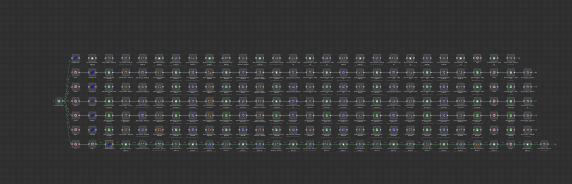
Heyo guys, I’ve built an automated reporting workflow (n8n + Klaviyo + Google Sheets + Looker Studio + Slack) for my email marketing agency. It’s been working really well, but now I’m running into a bit of a “challenge”. Rn, I have to duplicate the structure for every client and then just update some brand-specific details in the first step. Since it’s all weekly reporting, I want to keep everything in one single workflow instead of duplicating. I’ve added 7 clients so far, and as you can see in the screenshot, the flow is already getting kinda “big.” There are about 28 more brands I’d like to add. Am I okay to just keep expanding this single workflow, or could I run into performance/issues since the whole workflow might end up running for ~60 minutes each Monday?
For context:
Trigger: Schedule trigger (every Monday at 8 AM)
Hosting: n8n Cloud (hosted version)
What do you guys think?
Honestly I’m surprised how you managed to reach this position without running into maintenance problems. Although I’m not familiar with the process or the workflow altogether I feel like a Loop Over Items node would do great work and clean the canvas for you.
This has become a bit of a hot mess already as you’re going to struggle to maintain or make any changes to the workflow. You’ll also run into issues if you clone this for each client and then afterwards want to expand, you’ll need to make the same change 28+ times.
It’s difficult to see the detail of what exactly the workflow does from the screenshot, but i would recommend making use of a database somewhere in the workflow to store your clients and then loop over each client when the report runs. I would also break down the workflow into smalled sub workflows and call it like a function. This approach will make sections of the workflow reusable as well as breaking down the entire thing into smaller manageable pieces.
If I am doing this.
The first thing is seperate each client to one workflow.
Because if there is one node crash. Other client’s workflow will stop at the same execution.
It’s kind of vulnerable.
Each client should be a individual execution and at the end. There should have a notification node to tell you this run is finished or it’s having issue.
You’ll probably run into performance and maintenance issues if you keep expanding a single workflow that big. A better approach is to store client details in a DB/Sheet and then loop through them, or split into sub-workflows and call them like functions. This keeps things clean and easier to manage long term.
If you need more help structuring it, feel free to reach out at [email protected].
This topic was automatically closed 90 days after the last reply. New replies are no longer allowed.