Describe the issue: I am using n8n Cloud and encountering an error in my workflow settings. Under the “Timezone” dropdown, it displays “Default - Default Timezone not valid” instead of my local timezone (Asia/Kolkata).
Steps I’ve tried:
-
I have checked my n8n Cloud dashboard settings.
-
I am located in India (Asia/Kolkata).
-
The error persists even when attempting to use the default environment settings.
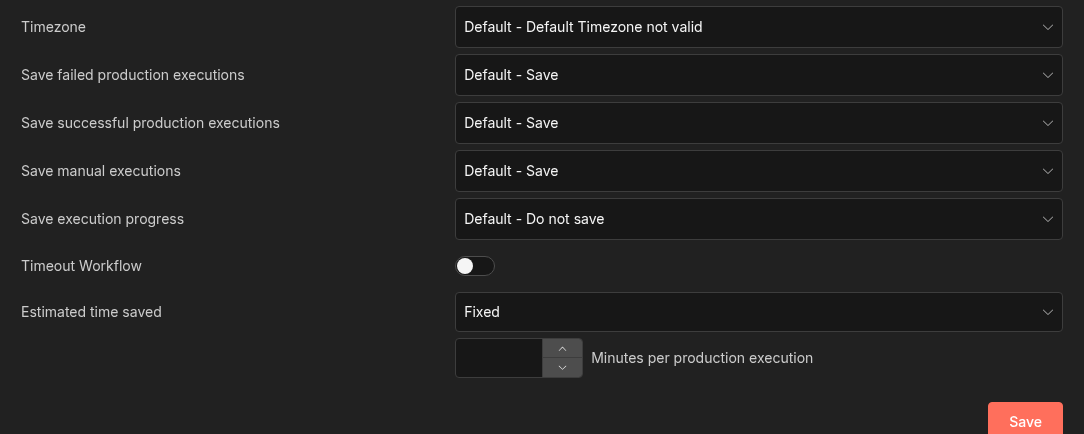
Debug info
core
- n8nVersion: 2.8.3
- platform: docker (cloud)
- nodeJsVersion: 22.22.0
- nodeEnv: production
- database: sqlite
- executionMode: regular
- concurrency: 5
- license: enterprise (sandbox)
- consumerId: 00000000-0000-0000-0000-000000000000
storage
- success: all
- error: all
- progress: false
- manual: true
- binaryMode: filesystem
pruning
- enabled: true
- maxAge: 168 hours
- maxCount: 2500 executions
client
- userAgent: mozilla/5.0 (x11; linux x86_64) applewebkit/537.36 (khtml, like gecko) chrome/145.0.0.0 safari/537.36
- isTouchDevice: false
Generated at: 2026-02-20T05:09:56.388Z