Describe the problem/error/question
I try to save some data in local file, it’s a very simple process.
”code in javascript” → convert to file > Read/write file from Disk, and it works in old version like 1.120.0, but when i upgrade to 2.0, when i execute the workflow, it failed, says that the file is not writable.

What is the error message (if any)?
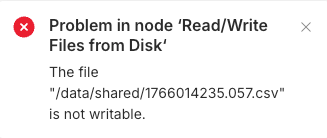
and this is my config piece of docker-compose.yml

and i have both directories in local environment and docker

Please share your workflow
(Select the nodes on your canvas and use the keyboard shortcuts CMD+C/CTRL+C and CMD+V/CTRL+V to copy and paste the workflow.)
{
“nodes”: [
{
“parameters”: {},
“type”: “n8n-nodes-base.manualTrigger”,
“typeVersion”: 1,
“position”: [
-1664,
16
],
“id”: “06cd0351-52bf-4ada-be75-59ca2cffa69c”,
“name”: “When clicking ‘Execute workflow’”
},
{
“parameters”: {
“binaryPropertyName”: “=data”,
“options”: {
“delimiter”: “,”,
“fileName”: “={{ $(‘Edit Fields’).item.json.file_name }}”,
“headerRow”: false
}
},
“type”: “n8n-nodes-base.convertToFile”,
“typeVersion”: 1.1,
“position”: [
-1088,
16
],
“id”: “862266e5-b2d2-4049-94dc-13f469fc1f5e”,
“name”: “Convert to File”
},
{
“parameters”: {
“operation”: “write”,
“fileName”: “=/data/shared/{{ $(‘Edit Fields’).item.json.file_name }}”,
“options”: {
“append”: false
}
},
“type”: “n8n-nodes-base.readWriteFile”,
“typeVersion”: 1,
“position”: [
-848,
16
],
“id”: “2be79750-c228-42a9-bf0c-e3ee3deee70b”,
“name”: “Read/Write Files from Disk”
},
{
“parameters”: {
“jsCode”: “// Loop over input items and add a new field called ‘myNewField’ to the JSON of each one\nconst ids = [123, 456, 789];\nreturn ids.map(id => {\n return {json: {user_ids: id}};\n});”
},
“type”: “n8n-nodes-base.code”,
“typeVersion”: 2,
“position”: [
-1280,
16
],
“id”: “d2c86b1a-8645-4e10-937f-0c1aad82f056”,
“name”: “Code in JavaScript”
},
{
“parameters”: {
“assignments”: {
“assignments”: [
{
“id”: “3dc9e70a-92d8-4bfe-bb76-772b154b7d03”,
“name”: “file_name”,
“value”: “={{ $now.toSeconds() }}.csv”,
“type”: “string”
}
]
},
“options”: {}
},
“type”: “n8n-nodes-base.set”,
“typeVersion”: 3.4,
“position”: [
-1456,
16
],
“id”: “351e9758-40cd-4219-b1c9-2ceb91c9386a”,
“name”: “Edit Fields”
}
],
“connections”: {
“When clicking ‘Execute workflow’”: {
“main”: [
[
{
“node”: “Edit Fields”,
“type”: “main”,
“index”: 0
}
]
]
},
“Convert to File”: {
“main”: [
[
{
“node”: “Read/Write Files from Disk”,
“type”: “main”,
“index”: 0
}
]
]
},
“Read/Write Files from Disk”: {
“main”: [
]
},
“Code in JavaScript”: {
“main”: [
[
{
“node”: “Convert to File”,
“type”: “main”,
“index”: 0
}
]
]
},
“Edit Fields”: {
“main”: [
[
{
“node”: “Code in JavaScript”,
“type”: “main”,
“index”: 0
}
]
]
}
},
“pinData”: {},
“meta”: {
“instanceId”: “471d10cfff1131e800432242dd5677f16c15d5bd7b1dda6c4491b5fde5adf07f”
}
}
Share the output returned by the last node
Information on your n8n setup
- n8n version:
- Database (default: SQLite):
- n8n EXECUTIONS_PROCESS setting (default: own, main):
- Running n8n via (Docker, npm, n8n cloud, desktop app):
- Operating system: