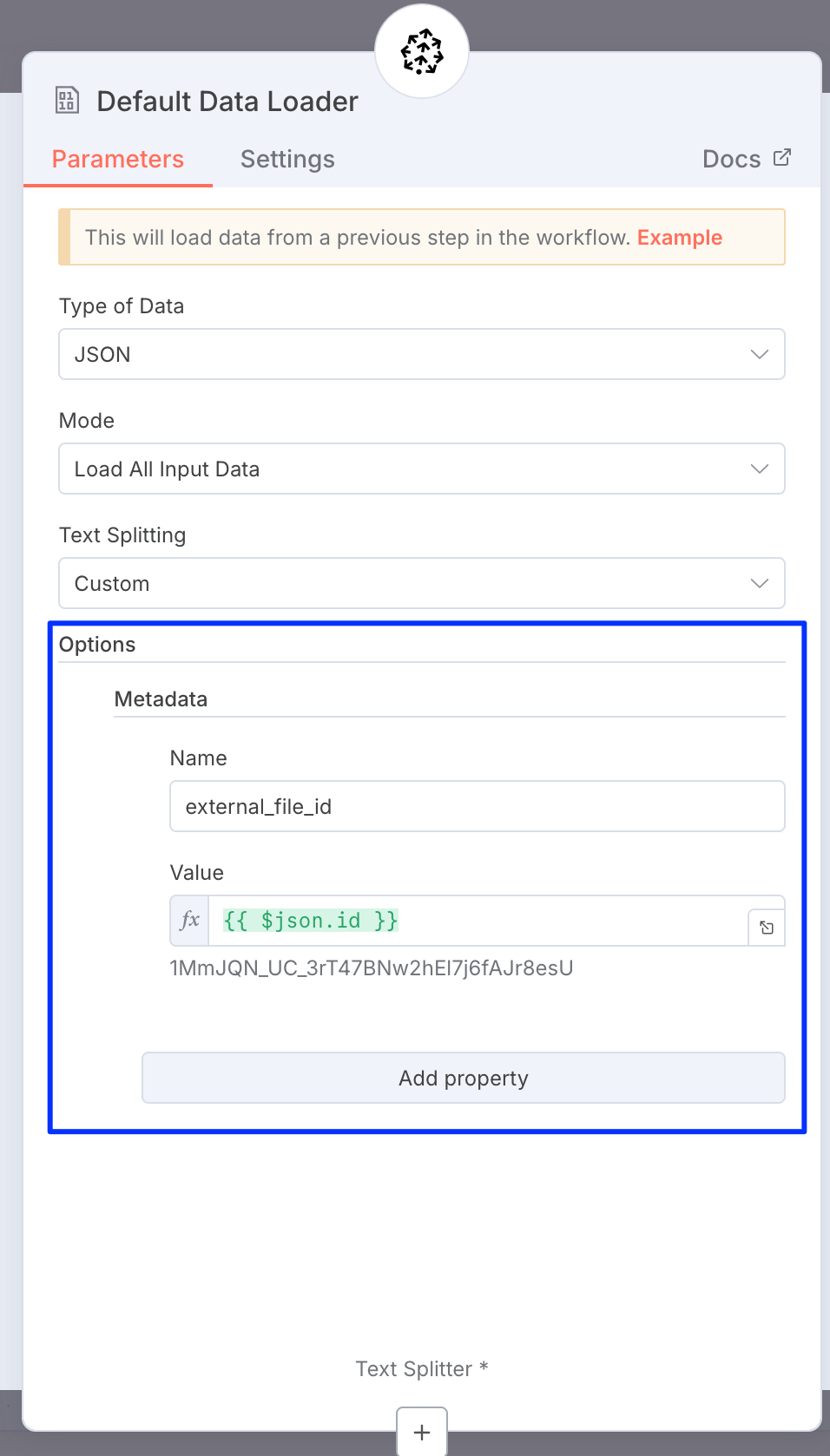
I am trying to embed text chunks with metadata (document_type and date) into a Pinecone Vector Database. I have tried using the PInecone Vector Store but with no success. How can I include the metadata in all the chunks that I embed into the database?
Can you share more about your setup, which data loader/text splitter you’re using? Are you experiencing any errors or are the vectors being upserted but no metadata is shown in the Pinecone console?
You should be able to set metadata right on the data loader node like this:
Thanks for the response. I’m using Default Data Loader and Recursive Text Splitter. Let me try out what you did and ask further questions if I have any.
@jennapederson I think n8n has a limitation where a user can only use ‘eq’ as an operator to filter on PInecone DB Metadata, correct? See below forum link. I wanted to use the time/date as metadata and filter on “everything since October 5” as an example. Can I do that through n8n and Pinecone?
I remember that being an issue. It looks like the node just assumes key/value pair rather than passing along an operator. On the backend, we support both `{"genre": "documentary"}` and`{"genre": {"$eq": "documentary"}}`and I suspect the node is using the first one by default.
I absolutely understand using the existing node would be better, but you could try implementing the query using an HTTP node and using this curl. You’d also have to generate your own query embedding first to pass into that vector field (that’s something the existing node does for you).
# To get the unique host for an index,
# see https://docs.pinecone.io/guides/manage-data/target-an-index
PINECONE_API_KEY="YOUR_API_KEY"
INDEX_HOST="INDEX_HOST"

curl "https://$INDEX_HOST/query" \
  -H "Api-Key: $PINECONE_API_KEY" \
  -H 'Content-Type: application/json' \
  -H "X-Pinecone-API-Version: 2025-04" \
  -d '{
        "vector": [0.0236663818359375,-0.032989501953125,...,-0.01041412353515625,0.0086669921875],
        "namespace": "example-namespace",
        "topK": 3,
        "filter": {"genre": {"$eq": "documentary"}},
        "includeMetadata": true,
        "includeValues": false
    }'
I don’t think you’ll have access to external dependencies like the Pinecone typescript SDK. So I think you could use a Code node that makes an HTTP call (similar to an HTTP node), but you’re right, you’d have to add in the query embedding too.
Just remember that you’d have to store a timestamp value as a number (unix timestamp) as metadata as that’s what the $ge operates on.