Hi team,
I’m facing intermittent ECONNRESET / socket hang up errors when using the HTTP Request node.
Problem description
I am seeing frequent HTTP Request node failures that:
-
Occur intermittently (not on every execution)
-
Happen across multiple workflows
-
Affect different HTTP Request nodes each time (not always the same node)
-
Occur roughly once per day per workflow
The errors mostly happen in HTTP nodes where I call service APIs, for example:
-
Uploading files to Google Cloud Storage
-
Calling my own Cloud Run services via HTTP
Below is the error message:
”The connection to the server was closed unexpectedly, perhaps it is offline. You can retry the request immediately or wait and retry later.”
{
“errorMessage”: “The connection to the server was closed unexpectedly, perhaps it is offline. You can retry the request immediately or wait and retry later.”,
“errorDetails”: {
“rawErrorMessage”: [
“socket hang up”,
“socket hang up”
],
“httpCode”: “ECONNRESET”
},
“n8nDetails”: {
“nodeName”: “Upload Renamed PDF to Same Folder”,
“nodeType”: “n8n-nodes-base.httpRequest”,
“nodeVersion”: 4.2,
“itemIndex”: 0,
“time”: “12/17/2025, 9:33:22 AM”,
“n8nVersion”: “1.50.1 (Self Hosted)”,
“binaryDataMode”: “default”,
“stackTrace”: [
“NodeApiError: The connection to the server was closed unexpectedly, perhaps it is offline. You can retry the request immediately or wait and retry later.”,
" at Object.execute (/usr/local/lib/node_modules/n8n/node_modules/n8n-nodes-base/dist/nodes/HttpRequest/V3/HttpRequestV3.node.js:1641:33)“,
" at processTicksAndRejections (node:internal/process/task_queues:95:5)”,
" at Workflow.runNode (/usr/local/lib/node_modules/n8n/node_modules/n8n-workflow/dist/Workflow.js:725:19)“,
" at /usr/local/lib/node_modules/n8n/node_modules/n8n-core/dist/WorkflowExecute.js:673:51”,
" at /usr/local/lib/node_modules/n8n/node_modules/n8n-core/dist/WorkflowExecute.js:1085:20"
]
}
}
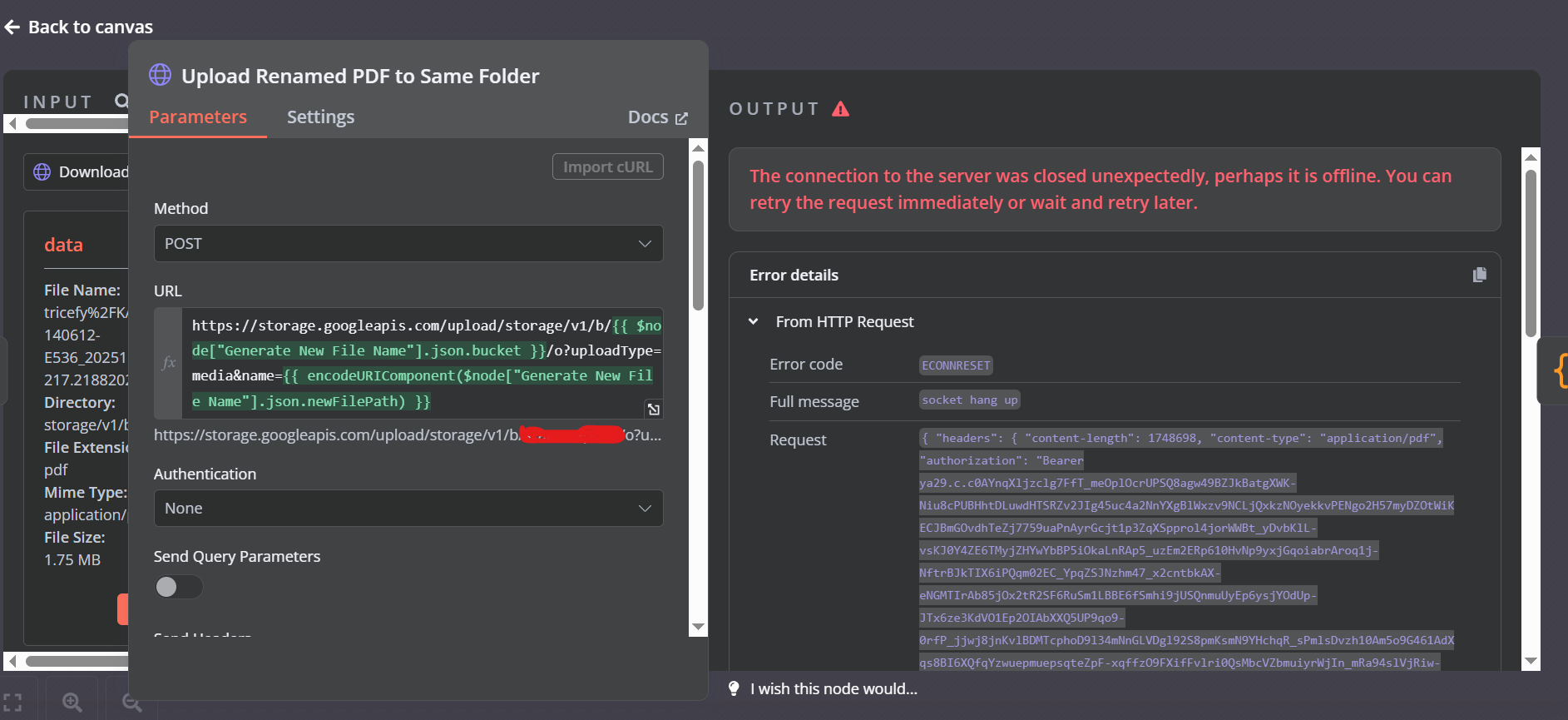
Below is one representative HTTP node where this error occurred (similar errors happen in other HTTP nodes as well):
This node uploads a PDF file to a GCS bucket using the JSON API.
Snapshot of what it looks like:
n8n setup
-
n8n version: 1.50.1
-
Database: PostgreSQL (Cloud SQL)
-
N8N_EXECUTIONS_PROCESS: own (default) -
Operating system: Linux (Google Cloud Run)
Hosting & networking setup
-
Hosting: Google Cloud Run
-
Region: us-central1
-
Running via: Docker
-
Serverless VPC Access: Enabled
-
VPC connector:
run-to-sql-connector -
All egress traffic routed through VPC
-
Ingress: All (public HTTPS endpoint)
Additional notes
-
No explicit proxy is configured in n8n
-
HTTPS is used for all HTTP requests
-
Retrying usually succeeds
-
Error appears unrelated to request payload size or specific API
Any guidance would be appreciated. Thanks in advance!
Reg.