Select a query provider in the Open Router chat model.
The idea is:
The purpose of this request for those of us who use systems like OpenRouter, which allows us to have a greater number of AI models, is the limitation of the page in being able to select the provider we need for the particular use case and achieve a better cost/benefit balance in the models we use, allowing us to better configure the AI models according to the use case.
Siguiendo la documentacion Oficial de OpenRouter es posible directamente en las solicitudes asignar el proovedor exacto que queremos usar para la consulta , permitiendonos mayor control del uso de tokens, velocidad y costo, Adaptandolos a nuestros requerimientos especificos.
My use case:
I need to be able to switch between model providers because there are parts of my workflow where speed is more important than cost, and in others where cost is more important than speed. I’m limited on the OpenRouter page to only being able to restrict providers or generate a global configuration that doesn’t address the specific needs of each developer.
It will allow us, either through a select in the OpenRouter chat model, to be able to select the providers or providers that we want to use for that AI model and define according to which parameters we want to prioritize in that AI agent and the model used (Speed, Cost or Latency)
Any resources to support this?
PD: English is not my native language and I apologize if I can’t explain myself completely.
Hola Cesar, es una idea genial, realmente venia pensando lo mismo sobre el nodo de OpenRouter mas que todo por cerebras, que es uno de los provedores mas rapidos y costoeficientes que existen, por lo pronto no se si sepas como se puede subir el issue a GitHub o como sea el proceso para que el equipo de N8N lo desarrolle.
Segun e conocimiento que tengo la solicitud es mediante este foro de comunidad solo que hay que generar interaccion constante con este topic para que no se pierda y genere vistas
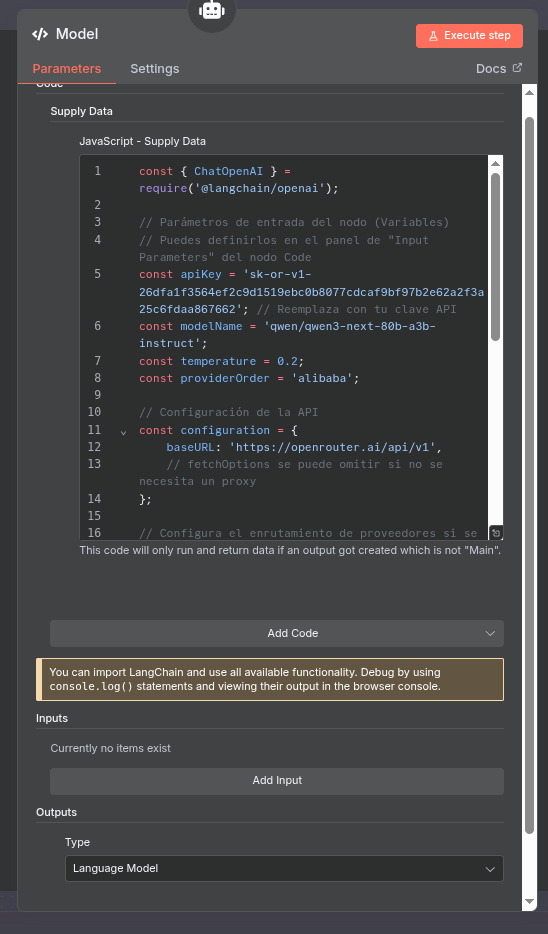
I found a temporary solution that works and meets the need, hoping that the n8n developers will support it. It is using the native n8n langchain node, which in a few words is the basis of all n8n.
(The data and including the API keys are test data, in the case of the API key it no longer exists in case you want to use it xddd)
// Parámetros de entrada del nodo (Variables)
// Puedes definirlos en el panel de “Input Parameters” del nodo Code
const apiKey = ‘api_key_openrouter’; // Api key OpenRouter
const modelName = ‘qwen/qwen3-next-80b-a3b-instruct’; //name model of openrouter
const temperature = 0.2;
const providerOrder = ‘alibaba,deepinfra/bf16,parasail/bf16’; //provider to routing
// Configuración de la API
const configuration = {
baseURL: ‘ OpenRouter ,
// fetchOptions se puede omitir si no se necesita un proxy
};
// Configura el enrutamiento de proveedores si se ha especificado
const modelKwargs = {};
if (providerOrder) {
modelKwargs.provider = {
order: providerOrder.split(‘,’).map(provider => provider.trim()),
};
}
// Crea una instancia del modelo de chat
const chatModel = new ChatOpenAI({
apiKey: apiKey,
model: modelName,
temperature: temperature,
timeout: 60000,
maxRetries: 2,
configuration,
modelKwargs,
});
// Devuelve el modelo para que la cadena lo use
return chatModel;
To answer my own question for others who might wander upon this. You use the Langchain Code node. It wont appear if you hit the + on the model selector on the AI Agent model selector. Just create the node first with the main + button. You have to choose the data not execute option for th e code block. Then you choose the output as a model. Put the code in above and it will work, but I had to fix all the apostraphies because the cut and paste changed them to stylized quotes not the coding quotes.